
To admit it, the Apple and Google Play Stores did a good job of removing bogus programs and applications. The statistics show that they removed over millions of them, as given below; nevertheless, that still represents a very small percentage of the total.
The data checking and stats matching are math of grade 2. I'm not going to do that.
There is a local cybersecurity authority whose major responsibility is to check the stats and, most importantly, work towards reducing and improving the stats, right? And definitely to detect and remove/block all of these fraudulent apps and services, and also to catch those who are behind all these criminal activities.
🕵️🕵️🕵️🕵️🕵️🕵️🕵️🕵️🕵️🕵️🕵️🕵️🕵️🕵️🕵️🕵️🕵️
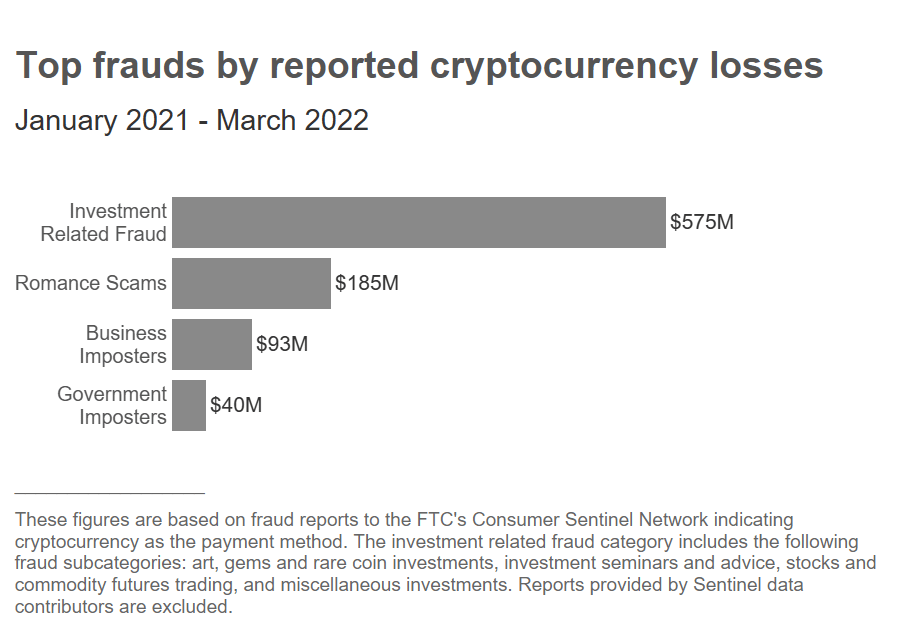
I'm here simply to raise the issue of how vulnerable we are to fraud and cyber attacks, and how easy it is to lose money in the digital world.
As we enter the digital era, I believe this will become a common, routine job for cybersecurity body.
As such, If we were to establish simple standard operating procedures when developing the digital environment and how to combat criminal offenses, I believe we could make our job significantly easier and prevent negative consequences much more efficiently than dealing with them.
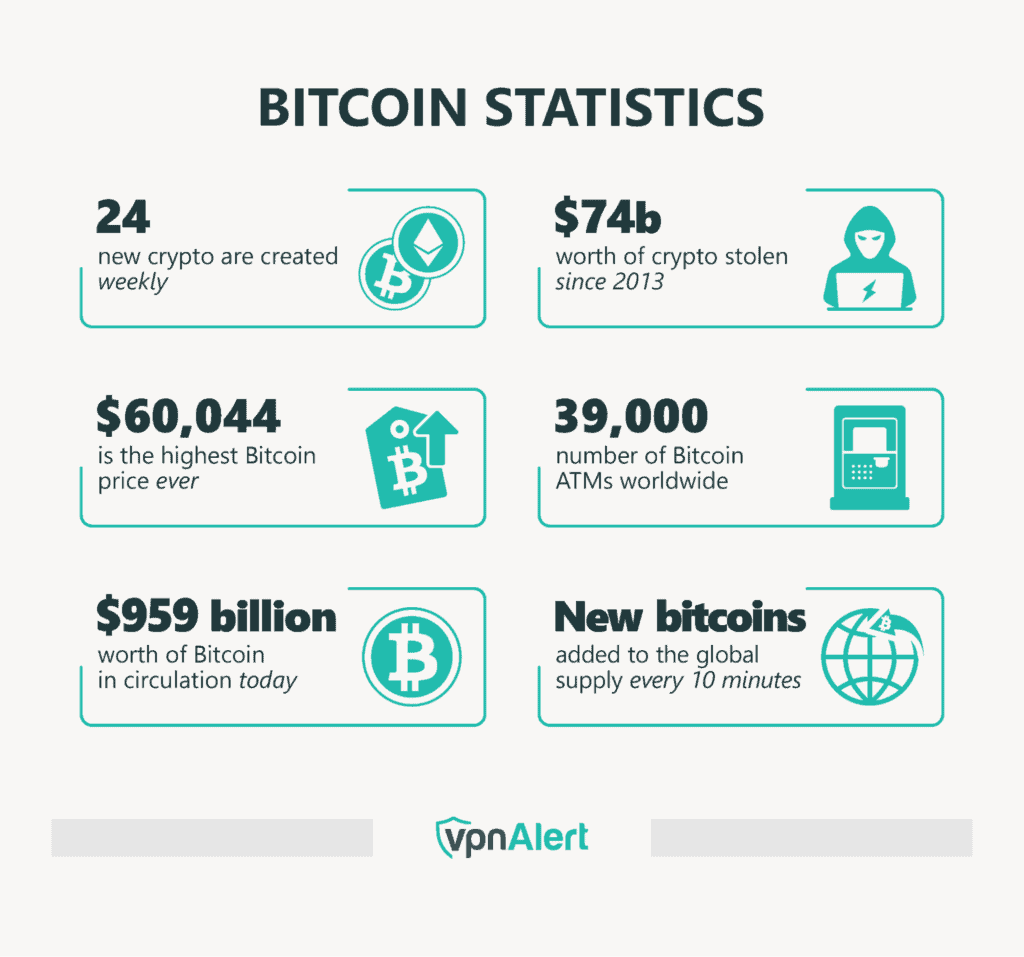
When it comes to simple standard operating procedures (#SOP ), it also specifically refers to IT specialists and web/app developers — that is, do develop very simple, yet functional products, and, most importantly, with an easy-to-use interface.
To add a little humor, #trading is also a basic arithmetic that second-grad kids can do, which is addition and subtraction and multiplication and division. Therefore, trading is not that difficult; it simply requires some skills and expertise.
You will eventually become a skilled and profitable trader if you continue to learn and trade day after day! 🚀
AI’s source statistics:
"In 2024 and 2025, tech giants intensified their "digital purge," blocking or removing millions of apps to combat fraud and security threats. Most of these actions happen before an app even reaches your phone.
✅✅✅✅✅✅✅✅✅✅✅✅✅✅✅✅✅
Google Play Store (Android)
Google primarily focuses on blocking malicious submissions before they are published.
Total Blocked (2024–2025): Google prevented more than 4.1 million policy-violating apps from being published (2.36 million in 2024 and 1.75 million in 2025).
Malicious Sideloaded Apps: Outside the official store, Google Play Protect identified and warned users about over 27 million new malicious apps in 2025.
Developer Bans: Google banned approximately 238,000 "bad actor" developer accounts over the last two years (158,000 in 2024 and 80,000 in 2025).
✅✅✅✅✅✅✅✅✅✅✅✅✅✅✅✅✅
Apple App Store (iOS)
Apple relies on a strict manual and automated review process to catch "bait-and-switch" and fraudulent apps.
Total Rejections (2024): Apple rejected over 1.9 million app submissions for failing to meet security, privacy, or fraud standards.
Active Removals: In 2024 alone, Apple removed more than 37,000 apps specifically for fraudulent activity.
✅✅✅✅✅✅✅✅✅✅✅✅✅✅✅✅✅
Specific Fraud Types:
320,000+ submissions were rejected for being spam or misleading.
43,000+ submissions were caught with "hidden features" (malicious code enabled after review).
17,000+ apps were removed for "bait-and-switch" maneuvers.
Developer Bans: Apple terminated over 146,000 developer accounts for fraud concerns in 2024.
✅✅✅✅✅✅✅✅✅✅✅✅✅✅✅✅✅
According to another stats, the Apple Store prevented more than $9 billion in fraudulent transactions over the last five years. Google Blocks 2.3 Million Malicious Apps from the Play Store in 2024. And it was detected and blocked more than 10,000 illegitimate apps.
✅✅✅✅✅✅✅✅✅✅✅✅✅✅✅✅✅
You might notice that 2025 numbers are slightly lower than 2024. Experts and Google attribute this to:
AI-Enhanced Reviews: New generative AI models now assist in 92% of reviews, helping catch complex patterns before apps go live.
Higher Entry Barriers: Stricter developer verification and mandatory pre-review "safety checks" have made it harder for scammers to get their apps into the stores in the first place.
✅✅✅✅✅✅✅✅✅✅✅✅✅✅✅✅✅
How to check if an app currently on your phone has been flagged as dangerous by these built-in security scanners:
On Android (Google Play Protect)
Android has a "silent" scanner that runs in the background, but you can force a manual check:
Open the Google Play Store app.
Tap your profile icon at the top right.
Select Play Protect.
Tap Scan. It will check all your apps against Google’s latest database of flagged threats.
Bonus: If you see "Turn on" instead of "Scan," your protection was disabled—turn it on immediately!
✅✅✅✅✅✅✅✅✅✅✅✅✅✅✅✅✅
On iPhone (iOS Security)
Apple doesn't have a "Scan" button because it checks for revoked certificates in real-time. To see if Apple has flagged something:
Check for "Untrusted Developer": If an app was installed outside the App Store and Apple has blocked it, it will simply fail to open and show an "Untrusted Enterprise Developer" alert.
App Store Updates: If an app you downloaded has been removed from the store for fraud, it will often disappear from your "Purchased" list or stop receiving updates.
Check "Safety Check": Go to Settings > Privacy & Security > Safety Check to see which apps have access to your data and if any suspicious permissions are active.
✅✅✅✅✅✅✅✅✅✅✅✅✅✅✅✅✅
Manual "Red Flag" Checklist
If the automated scanners miss something, look for these three warning signs:
Battery Drain & Heat: Scam apps often run hidden crypto-miners or data-scrapers in the background. Check Settings > Battery to see if a simple app (like a calculator or flashlight) is using 20% of your power.
"Ghost" Notifications: If you see ads appearing on your home screen or lock screen when no apps are open, a malicious app is likely running a "push ad" script.
The Review Swap: Search for the app on the store again. If the name or developer has changed significantly since you downloaded it, it’s likely a "bait-and-switch" scam.
Pro Tip: If you're really suspicious, copy the app's name and search for it on VirusTotal—it aggregates data from over 70 antivirus scanners."
Best of luck!



Always "DYOR"