
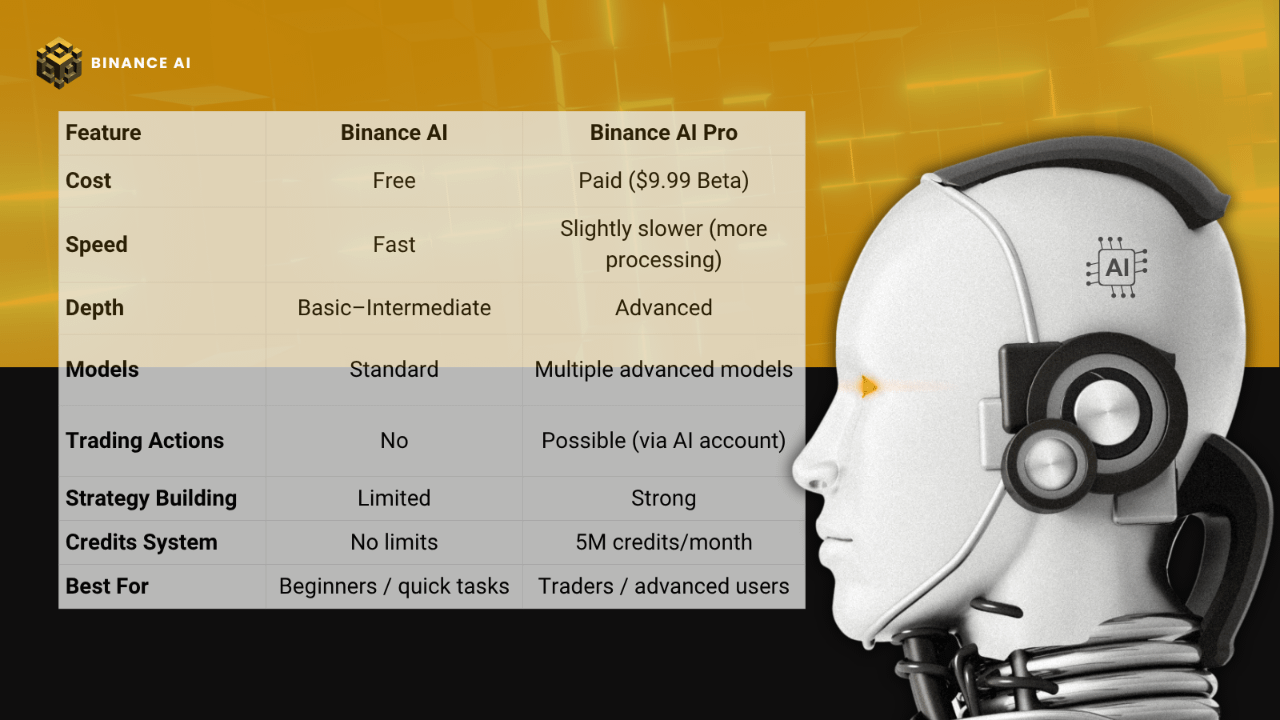
Last week, Binance quietly dropped something big: Binance AI Pro (Beta).
And if you’re already using Binance AI, you’ve probably asked yourself the same question I did:
Is Pro actually worth it… or just hype?
I didn’t want a theoretical answer. I tested both, side by side, same prompts, real use cases, and here’s the breakdown from actual daily usage.
First, What Are We Even Comparing?
1. Binance AI (Free Version)
This is the AI most people already have access to inside the app/web.
Think of it as:
Your smart crypto assistant
Good for quick answers, basic analysis, explanations
Handles:
Market summaries
Simple technical insights
General crypto education
It’s fast, simple, and honestly… more powerful than people give it credit for.
2. Binance AI Pro (Paid Beta)
Now this is where things get serious. Binance AI Pro is not just a chatbot, it’s an AI agent.
What makes it different:
Uses multiple advanced models (ChatGPT, Claude, Qwen, etc.)
Has its own AI account (sub-account) for execution
Can:
Analyze markets deeper
Monitor assets
Execute strategies (if funded)
Handle complex, multi-step prompts
💡 Basically: it doesn’t just answer, it can act (within limits).
How to Access Each One (Step-by-Step)
Binance AI (Free)
Open Binance app or website
Look for the AI icon (homepage or messages tab)
Click and start chatting
That’s it. No setup, no payment.
Binance AI Pro (Beta)
On App (Android for now):
Open Binance
Go to AI section
Tap Activate (top right)
Confirm subscription
On Web:
Go to Binance homepage
Navigate to AI section
Click Activate
💰 Pricing (Beta):
$9.99/month (discounted)
7-day free trial
5M credits/month
⚠️ Important:
Once credits finish → it falls back to basic models.
The Real Test, Same Prompt, Two Different Worlds
I ran this exact prompt on both:
“Give me a deep BNB analysis with technical indicators, risk levels, and short-term strategy.”
Binance AI (Free)
Clean explanation
Basic indicators
General direction
Safe, beginner-friendly
💪🏼Good answer… but surface-level.
Binance AI Pro
Multi-layered analysis
Clear strategy scenarios
Risk segmentation
More “trader-style” thinking
🦾 Felt like talking to someone who actually trades daily.
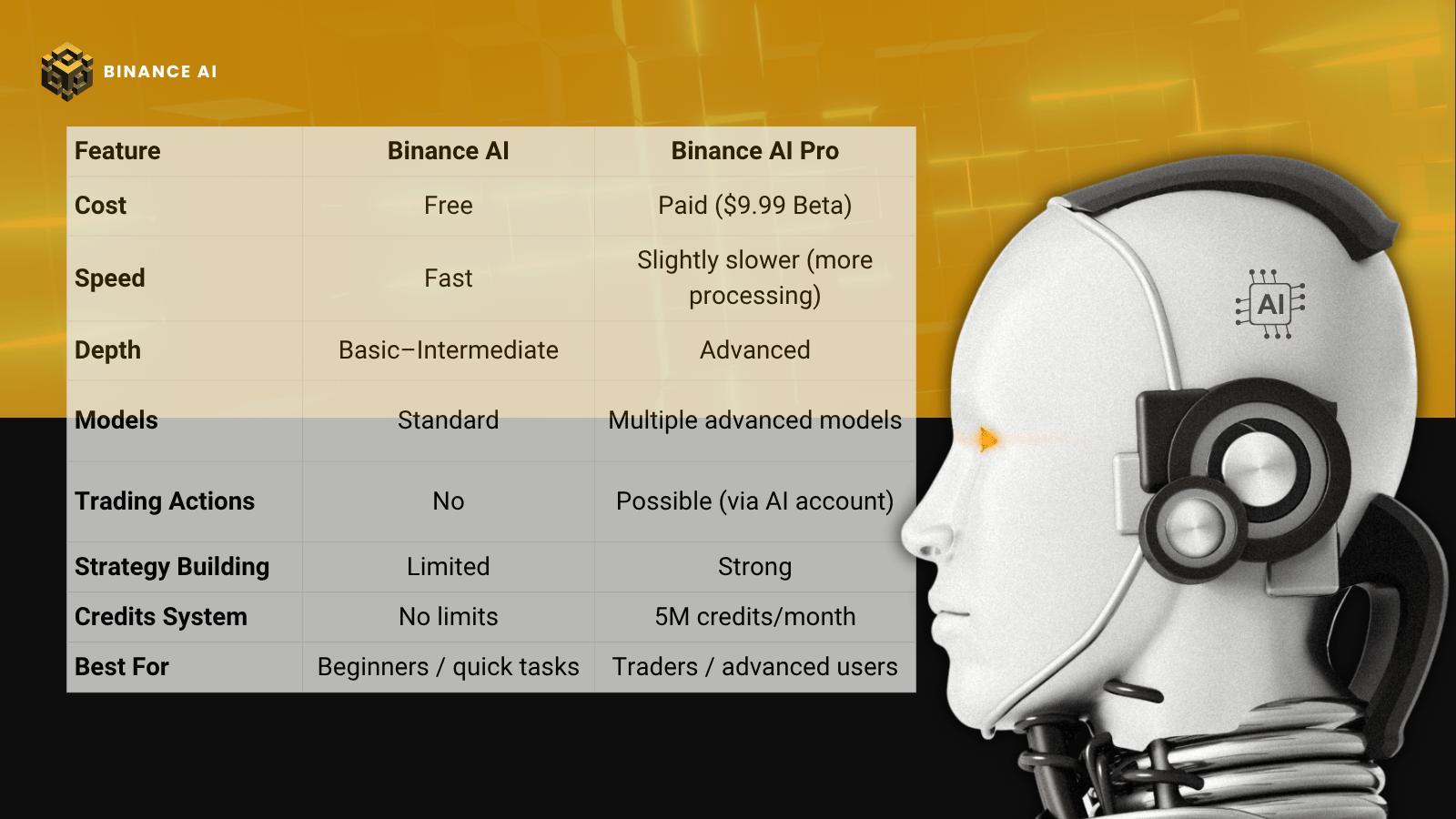
What Most People Don’t Realize
Here’s something I noticed quickly:
It’s not about “better AI”, it’s about “different use.”
Free AI = thinking assistant
Pro AI = execution + deep analysis engine
And that changes everything.
How I Personally Use Both (Daily Workflow)
This is where it gets practical.
Morning (Quick Scan)
I use Binance AI (Free) for:
Market overview
Quick sentiment checks
Fast answers
→ No need to burn Pro credits here.
Mid-Day / Deep Work
I switch to AI Pro when I need:
Detailed analysis
Strategy building
Multi-condition scenarios
→ This is where Pro actually shines.
Before Decisions
I sometimes:
Ask Free AI
Then ask Pro AI
If both align → confidence increases
If not → I dig deeper
Who Should Use What?
Stick to Free if:
You’re learning
You want quick insights
You’re not actively trading
Honestly, it’s already powerful enough.
Go Pro if:
You trade regularly
You want structured strategies
You ask complex, layered questions
You want AI that goes beyond “just answering”
That’s where Pro becomes worth it.
⭐The Part Everyone Should Read (Risk Reality)
Let’s be clear:
AI trading ≠ guaranteed profits
Binance does NOT control AI decisions
You are responsible for outcomes
Even with Pro: Use it as a tool, not a decision-maker.
Final Take (My Honest Opinion)
I’ll say it simply:
Binance AI is impressive.
Binance AI Pro is powerful, but only if you actually use it properly.
If you’re just asking:
“Is BTC going up?”
→ Don’t waste your money.
But if you’re asking:
“Build me a structured trading scenario with risk management”
→ Pro starts making real sense.
I’m not here to tell you which one to use, I’m here to show you how to use them right. Because in this space, the edge isn’t access… it’s how you move.💻💰