🔥 Don't be lazy! Take advantage of the moment and get it activated! (Still valid now)
What is currently the most comprehensive guide on how to activate X creator revenue certification on the entire internet?
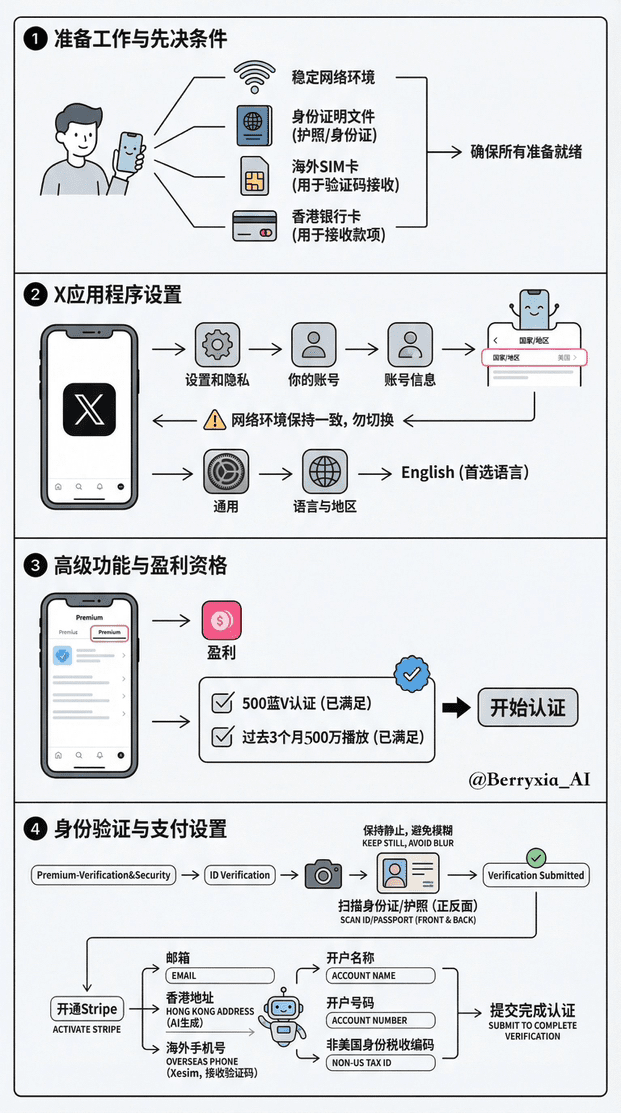
✍🏻 You need to prepare a few things: 1. A stable internet environment 2. ID card (passport) 3. Overseas card (the verification code may not be received in mainland China) 4. Hong Kong bank card
The process shown here is based on my own X account and the method I used; it does not represent everyone and is for reference only.
1. First, we open X, find settings and privacy. Then select your account, continue to choose account information, and see a country/region.
Key point: I am in the United States, so our network environment must remain consistent with this; do not switch!!!
Step two, we open the iPhone settings, find General, Language & Region, and select English as the preferred language. The phone will restart to switch to English.
Step three, after we open X, select Premium, find 'Profit', which is the pink icon, and click in.
Step four, you must meet the basic requirement of 500 blue V verifications and have 5 million plays in the past three months. You will see a checkmark here, indicating that you can meet the requirement. (The image marking has some issues, take this as the standard)
Step five, start selecting Premium-Verification & Security ) ID Verification certification.
Step six, choose to start uploading your ID card, it will directly prompt you to take a photo, scanning both the front and back. (I only managed to scan my passport once, and both attempts were unsuccessful, so it is recommended to use an ID card.)
Then you need to take a photo, during this time do not shake, just stay still, otherwise the photo will be blurry. Confirm and submit to the next step. Finally, a prompt will indicate Verification Submitted, just wait.
If there are no issues, it will directly prompt you that you have completed the verification, with the ID Submitted prompt.
Step seven, we open Stripe to receive salaries because I haven't opened it before, so just register online.
Step eight is to fill in the email, including a Hong Kong address (let AI help you randomly generate one), phone number (here I choose Xesim). Then receive the verification code (I will write a dedicated post for this in the next issue).
How to use the Xseim card, let me add that Xesim is a physical SIM card that integrates eSIM functionality. It allows phones without built-in eSIM to have eSIM capabilities.
If you are using an overseas account for a long time, it is essential to open at least one card. I have used it for a while and found it quite good; various code reception is quite stable.
Step nine, you will be asked to fill in whether you are a U.S. citizen tax code, writing non-U.S. identity means your ID card is your tax code, then choose a series of options for non-U.S. identities; if you don’t understand, you can ask grok.
Step ten, you need to fill in the bank account name, account number, address, etc. for your Hong Kong card, all in English. Make sure to choose the correct branch where you are located.
Step eleven, just follow the prompts to complete the submission, and you will complete the verification. After a while, it will prompt you that the verification is successful.
These steps should be enough to complete all verifications. Everyone should not rush through the verification process; it is recommended to complete it as soon as possible.
Remember not just to look without giving me a three-fold support!!! Wish you can lead old Ma's salary soon!