Disclaimer: In compliance with MiCA requirements, unauthorized stablecoins are subject to certain restrictions for EEA users. For more information, please click here.
SEPA is a European Union initiative that came into force in 2014 and which created a single market for euro-denominated retail payments, allowing payment services users to make cashless, euro-denominated payments in a fast, safe and efficient way, to payees located anywhere in the 36 countries that form part of the SEPA area: the 27 EU Member States plus United Kingdom, Iceland, Norway, Liechtenstein, Switzerland, Monaco, San Marino, Andorra and Vatican City State/Holy See. In simple terms, anyone who holds a payment account with a bank or other payment service provider (PSP) located in the countries covered by the SEPA initiative will, regardless of where in SEPA they are themselves located, be able to send euro-denominated payments to, and receive such payments from, accounts anywhere else in SEPA.
We offer SEPA bank transfer deposit and withdrawal services for the following countries: Andorra, Albania, Austria, Belgium, Bulgaria, Saint Barthelemy, Switzerland, Cyprus, Czech Republic, Germany, Denmark, Estonia, Spain, Finland, France, French Guiana, Guadeloupe, Greece, Croatia, Hungary, Ireland, Iceland, Italy, Liechtenstein, Lithuania, Luxembourg, Latvia, Monaco, Moldova, Montenegro, Saint Martin, North Macedonia, Martinique, Malta, Norway, Poland, Saint Pierre and Miquelon, Portugal, Réunion, Romania, Sweden, Slovenia, Slovakia, San Marino, Vatican City, Mayotte.
SEPA transfers for users located in the Netherlands are not available.
Fees may vary depending on which deposit or withdrawal channel you choose. Fees may vary depending on which channel you are using, typically 1 EUR per transaction for SEPA bank transfer. Fees can be 0 during specific promotional campaigns, depending on the campaign rules and eligibility.
Important Notes:
Our fees may change from time to time. Please login to your Binance account and navigate to the bank deposit page to get the most recent information on our fees.
Our fees do not include any fees that your bank may charge you for depositing EUR to your Binance account. .
SEPA Instant transfers are available any time of day. However, users are advised to consult their bank or payment service provider (PSD) regarding the availability of these transfers and any fees that they may charge.
Typically, you will receive the funds in your Binance account within the indicated time frame. If you do not receive your funds within that period, please contact our customer service team for assistance.
Transfer Type | Expected Processing Time |
SEPA Instant | Up to 24 hours |
SEPA Standard | Up to 3 business days |
The transfer must come from an account in your name. The legal name of the account from which the funds are coming must match the legal name registered on your Binance account.
Please do not transfer funds from a joint account. If your payment is made from a joint account, the transfer will most likely be declined by the bank as there is more than one name and this will not match the name registered on your Binance account.
You must attach the exact reference code when initiating a EUR deposit transaction. For more details, please visit Frequently Asked Questions on SEPA EUR Bank Transfer Reference Code.
Do not make any transfers below 2 EUR. After deducting the relevant fees, any transfers below 2 EUR will NOT be credited or returned.
Yes, Binance applies limits on the maximum EUR amounts you may deposit to and/or withdraw from your Binance account on a given time frame. These limits are subject to your Binance account’s verification level. You may check your limits on your Binance profile in our website or mobile app [Identification].
You can upgrade your account limits by completing additional verifications or you can wait until the next day to deposit again.
For more details, please visit:
How to Complete Identity Verification for a Personal Account?
How to Complete Additional Verification Before Using Binance’s Fiat Service?
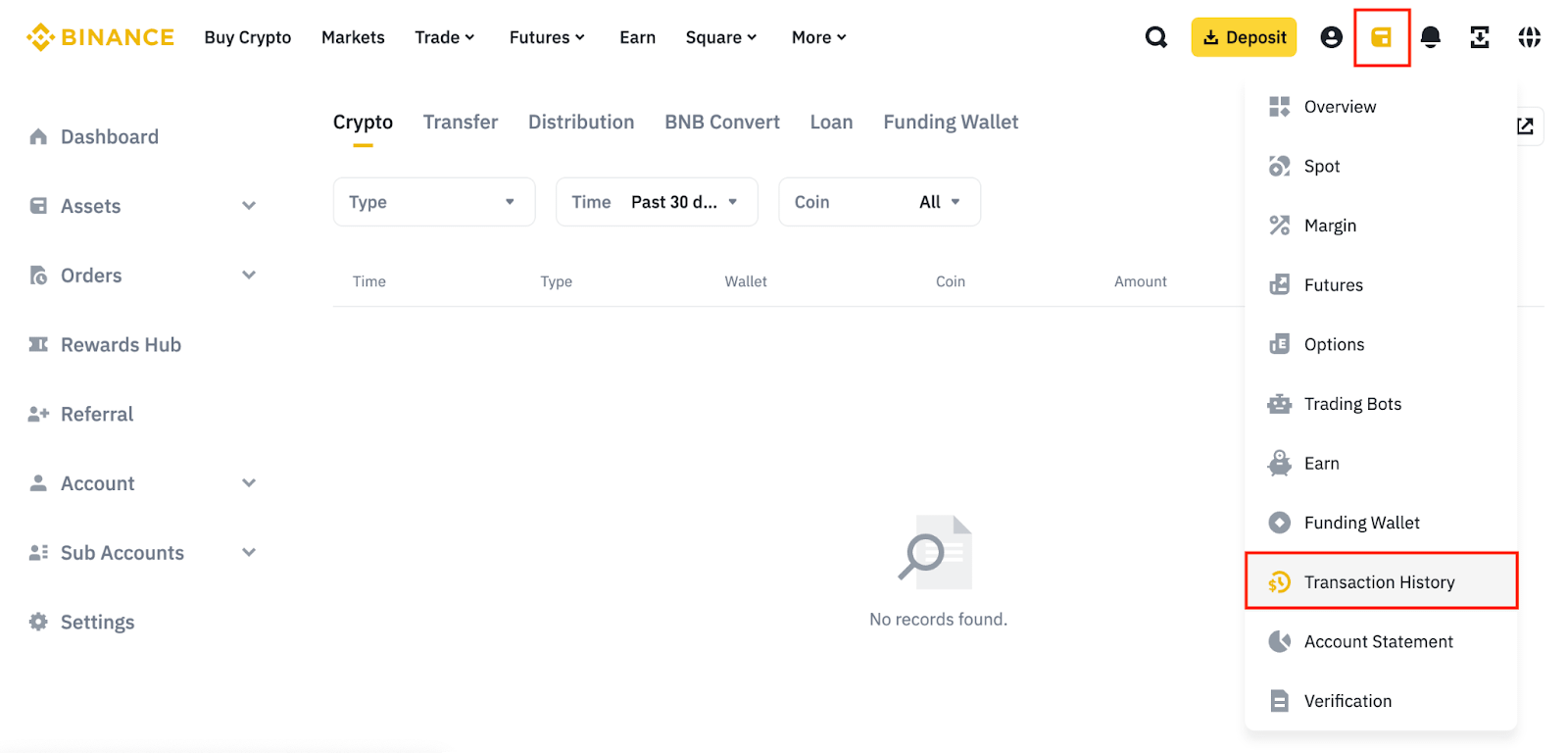
Mouse over the wallet icon and click [Transaction History].
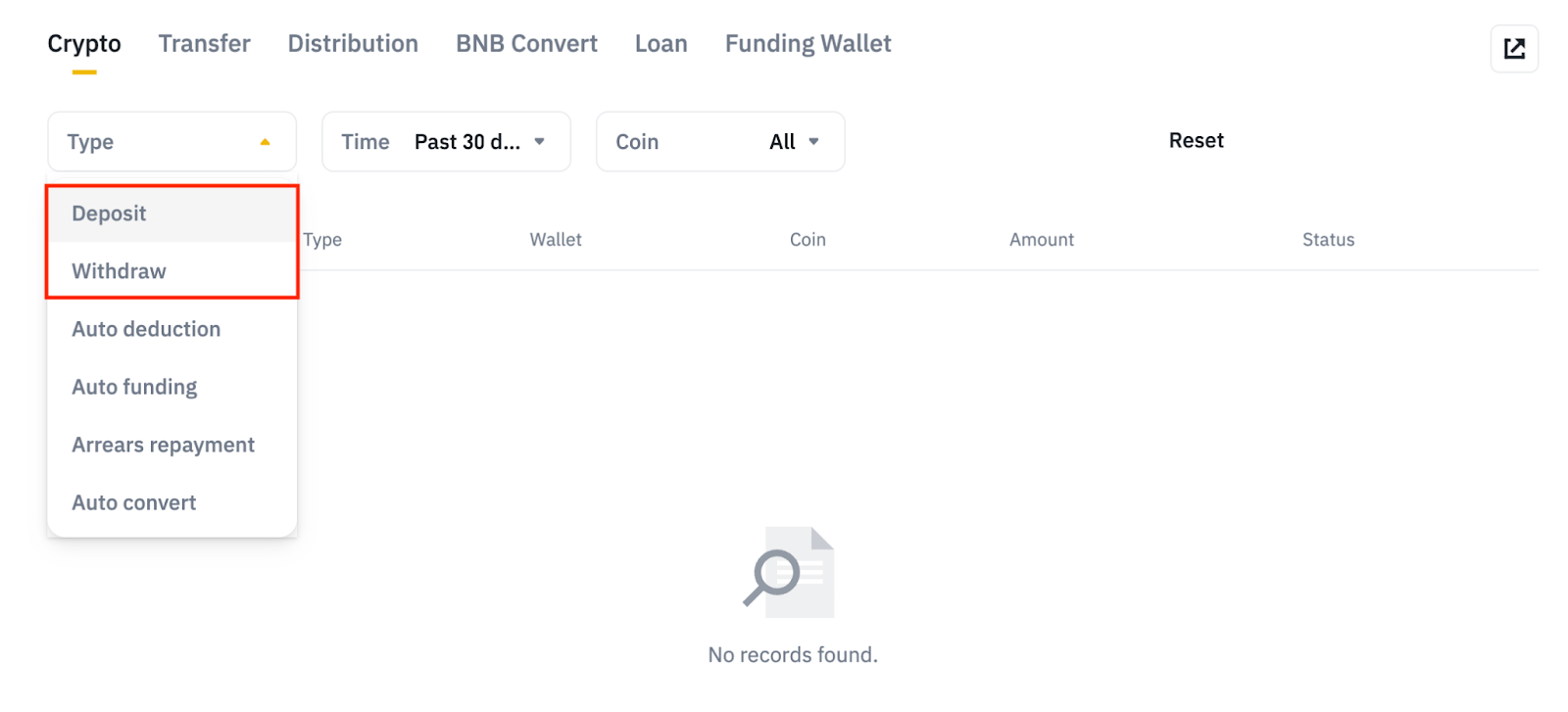
Choose [Deposit] or [Withdraw] under [Type] to view your order history.
There may be two possible reasons for the delay:
Please ensure that all transaction information is accurate, including any reference codes. Double-checking these details can help avoid delays.
If you are using SWIFT as a transfer method, please be aware that your funds may be returned.
Please note that SEPA bank transfers through SWIFT are not supported. Additional fees may apply, and it may take longer to return the funds to your account in this case. As such, please confirm that you are NOT using SWIFT when making a SEPA transfer.
To check on the status of your order, please follow these steps:
a. Check for new deposits/buy orders:
Look for any new deposits or buy orders in your account within 2 to 3 business days after the withdrawal or sell order.
If you see a new deposit or buy order: This indicates that the funds were returned due to an issue with your bank. We recommend contacting your bank for further clarification.
If you don’t see a new deposit or buy order: Remember that each payment method has its own processing time. If this timeframe hasn’t passed, please be patient.
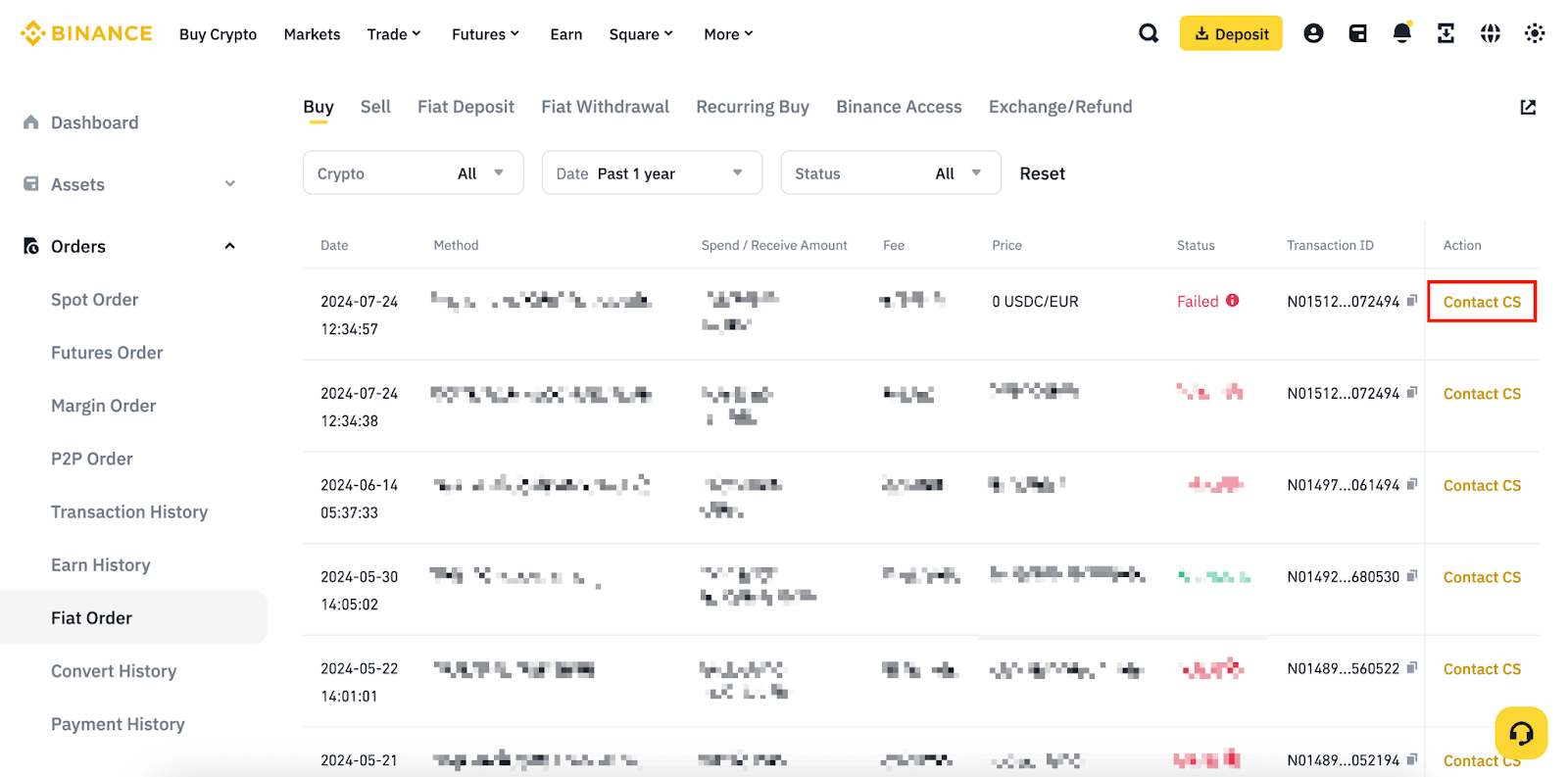
b. If you haven’t received your funds within 24 hours, go to [Orders] - [Fiat Order] and click [Contact CS] next to your order detail. Our Customer Support team is here to assist you with this process.
Returned funds to your account may be due to incorrect bank details or an issue with the receiving bank. Please note, as the return is caused by the bank or payment service provider, the withdrawal/sell order fee cannot be refunded. To avoid this, please ensure all bank details are accurate, or consider using a different account (with another bank or payment service provider).
