
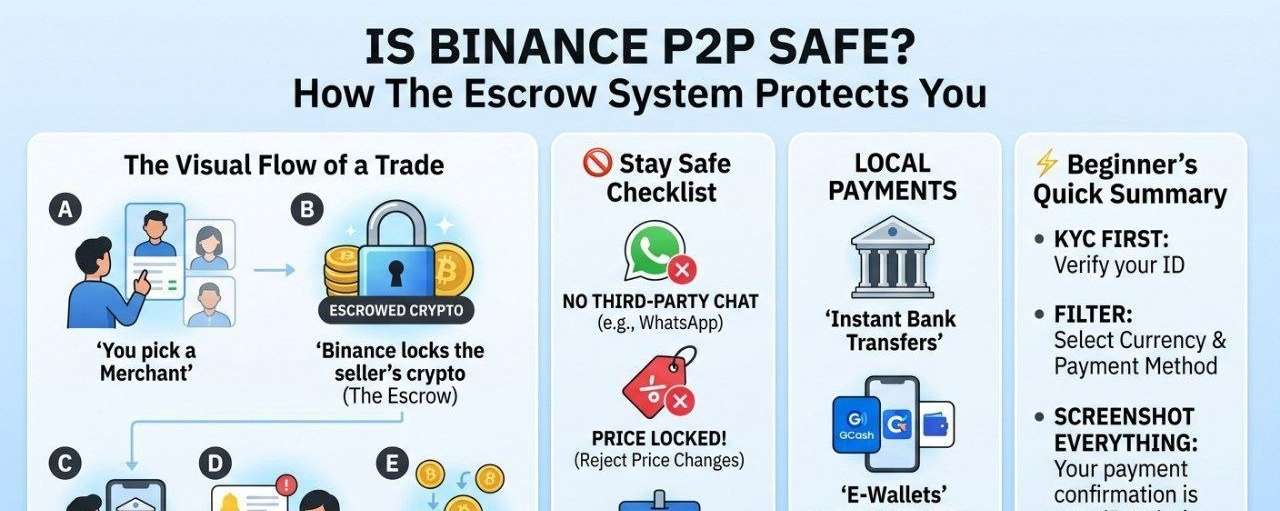
The P2P Ecosystem at a Glance
In a traditional exchange, you buy from the "house." In P2P, you buy from a person, and Binance acts as the Marketplace & Referee.
1. The Visual Flow of a Trade
Step A: You pick a "Merchant" (like choosing a highly-rated seller on Amazon).
Step B: Binance locks the seller's crypto (The Escrow). It’s now in "limbo."
Step C: You send money via your local bank/app (e.g., Bank Transfer, GCash, Revolut).
Step D: The seller sees the money in their bank and clicks "Release."
Step E: The "limbo" crypto drops into your wallet.
🔍 How to Spot a "Safe" Merchant
When you open the P2P list, don't just look for the cheapest price.
🚫 The "Stay Safe" Checklist
If you see any of these, cancel the trade or contact support:
The "Friend" Request: "Hey, can we talk on WhatsApp instead?" (No! Stay on Binance chat for evidence).
The "Price Change": "The market went up, pay me $10 more." (No! The price is locked once you click buy).
The "Third Party": The bank account name is "John Doe" but the Binance name is "Smith Ltd." (No! Names must match exactly to prevent fraud).
💰 Which Local Payments are Best?
The "best" method is the one that is instant and provides a digital receipt.
Instant Bank Transfers: Best for large amounts.
E-Wallets (GCash, Momo, Wise): Best for beginners because they are fast and have clear "Transaction Sent" screens.
Cash-in-Person: Avoid this. It’s high risk and Binance cannot otect you if things go wrong physically.
Best Practices for Selling Cryptocurrency on P2P
Selling your crypto can feel like the high-stakes side of P2P because you are the one waiting for cash to hit your real-world bank account.
The golden rule is simple:
🚫Never release the crypto until you have personally verified the funds in your balance.
🚫Scammers often send fake SMS alerts or spoofed emails that look exactly like bank notifications.
🚫 Do not trust your phone’s lock screen; log in to your banking app and confirm the Available Balance has actually increased.
✅ Verify the Sender’s Identity
To avoid Triangle Scams where a scammer uses a stolen bank account to pay you always check that the name on the bank transfer matches the verified name on the buyer’s Binance profile.
🔔 If User A is buying on the platform but User B sends the money, you risk a bank reversal later.
🤔 If names don’t match, refund the money immediately to the original source and cancel the trade.
Managing Your Ad and Limits
If you are acting as a maker (creating an ad), set clear Terms of Trade.
✅ Mention that you don't accept third-party payments and require a screenshot of the transfer.
Additionally, use the Counterparty Requirements ✅ tool to filter out new accounts. Setting a requirement for buyers to have completed at least 10 previous trades or to have registered more than 30 days ago significantly reduces your exposure to bad actors.
Finally, maintain a professional tone in the chat. Being polite but firm about your security protocols ensures that serious buyers feel comfortable and scammers realize you aren't an easy target.
⚡ Summary for the Beginner
KYC First: You must verify your ID on Binance before you can use P2P.
Filter: Use the filter tool to select your Currency and Payment Method immediately.
Screenst Everything: Always take a screenshot of your payment confirmation from your bank app. It is your "Receipt" if you need to win a dispute.
What local payment method are you planning to use? I can give you specific tips for that exact app.