Disclaimer: In compliance with MiCA requirements, unauthorized stablecoins are subject to certain restrictions for EEA users. For more information, please click here.
Disclaimer: This FAQ Page is for general information and educational purposes only. It does not constitute legal terms or any form of legal agreement between you and Binance. It should not be construed as financial, legal or other professional advice. The information on this page may be outdated. For legal terms applicable to Futures and Options Trading Services, please refer to the Terms of Use, the Exchange Rules (including the Exchange Procedures) and the Clearing Rules (including the Clearing Procedures) which come into effect on 5 January 2026. Additional terms and conditions will also be set out in the Contract Specifications applicable to the relevant Derivatives contract.
Grid trading is a trading bot that automates the buying and selling of Futures contracts. It is designed to place orders in the market at preset intervals within a configured price range.
Grid trading is when orders are placed above and below a set price, creating a grid of orders at incrementally increasing and decreasing prices. In this way, it constructs a trading grid. For example, a trader could place BTC buy orders at every 1,000 USDT below the market price and place sell orders at every 1,000 USDT above the market price to take advantage of ranging conditions.
Grid trading performs best in volatile and sideways markets when prices fluctuate in a given range. This technique attempts to make profits on small price changes. The more grids you include, the greater the frequency of trades will be. However, it comes with an expense as the profit you make from each order is lower.

Thus, it is a tradeoff between making small profits from many trades, versus a strategy with lower frequency but generates a bigger profit per order.
Long/short grid trading is a popular algorithmic trading strategy that enables users to trade with the market trend within a grid trading system using a trading bot. With this bot, traders can choose whether to open an initial position (long or short) or create a grid without opening positions, based on their analysis and simultaneously place buy-limit and sell-limit orders at predetermined intervals to capitalize on market volatility and ranging conditions.
For example, a trader could open an initial long position in BTCUSDT to express his bullish view on Bitcoin. He can set up the Grid Trading Bot to place buy orders at every 1,000 USDT below the market price of BTCUSDT, while also placing sell orders at every 1,000 USDT above the market price of BTCUSDT. This allows him to trade with the underlying trend within a grid trading system.
Binance Grid Trading now supports USDⓈ-M and COIN-M Futures. You can customize and set grid parameters to determine the grid's upper and lower limits and the number of grids. Once the grid is created, the system automatically buys or sells orders at preset prices.
Let’s understand how it works.
You expect Bitcoin to hover in a price range between 50,000 USDT and 60,000 USDT in the next 24 hours. In this case, you could set up a grid trading system to trade within this predicted range.
On the grid trading panel, you could set parameters of the bot, including:

In this scenario, as the BTC price falls toward 55,000 USDT , the grid trading bot will accumulate buy positions on the way down at a lower-than-market price. As the price recovers, the bot will sell on the way up at a higher-than-market price. This strategy essentially attempts to profit from price reversions.
For long and short grids, you can choose whether or not to open the initial position during grid creation. If you choose to open an initial position, a long position will be opened on the long grid and a short position on the short grid. The neutral grid does not initially open positions.
How can having an initial position affect your long/short grid?
For more details, please read What Is Long/Short Grid Trading?
Please note: If you choose not to open initial positions for the Futures Grid, the number of pending orders for the Futures Grid will be less than the number of grid levels you set. The specific number of pending orders depends on the current market price and the configured grid range.
Risk Warning: Grid trading as a strategic trading tool should not be regarded as financial or investment advice from Binance. Grid trading is used at your discretion and at your own risk. Binance will not be liable to you for any loss that might arise from your use of the feature. It is recommended that users should read and fully understand the Grid Trading tutorial and make risk control and trade rationally within their financial ability.
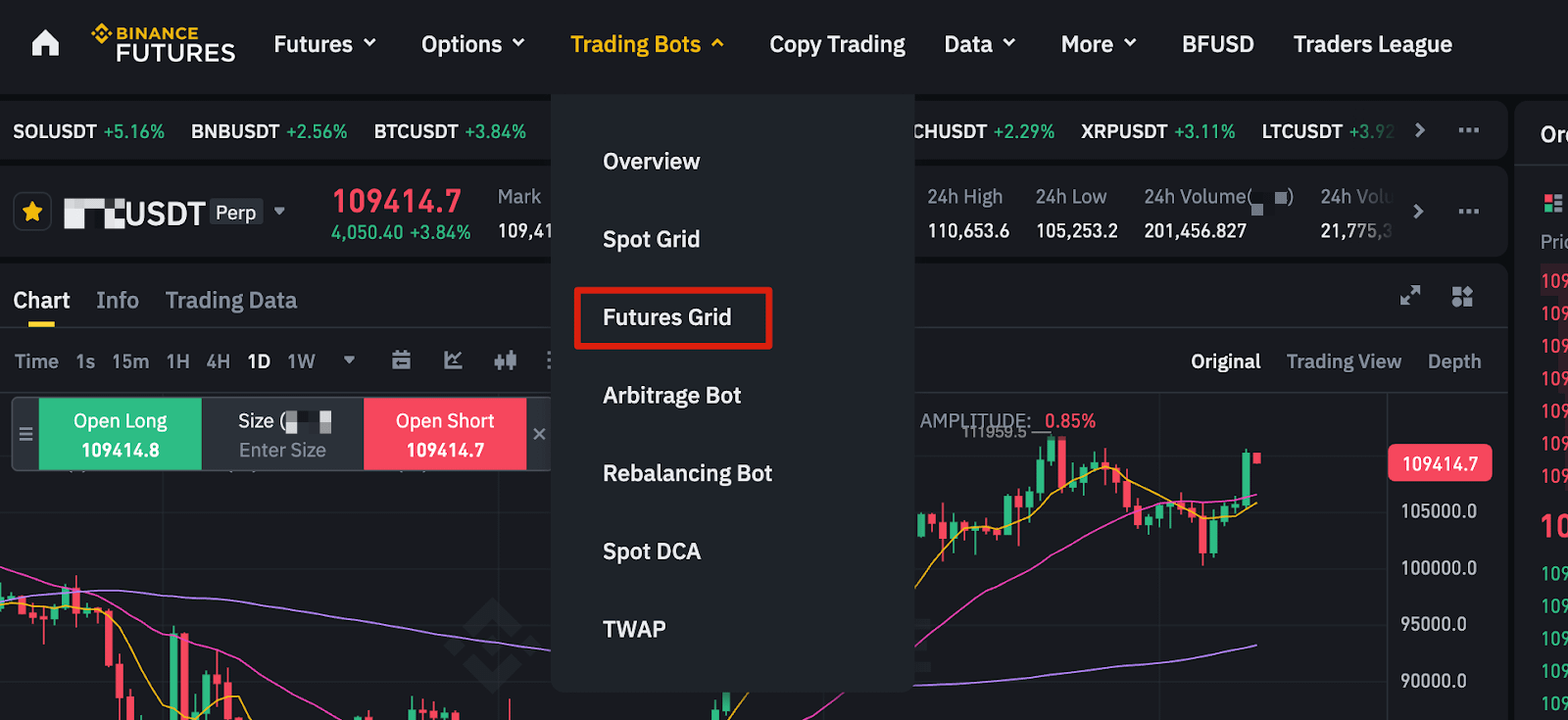
1. Log in to your Binance account and go to [Futures]. Click [Trading Bots] - [Futures Grid].
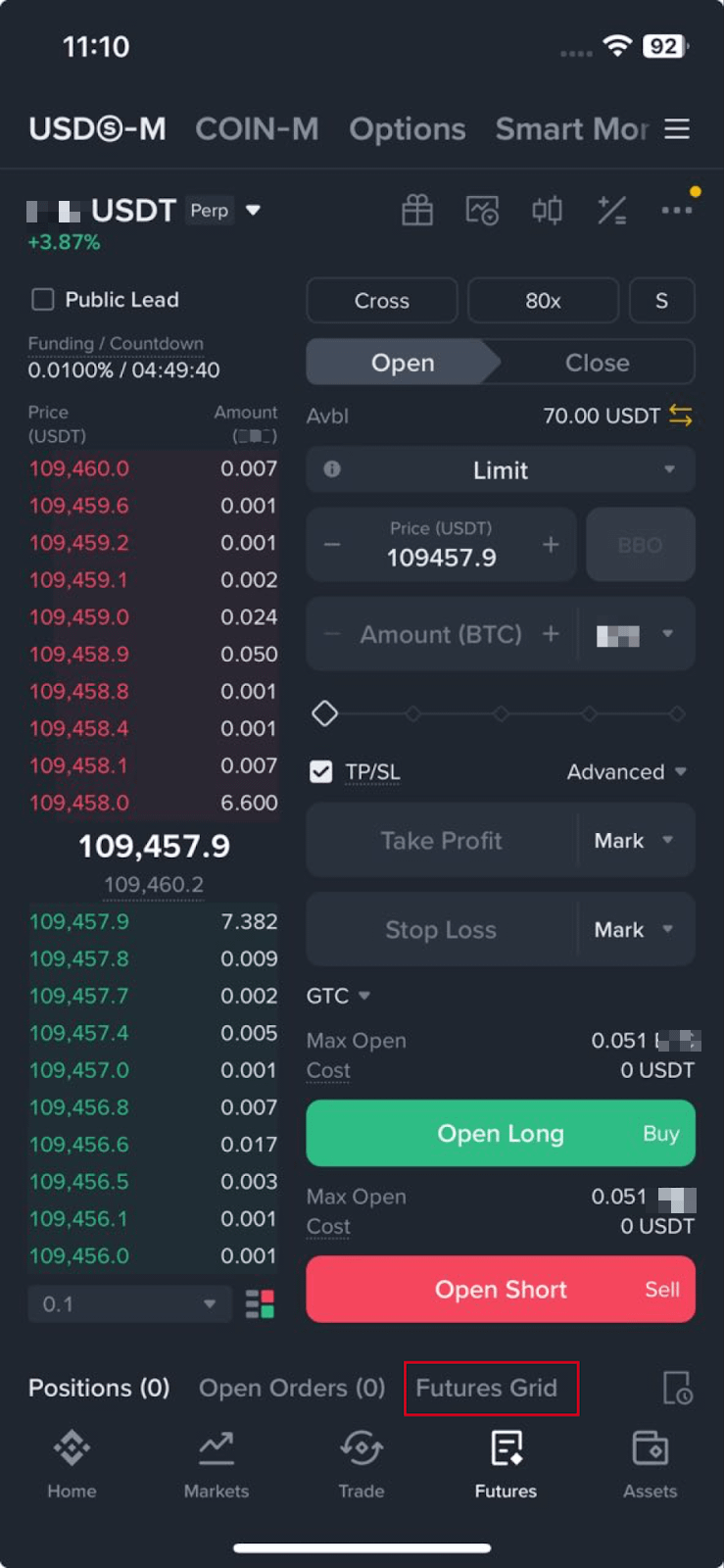
If you’re using the app, go to [Futures] - [USDⓈ-M] or [COIN-M]. Tap [Futures Grid] on the bottom Positions bar.
2. Select a symbol to execute the strategy and set the grid parameters. Select the grid direction (Long, Short, or Neutral), the range, the number of grids, and order size. Then click [Create] to confirm.
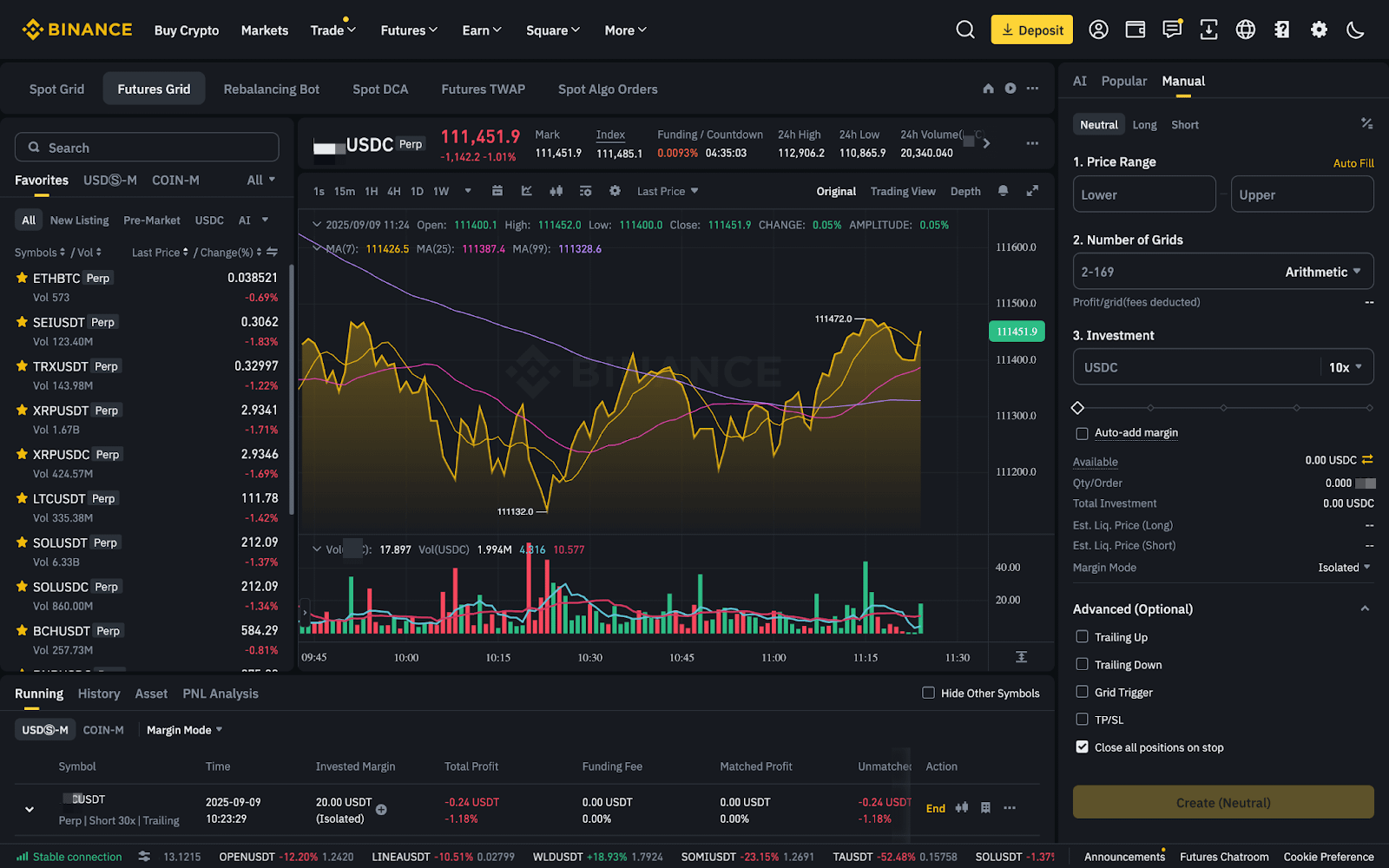
For Long/Short grid: Enter the parameters of your long/short grid trading bot on the grid trading panel. The key parameters that you must include are:
Optional: Enable or Disable the Auto-add Margin function.
If the current market price exceeds the grid trading range, the Futures grid trading bot will start without any position. Then assign the initial margin of the position. The system will calculate your initial margin value based on the number of grids, leverage, and price range you set. Note that the denser the grid, the greater the corresponding initial margin.
Please note: The notional value of each grid order must meet the minimum requirement. You can reduce the number of grids or increase the initial margin to ensure that each grid’s minimum notional value is met.
When the initial margin is lower than the minimum requirement, you will be notified to meet the minimum initial margin required to activate the grid trading bot.
Please ensure that your margin balance is higher than the maintenance margin to avoid liquidation.
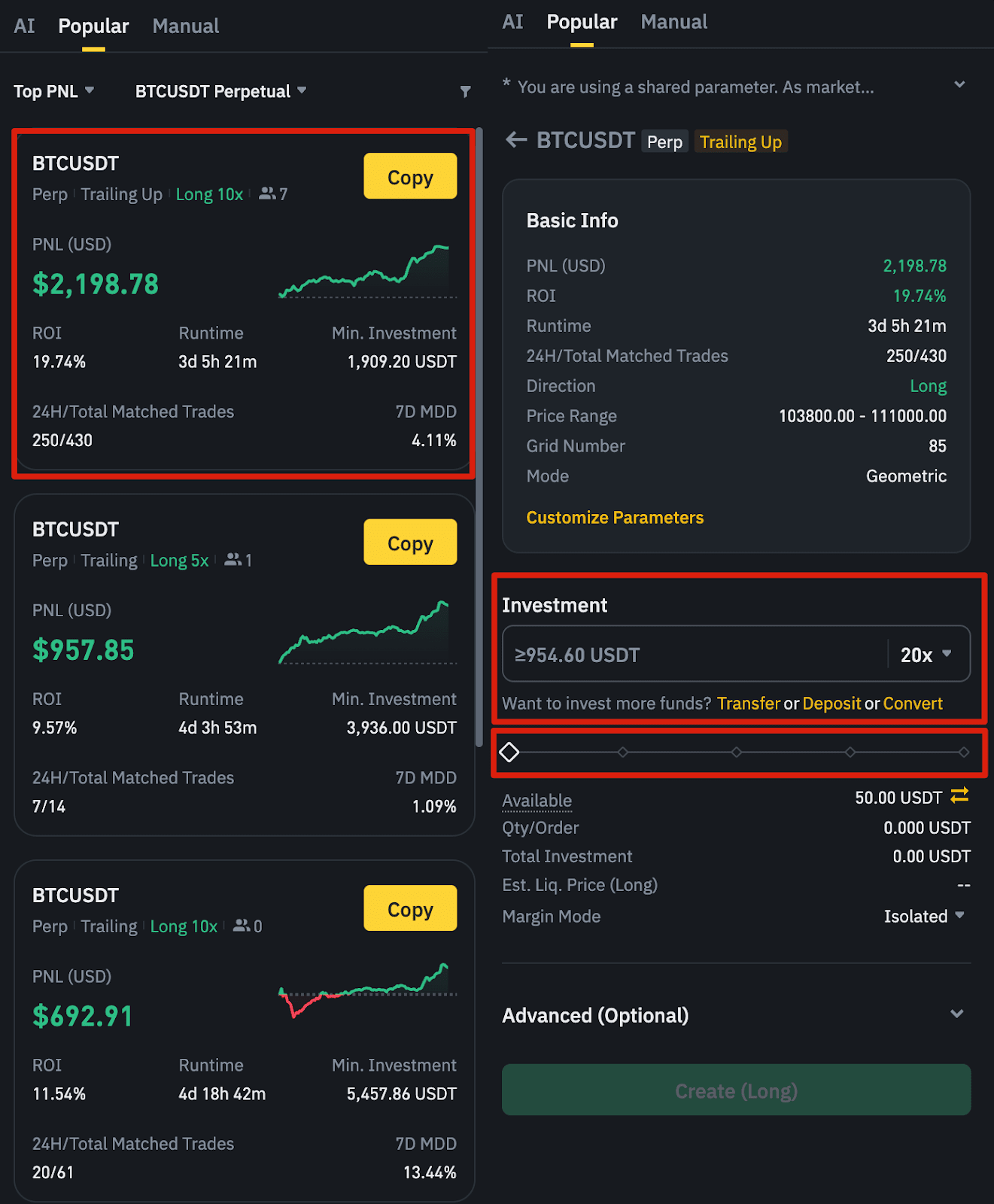
Please note: The following conditions might prevent the successful creation of a new grid:
Let’s use the USDⓈ-M Futures BTCUSDT Perpetual contract as an example to understand the process for grid trading.
For parameters #10 & #11:
You can place your grid limit orders immediately or trigger them when the market price reaches a certain value. The grid orders will be triggered when the market price (Last Price or Mark Price) rises above or falls below the trigger price you enter.

For parameters #1, #2,# 3,# 4, and #6:
You can determine a series of price levels according to the latest market price (buy, sell, mid-price), and place sell limit orders at a price higher than the market price, and a buy limit order at a price lower than the market price. After that, you can wait for the limit orders to be triggered and executed.

For neutral grids, the strategy does not involve an initial position. Instead, the initial position is established only when the market exceeds the closest price point after the initial setup.
Example:
Suppose you have set your strategy parameters as such:
The price distribution will be as follows: 20,000 USDT, 25,000 USDT, 30,000 USDT, 35,000 USDT, 40,000 USDT, 45,000 USDT
Initial sell orders for the neutral grid will be placed above the current market price. Meanwhile, the buy orders will be populated below the current market price. Note that the price nearest to the market price would be excluded. In this scenario, the initial grid limit orders will be populated as such:
| Direction | Price |
| Sell | 45,000 USDT |
| Sell | 40,000 USDT |
| Buy | 30,000 USDT |
| Buy | 25,000 USDT |
| Buy | 20,000 USDT |
Grid update means that every time a price point is touched, i.e., a limit order is filled, the grid limit order will update in time. The price of the most recently executed order will always be the one that is switched off, meaning it will not trigger any order. Buy or sell limit orders are then filled in again according to the set parameters to maintain the number of limit orders in the grid.
For example, the initial market price is 10,010 USDT , and the grid limit price at each unit is:
Price | Direction |
10,200 USDT | Sell |
10,100 USDT | Sell |
10,000 USDT | Buy |
9,900 USDT | Buy |
9,800 USDT | Buy |
Assuming that the price drops to 10,000 USDT and the buy order (the initial open position) is executed, the grid limit orders will become:
Price | Direction |
10,200 USDT | Sell |
10,100 USDT | Sell |
10,000 USDT | - |
9,900 USDT | Buy |
9,800 USDT | Buy |
Let’s assume the price then rises to 10,100 USDT, triggering the execution of the 10,100 USDT sell order. The grid limit orders will be updated as follows:
Price | Direction |
10,200 USDT | Sell |
10,100 USDT | - |
10,000 USDT | Buy |
9,900 USDT | Buy |
9,800 USDT | Buy |
If after that the price drops to 9,900 USDT, the two buy orders (10,000 USDT and 9,900 USDT) are then executed, and the grid limit orders will be subsequently updated as follows:
Price | Direction |
10,200 USDT | Sell |
10,100 USDT | Sell |
10,000 USDT | Sell |
9,900 USDT | - |
9,800 USDT | Buy |
And so on.
For parameter #12:
You can manually terminate the grid operation or set a Stop Trigger. There are 3 options for setting Stop Triggers:
You can also set whether you want to keep the position open when the grid take profit and stop loss triggers the termination. This setting is independent of other termination scenarios, such as termination due to insufficient margin.
For parameter #13:
Enable [Open a position on creation] to automatically open position at market price when the grid is created; when disabled, the system will not open position for you after the grid is created. This feature is only for non-trailing grids.
Please note that during grid operation, the following scenarios will cause the grid to terminate:
USDⓈ-M Futures Short Grid Example:
Consider a short grid bot with a configured price range between 9,800 USDT to 10,200 USDT and a grid quantity of 4.
Assuming that the quantity of sell-limit orders at each price is 1, and the market price (the latest transaction price) is 10,010 USDT.
With an initial position opened:
The following scenario shows how a short grid with an initial position will be activated.
| Price | Direction |
| 10,200 USDT | Sell |
| 10,100 USDT | Sell |
| 10,000 USDT | Sell |
| 9,900 USDT | Sell |
| 9,800 USDT | Sell (not activated) |
In this case, the lowest sell-limit order (9,800 USDT) is excluded, and the subsequent sell orders are placed upwards from 9,900 USDT to 10,200 USDT. If the initial position is transacted between the prices of 9,900 USDT and 10,000 USDT, the initial number of grid orders will be 2.
Since the current market price is 10,010 USDT, the sell orders at the prices of 9,900 USDT and 10,000 USDT will be filled as the initial position. Once the initial position is filled, a buy order will be placed at the next lower price. The grid limit orders will be updated as follows:
| Price | Direction |
| 10,200 USDT | Sell |
| 10,100 USDT | Sell |
| 10,000 USDT | - |
| 9,900 USDT | Buy |
| 9,800 USDT | Buy |
To summarize, for short grid bots with an initial position opened, the first sell-limit order will trigger the initial short position. Simultaneously, the subsequent sell-limit orders will be populated in ascending order toward the highest boundary of your configured grid. Then, the buy-limit orders will be placed in the market once the initial short position is triggered, according to your bot’s parameters.
Similarly, long grid trading bots will be activated once the first buy-limit order is filled. Subsequently, all grid orders will be populated.
With no initial position opened:
The following scenario shows how a short grid without an initial position will be activated.
| Price | Direction |
| 10,200 USDT | Sell |
| 10,100 USDT | Sell |
| 10,000 USDT | - |
| 9,900 USDT | - |
| 9800 USDT | - |
In this case, since the current market price is 10,010 USDT, only the 2 sell orders above the market prices of 10,200 USDT and 10,100 USDT will be placed and no buy orders will be placed, so there is no initial position opened.
If the market moves up to 10,110, the sell order at the 10,100 price will be filled, and a short position is opened. The grid limit orders will be updated as follows:
| Price | Direction |
| 10,200 USDT | Sell |
| 10,100 USDT | - |
| 10,000 USDT | Buy |
| 9,900 USDT | - |
| 9800 USDT | - |
In summary, when creating a short grid and choosing not to open an initial position, the initial pending order may be less than the total number of grids, and only sell orders will be placed above the market price.
The logic of the long grid is similar, only buy orders below the market price will be placed initially.
Notes:
1. The initial pending orders of the grid are less than the total number of grids, and all pending orders cannot be viewed;
2. If the market fluctuates in the opposite direction, you may miss the market due to not opening a position at the beginning.
Disclaimer: This FAQ Page is for general information and educational purposes only. It does not constitute legal terms or any form of legal agreement between you and Binance. It should not be construed as financial, legal or other professional advice. The information on this page may be outdated. For legal terms applicable to Futures and Options Trading Services, please refer to the Terms of Use, the Exchange Rules (including the Exchange Procedures) and the Clearing Rules (including the Clearing Procedures) which come into effect on 5 January 2026. Additional terms and conditions will also be set out in the Contract Specifications applicable to the relevant Derivatives contract.
Choose the contract on which the trading bot will be deployed.
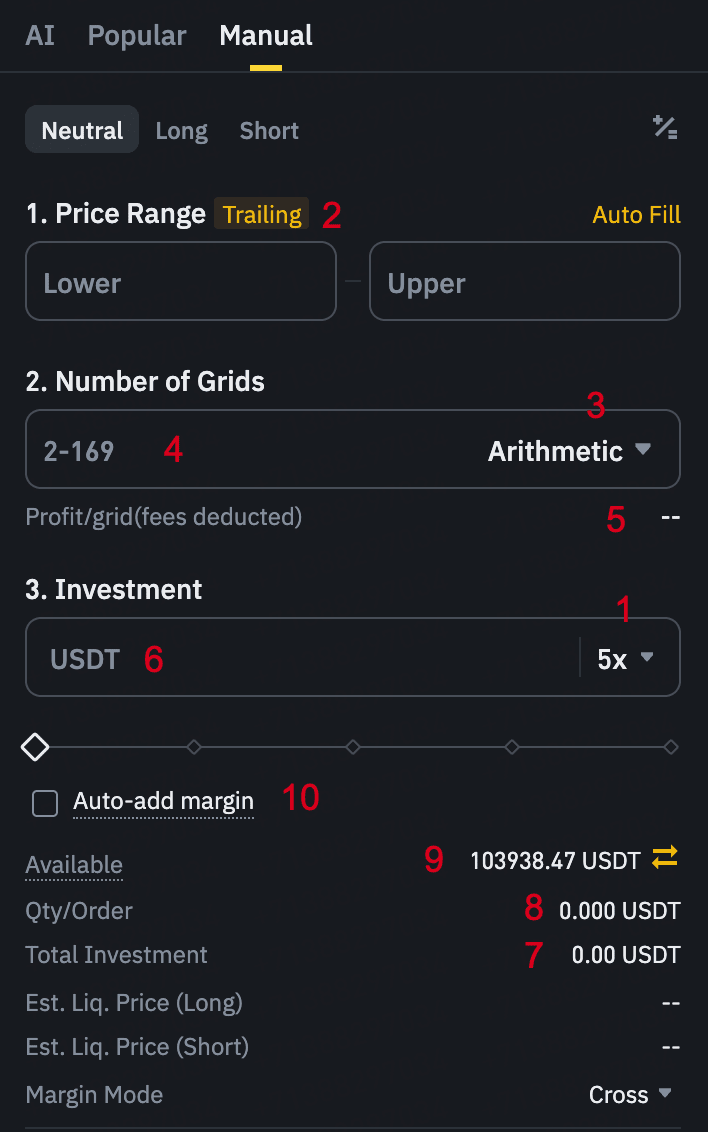
Start by adjusting the leverage. Please note that leverage magnifies both gains and losses. With leverage, you can magnify relatively small price movements to potentially create profits. However, leverage is a double-edged sword, please use it prudently.
*For USDⓈ-M Futures Grid, you can modify the price range and number of grids while the grid is running. However, for COIN-M Futures Grid, these parameters cannot be modified once the grid has been created.
Set the lower price and the upper price of the grid. If the highest or the lowest grid is exceeded, no more positions will be opened. For example, if the current BTCUSDT perpetual Futures price is 48,000 USDT and you expect the price will fall when it goes above 49,000 USDT. In this case, you can set the upper price to 49,000 USDT. After the price reaches 49,000 USDT, the grid will no longer open positions.
*Cannot be modified after placing the grid order
Arithmetic: Each grid has an equal price difference.
The arithmetic grid divides the price range from grid_lower_limit to grid_upper_limit into grid_count by an equal price difference.
The price difference of each grid is:
price_diff = (grid_upper_limit - grid_lower_limit) / grid_count
Then it constructed a series of price intervals:
price_1 = grid_lower_limit
price_2 = grid_lower_limit + price_diff
price_3 = grid_lower_limit + price_diff * 2
...
price_n = grid_lower_limit + price_diff * (n-1)
At grid_upper_limit, n = grid_count
Example: Arithmetic price_diff = 100: 1,000, 1,100, 1,200, 1,300, 1,400,... (the next price is 100 higher than the previous one)
Geometric: Each grid has an equal price difference ratio.
The geometric grid divides the price range from grid_lower_limit to grid_upper_limit into grid_count by an equal price ratio.
The price ratio of each grid is:
price_ratio = (grid_upper_limit / grid_lower_limit) ^ (1/grid_count)
The price difference of each grid is:
price_diff_percentage = ( (grid_upper_limit / grid_lower_limit) ^ (1/grid_count) - 1) * 100%
Then it constructed a series of price intervals:
price_1 = grid_lower_limit
price_2 = grid_lower_limit * price_ratio
price_3 = grid_lower_limit * price_ratio ^ 2
...
price_n = grid_lower_limit * price_ratio ^ (n-1)
At grid_upper_limit, n = grid_count
Example: Geometric grid price_diff_percentage = 10%: 1,000, 1,100, 1,210, 1,331, 1,464.1,... (the next price is 10% higher than the previous one)
Grid Counts Limits
For USDⓈ-M Futures Grid, if the grid count you set exceeds the system limit (currently 169 by default), the system will automatically enable the Dynamic Order Mechanism. In this mode, the Trailing, Add Investment, and Modify Parameters features are not available.
With Dynamic Order Mechanism enabled, the system will not place orders for all grids at once. Instead, it will place up to 169 orders around the current market price. As the market moves, the system will dynamically cancel and place new orders to keep orders distributed near the latest price, reducing the number of active orders at any given time.
Please note: Price difference cannot be lower than the tick size, and the minimum price difference may vary by symbol. If you encounter an error “Price difference of grids is too small”, please adjust the grid count, grid upper/lower limits, or grid quantity accordingly.
To reduce system load, the price difference for symbols with a tick size of 0.00001 or smaller, the minimum price difference is 10 * tick size, and for symbols with a tick size of 0.0001, the minimum price difference is 5 * tick size. There are no restrictions for symbols with tick size bigger than 0.0001.
If the profit/grid is less than the maker commission, you will be notified that the total grid profit may not be able to cover trading fees.
How to calculate? (The profit/grid displayed is for reference only)
1). Arithmetic grid
d = (grid_upper_limit - grid_lower_limit) / grid_count
c = TradingFeeRate (your current maker fee rate)
profit_per_grid_lower = (grid_upper_limit * (1-c)) / (grid_upper_limit-d) - 1 - c
profit_per_grid_higher = (1-c) * d / grid_lower_limit-2c
Example: Price interval = 1,000 - 2,000, Grid_count = 10, Commission = 0.1%
Price difference of each grid is = (2000-1000) / 10 = 100
profit_per_grid_lower = (2000*(1-0.1%)) / (2000-100) - 1 - 0.1% = 5.05%
profit_per_grid_higher = (1-0.1%) * 100 / 1,000 - 2 * 0.1% = 9.79%
2). Geometric grid
r = (grid_upper_limit/grid_lower_limit) ^ (1/grid_count)
c =TradingFeeRate (your current maker fee rate)
profit_per_grid_geo = (1-c) * r - 1 - c
Example: Price interval = 1,000 - 2,000, Grid_count = 10, Commission = 0.1%
Price ratio of each grid is = (2,000 / 1,000) ^ (1/10) = 107.18%
Profit/grid = (1 - 0.1%) * 107.18% - 1 - 0.1% = 6.97%
*Cannot be modified after placing the grid order
Investment = initial_value / leverage
You can adjust the percentage of the investable amount up to 100% (Initial margin = percentage * margin balance).
Please note: It must be within the interval between the min_initial_margin and the margin balance.
For USDⓈ-M Futures Grid
Calculate the min grid qty:
min grid qty = max(minQty, minNotional/grid_lower_limit)
min_initial_margin= min grid qty * sum (price)/ (leverage * adjust_coef)
“assuming price” is defined as per the following formulas:
assuming_price (BUY) = price*
assuming_price (SELL) = max (mark_price, price)
*”price” is the price of every order in the grid trading strategy, automatically set by the grid parameters. This definition applies every time “price” is quoted moving forward in the article.
min_initial_margin = sum (min grid qty * assuming price + leverage * min grid qty * abs {min [0, side * (mark price - price)]}) / (leverage * adjust_coef)
Note: If you have set a trigger price, the mark price should be replaced by the trigger price.
For COIN-M Futures Grid
Calculate the minimum grid quantity:
min grid qty = minQty
min_initial_margin = min grid qty * sum (contract_multiplier / price) / (leverage * adjust_coef)
Define the assuming price:
assuming price (BUY)= min( mark price, price)
assuming price(SELL) = price
min_initial_margin = min grid qty * sum (contract_multiplier /assuming price + leverage * contract_multiplier * abs {min [0, side * (1 / Order's Price - 1 / mark price)]}) / (leverage * adjust_coef)
*”min grid qty” is the minimum trade amount of the symbol. You can find more details on the trading rules page.
*If you have set a trigger price, the mark price should be replaced by the trigger price.
*Currently, the adjust_coef has defaulted to 0.8. It will be adjusted according to market conditions.
*Cannot be modified after placing the grid order
Total Investment = Initial Margin * Leverage
For USDⓈ-M Futures Grid
Direction Neutral:
grid_qty = adjust_coef * initial_margin * leverage / sum (price)
Direction Long/Short Grid:
“assuming price” is defined as per the following formula:
assuming_price (BUY) = price
assuming_price (SELL) = max (mark_price, price)
grid qty = adjust_coef * initial_margin * Leverage / sum (assuming_price + leverage * abs (min (0, side * (mark_price-price)) ) )
*If you have set a trigger price, the mark price should be replaced by the trigger price.
For COIN-M Futures Grid
Direction Neutral:
grid qty = adjust_coef * initial_margin * leverage / sum (1 / price)
Direction Long/Short Grid:
“Assuming price” is defined as per the following formula:
assuming_price (BUY) = min(mark price, price)
assuming_price (SELL) = price
grid qty = adjust_coef * initial_margin * Leverage / sum(contract_multiplier /assuming_price + leverage *contract_multiplier* abs(min(0, side*(1 / price - 1 / mark price)) ) )
*If you have set a trigger price, the mark price should be replaced by the trigger price.
How grid orders are set?
Common rules
How initial order placements in long/short grids differ from neutral grids?
Neutral grids spread orders evenly above and below the current market price when activated. This means the first order triggered will establish a new long or short position depending on price movement. If the price goes up, it will trigger a sell order, starting the grid with an initial short position. If it goes down, it will trigger a buy order, and the grid strategy will start with a long position.
Unlike neutral grids, Long grids (with an initial position opened) will place only buy orders above the current price when activated (T+0). This aims to immediately build a long position as high buy orders get filled near the last price at the time of grid activation. The filled buy orders are then replaced with sell orders (T+1).
Following the same logic, Short grids (with an initial position opened) will place only sell orders below the current price when activated to establish a short position. It aims to immediately build a short position as low sell orders get filled close to the last price at the time of grid activation (T+0). The filled sell orders are then replaced with buy orders (T+1).
The logic behind the initial order placement allows long grids to establish an initial long position by having buy limit orders filled close to the current market price. If an uptrend is anticipated, the long position built from these limit orders can then be sold at higher price levels within the grid range for profit.
Similarly, short grids establish an initial short position by having sell limit orders filled close to the current market price. If a downtrend is anticipated, this short position can then be bought back at lower prices within the grid range, allowing the short position to be closed at a more favorable price.
Example
You've set up a long grid on ETHUSDT and chose to have an initial position:
As this is a long grid made of 5 grids, the system will start by placing 5 buy limit orders upon grid confirmation to build an initial long position.
Given the range and ETHUSDT price at grid activation, 4 out of these 5 limit orders are placed above the last price at the time of grid activation (T+0).
This causes the 4 limit orders above current market price to be executed immediately, building up your initial long position.
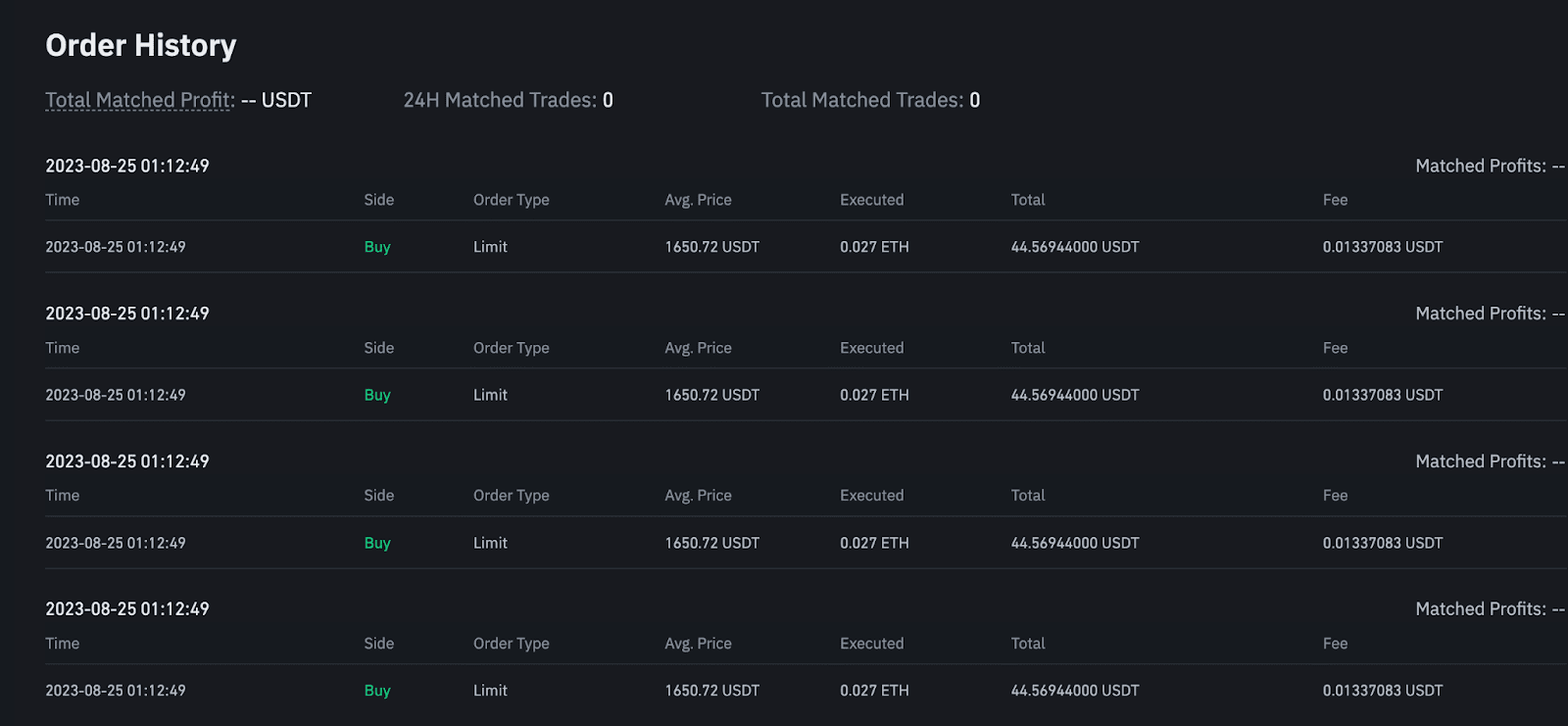
Filled grid trading bot orders
Right after, the filled buy limit orders are automatically replaced by sell orders, which are in turn placed on the upper grid (T+1).
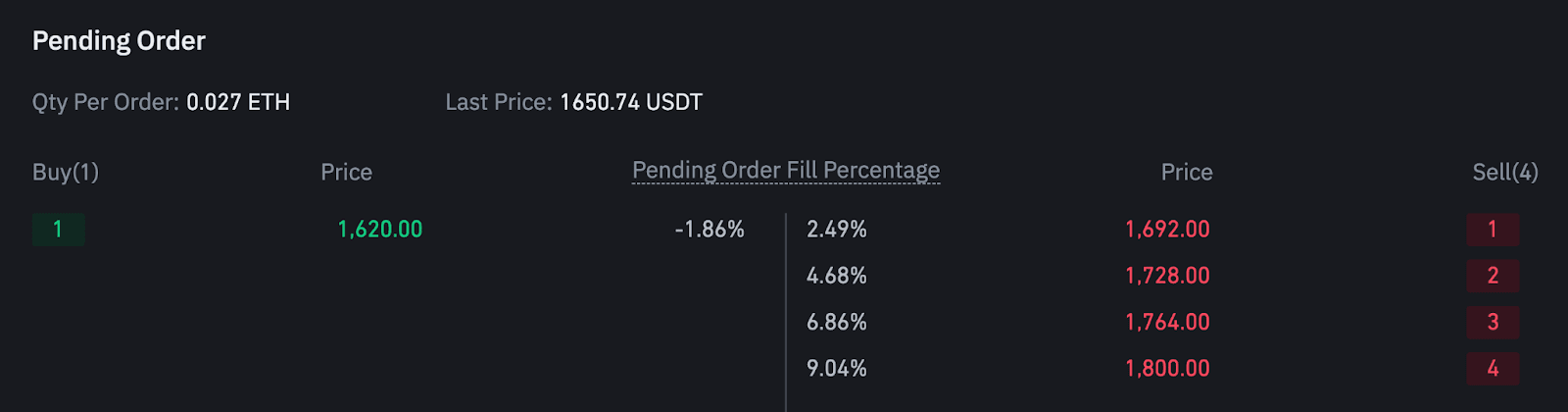
Pending grid trading bot orders
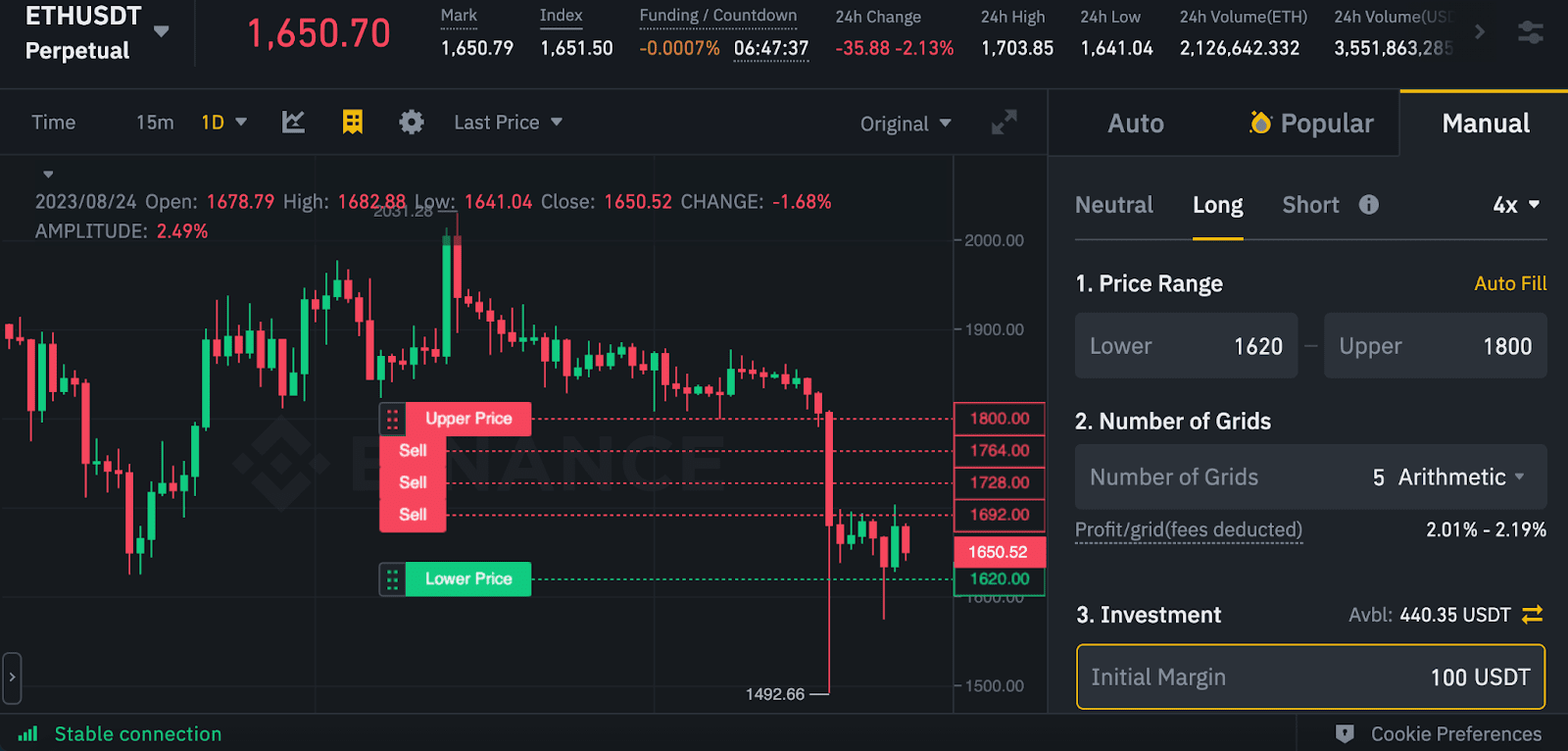
Grid trading bot orders preview on the candlestick chart
The initial long position size at T+1 is therefore composed by the number of grids above the current price, corresponding to the initial buy limit orders that have been executed.
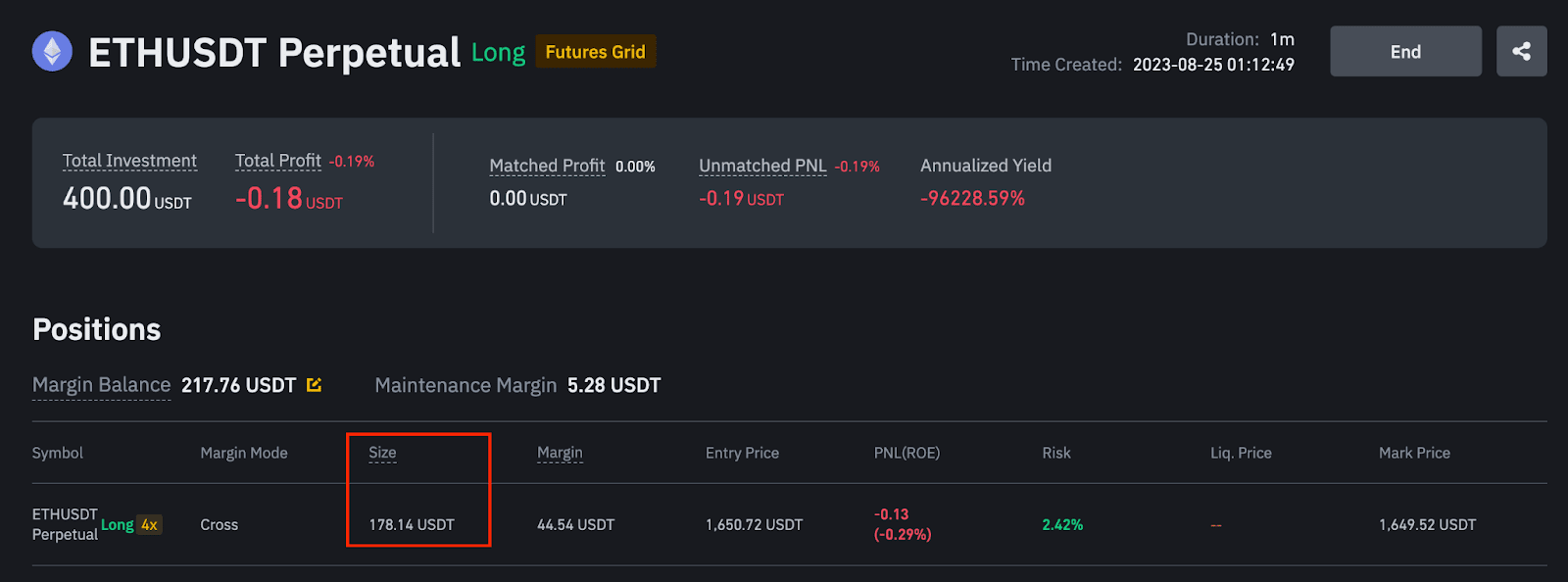
Reflecting the 4 buy market orders, your initial position size will then be 4 * 0.027 ETH = 0.108 ETH, equivalent to 178.28 USDT as initial entry price of 1,650.72 USDT.
Under Default Mode, it will show the margin balance of your USDⓈ-M or COIN-M Futures Account. Under Portfolio Margin Mode, you will see the available balance in your Spot Account.
*Optional, can be modified before the grid is closed, the feature is disabled by default.
Under Classic Trading Account Mode
If Auto-add margin is selected, when the symbol's leverage bracket is reduced, required margin will be automatically added from your USDⓈ-M Futures Account to keep the bot running. However, please note that this can impact your other positions in your USDⓈ-M Futures account. Under extreme market conditions, transferring funds from your USDⓈ-M Futures account may affect the maintenance margin ratio of your USDⓈ-M Futures account and could lead to liquidation.
Under Portfolio Margin Account Mode
When the symbol's leverage bracket is reduced, required margin will be automatically added from your Spot Account to keep the bot running.
If Auto-add margin is not checked off, you must manually add margin to prevent the bot's termination after a leverage adjustment.
*Please note: Auto-add margin only happens when the leverage bracket is reduced. For other scenarios such as when there is insufficient margin, this feature is not applicable and auto-add margin will not occur.
The calculation of Auto-add margin amount when leverage brackets are reduced is as follows:
1. Calculate the current Max Notional
maxNotional = (abs(positionNotional)+ price*qty)*buffer,
where positionNotional = positionQty*markPrice, buffer is 1.005.
2. Get the maxNotional corresponding to the current leverage bracket
Please refer to the Leverage bracket on the Trading rules page.
3. Calculation of account available margin for current grid
availableMargin = margin balance - total initial margin - IM_after
availableMargin = margin balance - total initial margin
4. Calculation of required margin for current grid
requiredMargin = max(InitialMargin_after - InitialMargin_before,0)
5. Calculation of Auto-add Margin amount
*Optional, can be modified before the grid is triggered
1). Grid trigger type: When the last price or the market price you choose reaches the trigger price, the grid will start running.
2). Stop trigger type: When the last price or the market price reaches the top or bottom stop price, the grid will be stopped.
*Optional, can be modified after placing a grid order
Your grid order will be triggered when the last price or the mark price rises above or falls below the trigger price you set.
The grid trading bot also comes with enhanced functions that enable you to manage your positions and risk better. One of which is the trigger price. The trigger price is a predetermined price level at which the grid trading bot will be activated. This allows you to dictate when the system will be active when market conditions meet your criteria.
When a grid trade is triggered, the system divides the asset price range into several grid levels according to your parameters and sets pending orders for each price level. When the asset’s price falls, a buy order is executed, and a sell order is placed immediately at a high price. When the price rises, a buy order is placed directly at a lower price as soon as a sell order is executed. This bot sets you up to buy low and sell high, allowing you to profit in volatile market conditions.
*Optional, can be modified after placing the grid order.
Additionally, you can set a stop-loss for your grid positions. Once the asset’s price crosses below or above the stop loss range, your entire grid position will be closed. This feature protects your position from incurring outsized losses when the market behaves unfavorably.
You can also set whether or not you want to keep the position open when the grid stop-loss triggers the termination.
1. Price Trigger
For the USDⓈ-M and COIN-M grids, the stop_upper_limit price should be higher than the last price (mark price) and the trigger price.
When the latest market price reaches the Stop_upper_limit, the grid will stop working.
Stop_lower_limit price
For the USDⓈ-M and COIN-M grids, the stop_lower_limit price should be lower than the last price (mark price), and the trigger price.
For USDⓈ-M trailing grids, please note that if the stop_upper_limit price is lower than the trailing up limit price (for trailing up grids) and the stop_lower_limit is higher than the trailing down limit price (for trailing down grids), it may terminate the grid before reaching the trailing up or trailing down limit price.
When the latest market price reaches the Stop_lower_limit, the grid will stop working.
2. PNL Trigger
The calculation of the total profit is based on the last price or the mark price that you have selected.
3. ROI% Trigger
The system will calculate the PNL corresponding to the ROI% you entered, and determine whether the conditions for triggering the TP/SL are met based on the estimated PNL.
4. Close All Positions on TP/SL Stop
You can also set whether or not you want to keep the position open when the grid take profit or stop loss triggers the termination. This setting is independent of other termination scenarios, such as termination due to insufficient margin.
Users can create a Long or Short Futures grid with or without opening a position. If you enable [Open a position on creation], the system will automatically open position at market price when the grid is created; when disabled, the system will not open position for you after the grid is created. This feature is only for non-trailing grids.
*Optional, can be modified after placing the grid order
You can enable this function to automatically close all open positions of the symbol at the market price when the grid stops. This option will not affect your TP/SL settings. If the price reaches the TP or SL, your positions will be closed or remain open depending on your TP/SL settings.
*Please note that the above parameter setting suggestions are for reference only. Futures trading carries a substantial risk and the possibility of both significant profits and losses. Past gains are not indicative of future returns. All of your margin balance could be liquidated in the event of extreme price movement. Binance shall not be liable for any of your losses.
position_notional = Latest_Mark_Price * size
position_notional_value = abs (position notional)
present notional = max (abs (position_notional + open order's bid_notional), abs (position_notional - open order's ask_notional))
*Abs: absolute value
open order's ask_notional = askNotional
open order's bid_notional = bidNotional
Occupied margin = present notional / current leverage
Occupied margin = (present notional - position_notional_value) / leverage + isolatedWalletBalance
The profit and loss calculation for a long/short grid trading bot considers both the total matched profits, the unmatched profit and loss, and the funding fees of the position. In this case, completed transactions are recorded as matched transactions, while partially completed transactions are recorded as unmatched transactions. A matched transaction means that every short position (or long position) in the grid trading bot is matched by a corresponding buy order (or sell order).
| Index | Definition | Methodology |
| Unmatched PnL | The profit and loss of unmatched grid transactions | Unmatched PnL = Total Profit - Matched Profit - Funding Fees |
| Total Profit | Total matched profit and unmatched profit and loss since inception | Total Profit = Realized Profit + Unrealized PnL + Funding Fees |
| Yield | Total return ROI | ROI = Total Profit / Initial Margin * 100% |
| Annualized Rate of Return | Annualized total return APR | APR = ROI * Year / T (T is the running time of the bot) |
You can use the realized profit, unrealized PnL, and the funding fees to calculate the total profit:
Total Profit = Net Realized Profit + Unrealized PnL + Funding Fees
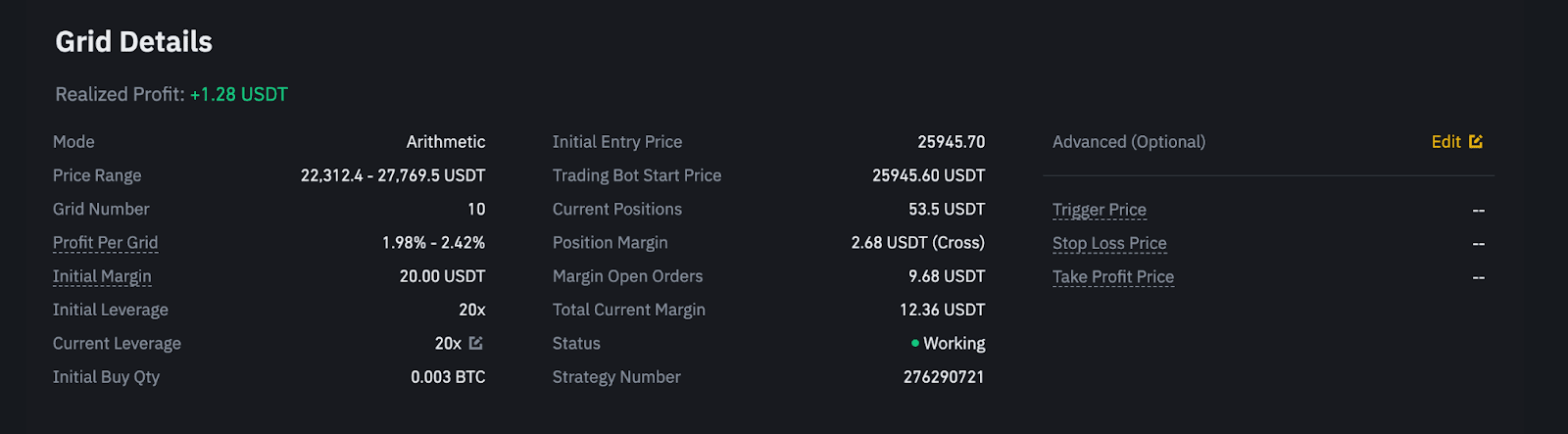
Let’s use the USDⓈ-M Futures Grid as an example. Assume a positive Funding Rate of 0.01% for this pair.
1. Calculate the net realized profits
Net realized profit = gross realized profit - total fee expenses of all the completed orders of the grid trading bot
Notes:
Total realized profit = 0.20596000 + 0.13932000 + 0.07268000 - 0.00642000 - (0.00123038 + 0.00122238 + 0.00121439 + 0.00321511 + 0.00321511 + 0.00321511 + 0.00321511 + 0.00482797 + 0.00483002 ) = 0.38535442
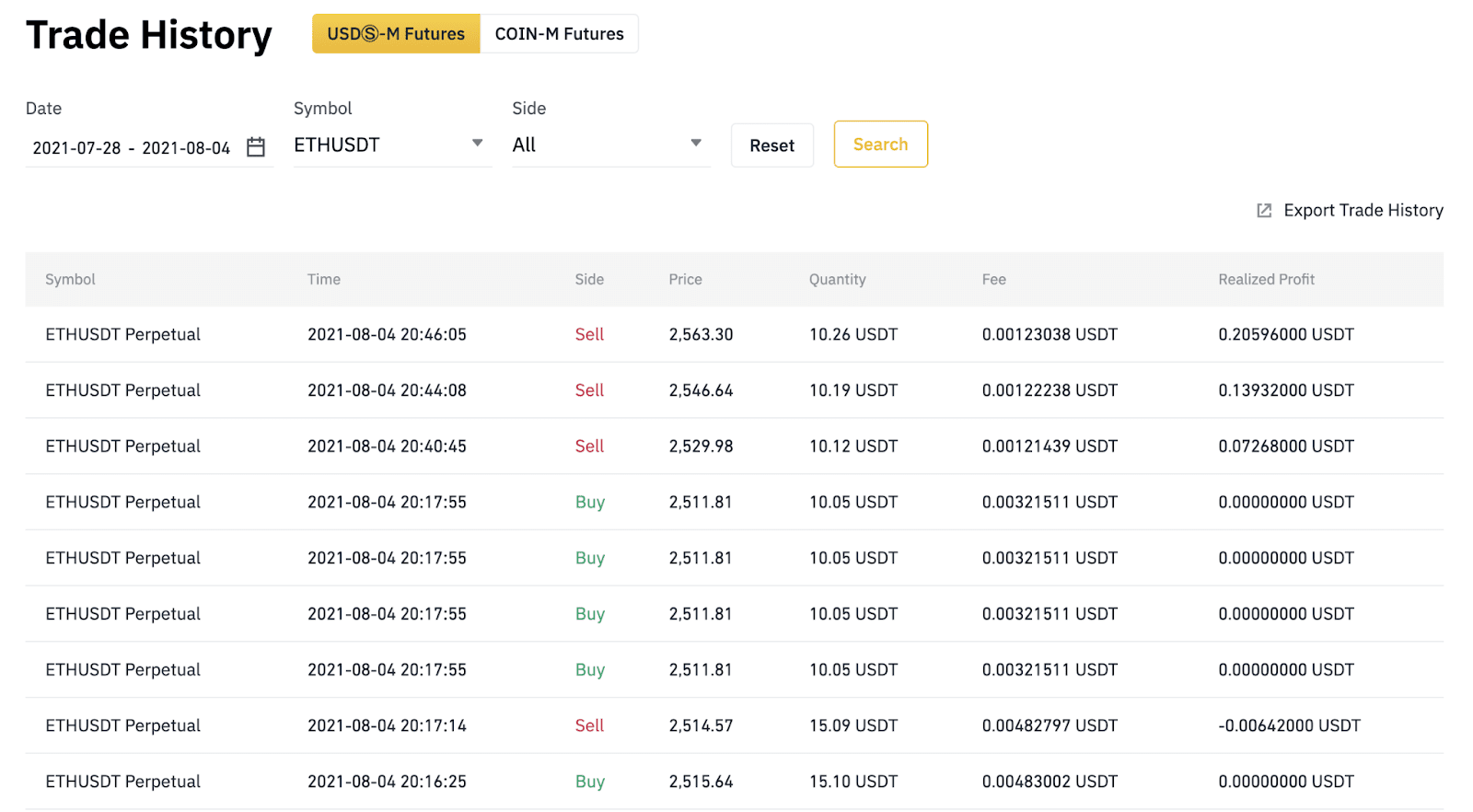
2. Calculate the unrealized PnL
Unrealized PnL is calculated based on the difference between the last price and the entry price of open positions. You can find your unrealized PnL and entry price under the [Positions and Orders] window.
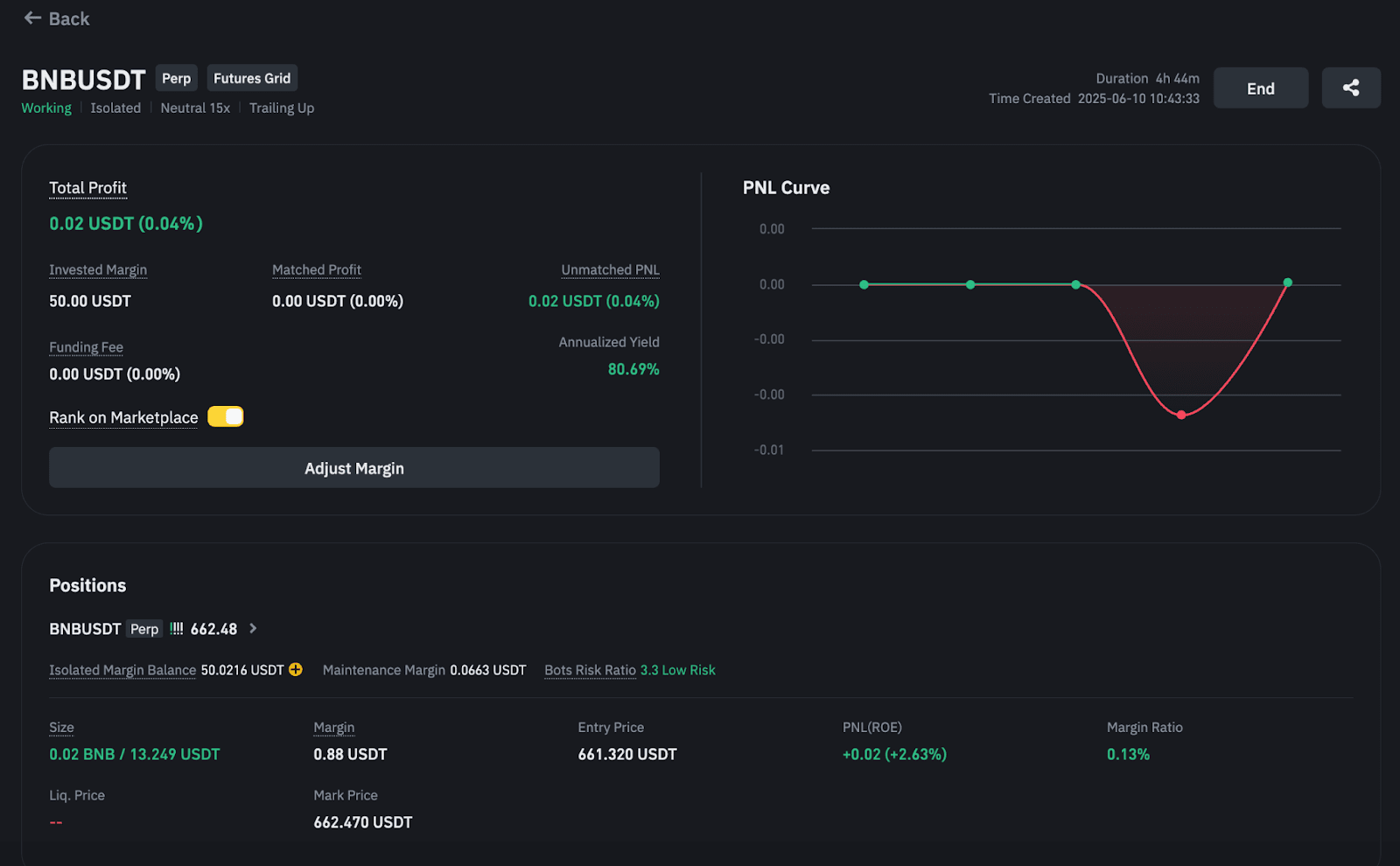
3. Calculate the total profits
Total Profit = Net Realized Profit + Unrealized PnL + Funding Fees
= 0.38535442 + 0.26 + 53.5 * 0.01%
= 0.65070442 USDT
4. Calculate the unmatched profits
Unmatched profits is the unrealized profit of filled grid orders that are not matched.
Unmatched PnL = Total Profit - Matched Profit - Funding Fee
= 0.65070442 USDT - 0.60454353 USDT - 53.5 * 0.01%
= 0.04081119 USDT
Positions are matched using the First-In-Last-Out (FILO) methodology. Under FILO, orders that are filled first will be matched last.
Example
Suppose a long grid trading bot is filled in the following order:
| Price | Direction | Sequence |
| 10,200 USDT | Buy | 1st |
| 10,100 USDT | Buy | 2nd |
| 10,000 USDT | Buy | 3rd |
The corresponding sell orders to be matched will be in the following sequence:
| Price | Direction | Sequence | Matched Sequence |
| 10,200 USDT | Buy | 1st | 3rd |
| 10,100 USDT | Buy | 2nd | 2nd |
| 10,000 USDT | Buy | 3rd | 1st |
The last buy order (10,000 USDT) will be matched with a corresponding sell order at 10,100 USDT, and the remaining buy orders will be matched at a higher selling price.
Disclaimer: This FAQ Page is for general information and educational purposes only. It does not constitute legal terms or any form of legal agreement between you and Binance. It should not be construed as financial, legal or other professional advice. The information on this page may be outdated. For legal terms applicable to Futures and Options Trading Services, please refer to the Terms of Use, the Exchange Rules (including the Exchange Procedures) and the Clearing Rules (including the Clearing Procedures) which come into effect on 5 January 2026. Additional terms and conditions will also be set out in the Contract Specifications applicable to the relevant Derivatives contract.
Maintaining an optimal margin is vital for ensuring the smooth functioning of your trades using Futures Grid Trading.
The "Add/Remove Margin" feature on Binance Futures Grid provides you the flexibility to manage your margin for running trades. This can be particularly useful to avoid liquidations, especially in a volatile market.
Adding margin gives your trade more cushion, while removing margin retrieves excess funds from a position.
However, adjusting the margin doesn't affect the actual size of the position or the Return On Equity (ROE).
The maximum amount you can remove is determined by either the profit earned from the grid or any additional margin you've added after the grid's creation.
In other words, the upper limit for removal is the lesser of the two following values:
Please note, for Portfolio Margin Mode: The creation of your Futures Grid and the adjustment of margin will transfer funds from your Spot Account. If you have enabled BNB fee payment, your BNB fee deduction will still use the asset in your USDⓈ-M Futures Account, which will lead to changes in the equity and risk level of the portfolio margin account. Please pay attention to the risk level to avoid liquidation of the Portfolio Margin account.
1. Go to the Futures Grid trading interface and find your running orders.

2. Look for the position you want to adjust. Click the [+] button next to the initial margin.

3. A pop-up box will appear, you can choose to add margin or remove margin.

4. Specify the amount of margin you wish to add or remove from the selected grid.
Please note: The interface will provide insights, such as the margin balance change and the margin ratio change, to give you a clear picture of the outcome from your input. Adjusting your margin will not modify your position size or your ROE.

1. Go to [Trading Bots] - [Futures Grid].
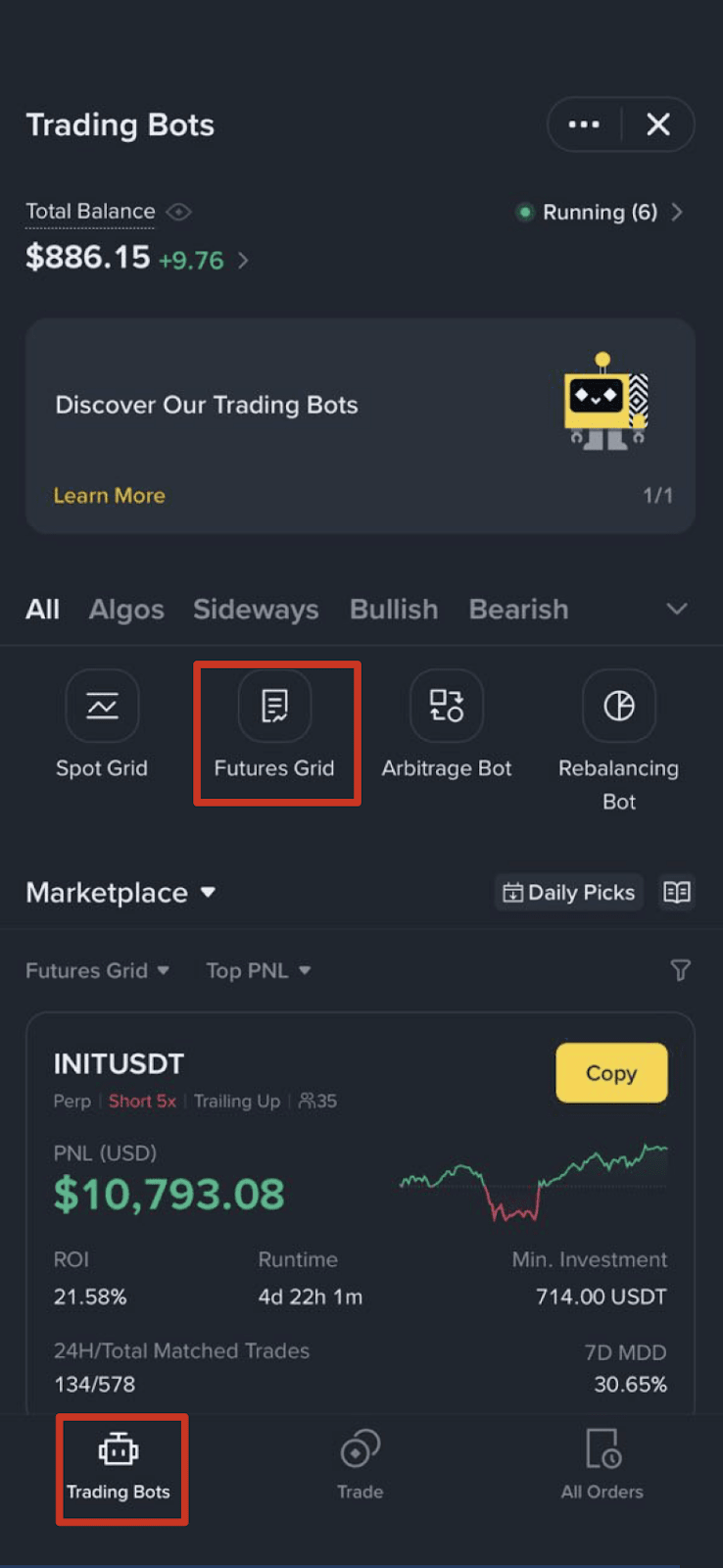
2. Tap [All Orders].

3. Tap [Adjust Margin].

Alternatively, you can also go to the [Running Order Detail] page and tap the [+] button next to your margin balance.

4. You’ll see a pop-up window. Choose [Add Margin] or [Remove Margin]. Then, enter the margin amount you wish to add to or remove from the selected grid.

Note:
1. Go to the Futures Grid Trading interface and find your running orders.
2. Look for the grid you want to adjust. Click the [...] button under the Action column.

3. Add your investment amount on the selected grid.

1. Go to [Trading Bots] - [Futures Grid].

2. Tap [All Orders] - [More] - [Add Investment].


3. Alternatively, you can also go to the [Running Order Detail] page and tap [More].

4. Enter the margin amount you wish to add for the selected grid.

Disclaimer: This FAQ Page is for general information and educational purposes only. It does not constitute legal terms or any form of legal agreement between you and Binance. It should not be construed as financial, legal or other professional advice. The information on this page may be outdated. For legal terms applicable to Futures and Options Trading Services, please refer to the Terms of Use, the Exchange Rules (including the Exchange Procedures) and the Clearing Rules (including the Clearing Procedures) which come into effect on 5 January 2026. Additional terms and conditions will also be set out in the Contract Specifications applicable to the relevant Derivatives contract.
The UM Futures Grid Parameter Modification feature allows you to adjust key parameters—such as price range and the number of grids—while the grid is in “working” status. This functionality is available for both normal and trailing grids, enabling you to optimize your grids flexibly in response to market changes.
1. Go to the Futures Grid trading interface and find your running orders.
2. Look for the grid you want to adjust. Click the [...] button under the [Action] column. If your grid is out of the price range, you also can hover over the [i], then click [Modify Parameters] in the tooltip.


3. Modify your price range and the number of grids on the selected grid.
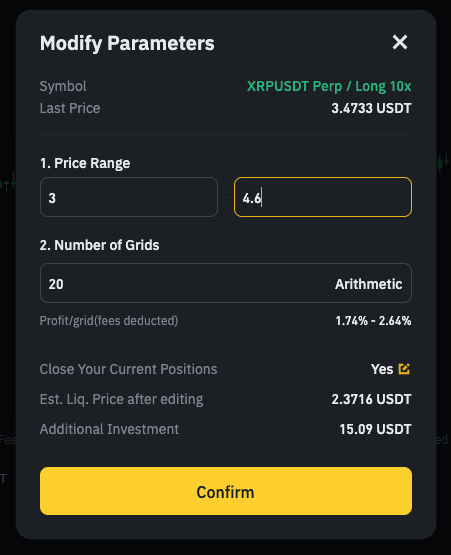
When modifying parameters of a running futures grid with existing positions, you can choose whether to close these positions:
Please note: When modifying parameters, the system will first terminate the current grid, then attempt to create a new grid using the updated parameters. If creation of a new grid fails, the current grid remains terminated and cannot continue running.
After adjusting the grid parameters, you will not be able to modify them again within 10 minutes. This restriction is designed to ensure the stability of the automated grid trading strategy and avoid frequent parameter changes affecting trading execution. Please confirm your parameter settings carefully before submission.
The system will calculate the minimum investment amount based on the new parameters. If your current balance is insufficient, we will display the additional investment needed. When the modified parameters are confirmed, we will automatically transfer the required amount from your USDⓈ-M futures account (for classic trading accounts) or your Spot account (for PM accounts). The calculation of the additional amount is as follows:
Calculation of Additional Investment
1. Calculate the remaining margin of the current grid.
initial_margin_left = invested margin + total profit + totalFundingFee
2. Calculate the total available assets in the account after the current grid is terminated.
account_available_margin= totalmarginBalance -totalIM + releaseIM
For releaseIM
3. Calculate the available assets after terminating the current grid.
4. Compare the available assets after terminating the current grid with the minimum required investment amount of the new parameters.
margin_required = max(new_min_initial_margin -grid_available_margin ,0)
Disclaimer: This FAQ Page is for general information and educational purposes only. It does not constitute legal terms or any form of legal agreement between you and Binance. It should not be construed as financial, legal or other professional advice. The information on this page may be outdated. For legal terms applicable to Futures and Options Trading Services, please refer to the Terms of Use, the Exchange Rules (including the Exchange Procedures) and the Clearing Rules (including the Clearing Procedures) which come into effect on 5 January 2026. Additional terms and conditions will also be set out in the Contract Specifications applicable to the relevant Derivatives contract.
| Time | The time when the grid was created |
| Symbol | Click on the leverage next to the symbol to adjust the grid leverage |
| Invested Margin | Margin at the time of grid creation + add investment |
| Total Profit | Total Profit = Realized Profit + Unrealized PnL + Funding Fee Notes: If the [Close all positions on stop] function is enabled with open positions under the grid, all positions will be closed at market price after the grid stops. The PnL of the closing positions are included in the grid profit. |
| Total Profit (%) | ROI = Total Profit / initial_margin * 100% |
| Matched profit | The total profit for each matched order. |
| Unmatched PnL | Unmatched PnL = Total Profit - Matched Profit - Funding Fee |
| Realized profit | Realized profit and loss from grid trading is the cumulative realized profits of all completed orders, minus the trading fees. For arithmetic grid, Total Profit = Number of Completed Orders * Profit/Grid - Total Commission |
| Unrealized PnL | Unrealized profit and loss on open positions calculated based on Last Price, and return on equity percentage |
| Duration | The time the grid has been in operation since the grid is triggered |
| Liq. Price | Please refer to the calculation of the liquidation price for USDⓈ-M Futures contracts and COIN-M Futures contracts. |
| Bots Risk Ratio | The Bots Risk Ratio(BRR) indicates the likelihood of your grid being terminated due to insufficient margin. A lower ratio means higher risk. If the Bots Risk Ratio drops below 1.0, your grid will expire. BRR = margin balance / occupied margin = (cross account balance + unrealized PNL) / occupied margin Please refer to the calculation of the occupied margin for more details. Notes: Extreme market conditions may cause discrepancies between the displayed ratio and actual grid status. This ratio serves as a reference. Always check the grid's actual status for accurate information. |
| Grid Status |
|
You can click [End] under [Action] to stop the grid. You can also choose to cancel unfilled orders and close all positions manually or automatically after the grid is stopped.
When the [Cancel all orders on stop] function is enabled, the system will automatically cancel all unfilled orders of that symbol when the grid is stopped. When the [Close all positions on stop] function is enabled, the system will automatically close all open positions of the symbol at the market price when the grid is stopped.
You can see all your open orders, including partially filled orders.


You can see a summary of all completed orders under the grid. Each transaction consists of a pair of corresponding buy and sell orders. Profits are calculated based on each pair of matched buy and sell orders.
Please note: The BNB commission fee is converted into margin assets using the real-time exchange rate at the time of the transaction.

Go to the [History] tab to check your grid order history and view grid details.

Grids Status
Canceled: You manually terminated the grid.
Expired: The grid was terminated due to the reasons below:
Position exceeds the maximum notional value
When the market surges, the notional value of the position will also increase. Once the notional value of the Futures Grid position exceeds the max notional value, then the active grid orders will expire regardless of whether the user's current position is profitable or at a loss, or if there are pending matching orders.
For example, if a user initially placed a MOVEUSDT grid bot at 50x leverage, at that time the user’s position notional value is 20,000. When the market surges and the price of MOVEUSDT increases from 0.6 to 1, the user’s grid bot will be terminated because the MOVEUSDT position notional value exceeds the maximum notional value for 50x leverage.

How to prevent my grid from expiring due to exceeding the maximum notional value?
1. What happens when Binance adjusts a symbol's max leverage?
If Binance adjusts the leverage bracket for a particular symbol, active grid orders using leverage above this new limit will expire whenever a new order is placed.
For example, if ADAUSDT initially had a maximum allowable leverage of 75x and is subsequently deleverage to 70x, all running grids with leverage settings between 71x and 75x will be terminated as soon as new orders are placed.

2. How to prevent my grid from expiring due to leverage changes?
In rare cases, a trading pair may be delisted. This will cause all corresponding grid orders to expire. Always keep an eye on Binance’s announcements for such occurrences.
Grids may also expire if there isn't sufficient margin to support them. Make sure to monitor the Bots Risk Ratio of your account and top-up your margin as needed.
If the market moves against your position substantially, the risk of liquidation increases. Using lower leverage or adding more margin can help mitigate this risk.
The Close All Positions on Stop (CPS) feature allows traders to halt their trading strategy and manage their open positions more effectively. It’s designed to give traders more control over their open positions when they decide to terminate or stop their grid trading strategy.
When terminating your grid strategy, you can decide whether to keep the position open or close via market orders.
At present, we support the setting to keep positions open in 2 scenarios. The first is a take-profit and stop-loss scenario [Close All Positions on TP/SL Stop], and second includes all other termination scenarios [Close All Positions on Stop].
For example, if you want to stop your BTCUSDT perpetual grid (or any other trading pair grid), you’ll be prompted to select whether the system should close all open positions; this setting is applicable for all termination scenarios, except for those where the take-profit and stop-loss trigger the termination.
If you have set a stop-loss price and want to set a different CPS setting than other scenarios, you can set [Close All Positions on TP/SL Stop].
When setting up the grid order, you have the option to pre-set whether you want to activate the CPS feature. This means you can decide in advance if your positions should automatically close at market price once the grid stops, offering more automation and peace of mind.


Regardless of whether you choose to enable or disable the CPS feature, the system will cancel the grid's open orders upon the termination of the grid.
If the CPS feature is activated, all positions associated with that grid will be closed at the current market price. If disabled, the positions will remain open, but you must manage them manually after the grid's termination.
In essence, the Close Position on Stop feature provides you with an added layer of strategy management.

When you end the grid but choose to keep your positions, you can check them under the [Running] tab and use market or limit orders to close any position.


If you use a limit order to close a position, you can check the open orders under the [Running] tab and cancel any order you see fit.


To view executed orders, go to the [Trading Bots Order] page.


Users’ cross-margin strategy sub-accounts can run multiple grid trading strategies simultaneously. If one of the grid trading strategies ends and the maximum transferable amount for that sub-account is 0, no funds will be transferred back to the user's main account.
When there are no more grid trading strategies running in the cross-margin strategy sub-account, all funds will be automatically transferred back to the user's main account.
