
Are you still struggling to connect to Telegram while configuring OpenClaw due to the inability to bypass the Great Firewall? Is the configuration of domestic Feishu too cumbersome? Tencent has come to the rescue! The QQ Open Platform now supports native integration with OpenClaw, enabling one-click deployment of AI bots.
Even beginners can easily get started. With Avecloud Skill, your QQ bot will instantly transform into a top-tier on-chain analyst. The steps are very simple:
Step one: Scan to log in
Go to the Tencent QQ Open Platform, website: https://q.qq.com/qqbot/openclaw/index.html
Open the QQ app on your phone and use the QR code scanner to scan the code on the page to complete the developer account login operation.
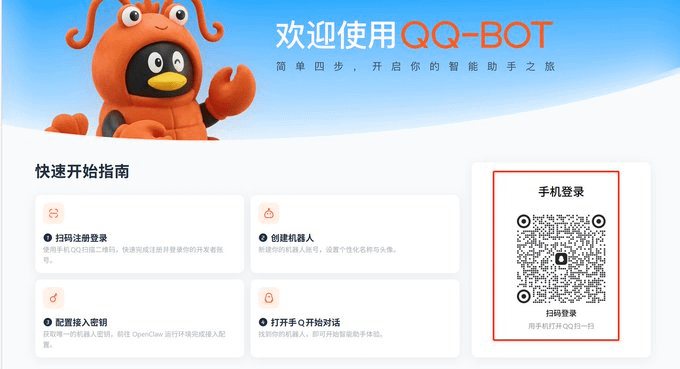
Step two: Create the robot
After successfully logging in, find the create robot button on the page and click it. Follow the prompts to complete the creation of the robot account, and you can set the robot's personalized name and avatar.
Note: After the robot is created, find the 'AppID' and 'AppSecret' parameters on the page, click the 'Copy' button on the right, and save them to your personal notes or memos (please keep them safe and do not disclose, pay attention to data security).

Step three: OpenClaw deployment execution
Open your Tencent Cloud OpenClaw (Tencent Cloud configuration openclaw tutorial, refer to the last article: https://x.com/aveai_info/status/2029038264204882120)
Follow the three command lines displayed on the QQ open platform page 'OpenClaw Native Access Process' to complete the corresponding operations in sequence, strictly follow the instructions.


Step four: QQ robot dialogue verification
Open QQ, find the robot account you just created, initiate a chat, and if you successfully receive a response from the robot, it means the link configuration between OpenClaw and QQ is all successful.
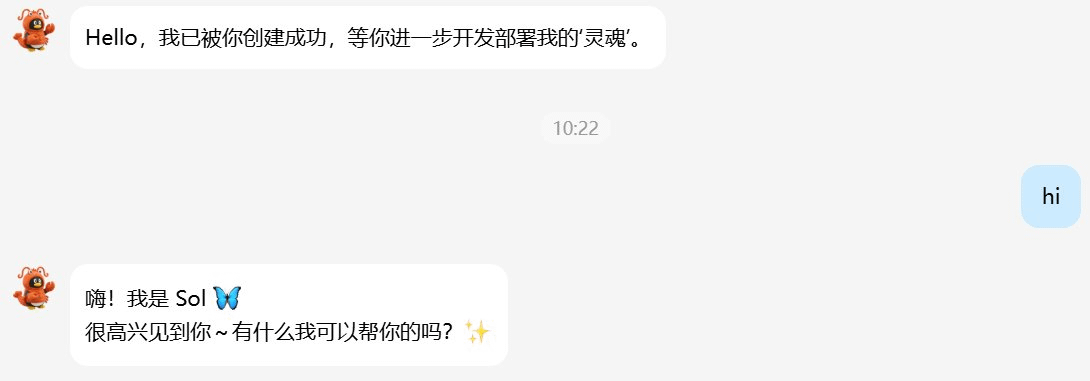
Step five: Connect to Avecloud Skill
Next, you can let your robot install the Avecloud Skill in the chat window. It is not only a chat robot but also your on-chain 'personal radar.'
Note: Register for an Ave Cloud account to obtain the API Key. For tutorials, refer to https://x.com/aveai_info/status/2029038264204882120, this will not be repeated here!

After connecting to Avecloud Skill, your robot will have the following 'superpowers':
✅ Full-dimensional data query: covering over 130 mainstream public chains, retrieving token information in real-time.
✅ Millisecond-level price tracking: connect to over 300 DEX depth data, grasp price changes in real-time.
✅ Accurate transaction statistics: analyze large on-chain transactions, pool liquidity, and buy/sell order distribution with one click.
✅ Intelligent analysis and decision-making: Say goodbye to cumbersome manual searches, complete initial screening and due diligence of tokens during the conversation.

🚀 Go experience it now! Connect to Avecloud Skill, let your QQ robot get moving, and create a 24-hour AI on-chain radar!