

The secure version of lobster is here! Rust reconstruction + full WASM sandbox, completely blocking those annoying vulnerabilities of OpenClaw, so you no longer have to fear losing your shrimp! Brothers, upgrade to IronClaw, the sense of security is off the charts!🦞💪
After playing OpenClaw for a long time, are you always worried: Will messing up the Skill get me caught? Will a broken Prompt leak my Key? If the channel gets hacked, will my wallet be emptied?
Now there is finally a hardcore solution——IronClaw! Officially rewritten from scratch in Rust, all tools run in a WASM sandbox, core vulnerabilities are completely blocked, and security has skyrocketed! No more worrying, shrimp farmers are overjoyed!
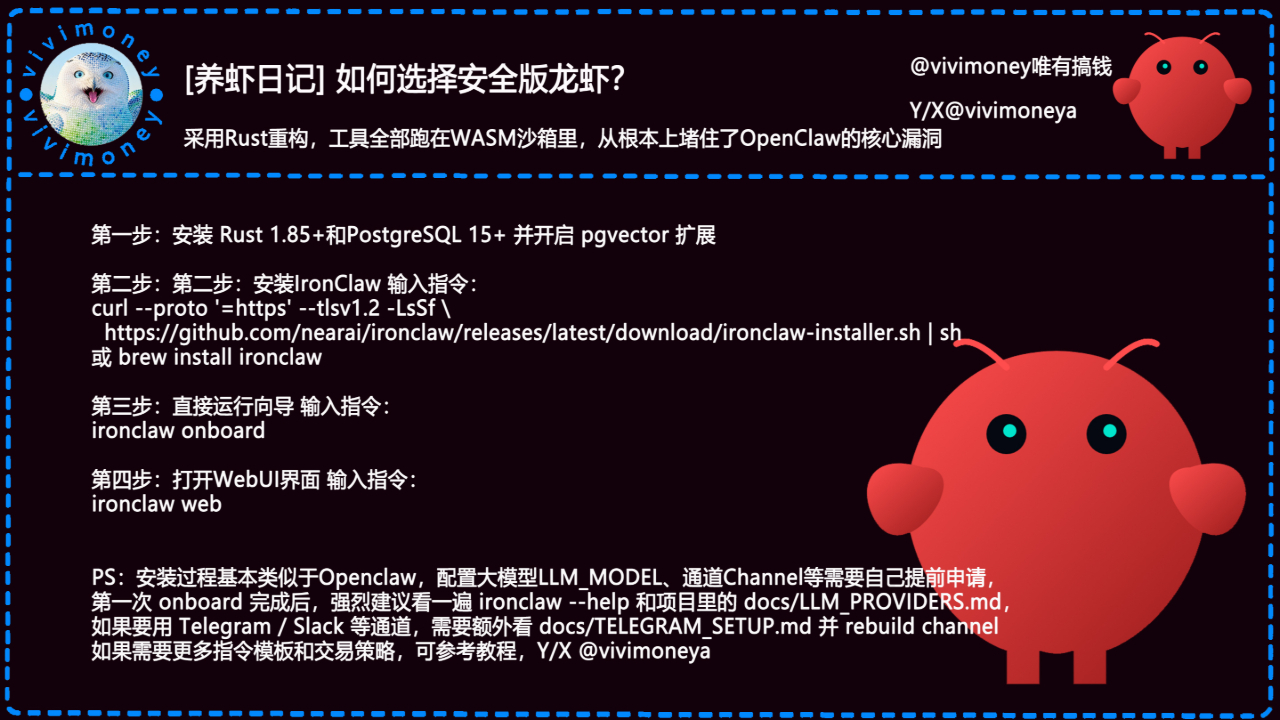
Super simple four steps to switch to the safe version of Lobster, let's go (basically the same as installing OpenClaw, but much more stable):
1️⃣ First, prepare the environment (Rust + PostgreSQL is a must)
Install Rust 1.85+ (just run rustup update stable)
Install PostgreSQL 15+, don't forget to enable the pgvector extension (a magical tool for vector search, super useful for storing memories/embeddings)
Supports Windows/Mac/Linux, you can use brew/apt/yum freely
2️⃣ Install the IronClaw core (choose one of two methods)
One-click script is the best:
curl --proto '=https' --tlsv1.2 -LsSf https://github.com/nearai/ironclaw/releases/latest/download/ironclaw-installer.sh | sh
Or for Mac users directly:
brew install ironclaw
After installation, input ironclaw --version to verify, if successful, it's a green light!
3️⃣ Run the wizard to initialize (the first time is the most critical)
Directly throw it out:
ironclaw onboard
It will ask you step by step: which LLM_MODEL to choose (Claude/GPT/Gemini/local is fine), what to use for Channel (Telegram/Slack/Discord/Web), where to fill in the API Key...
After filling everything out, it automatically helps you create the database, configure the tables, and test the channel, super foolproof!
4️⃣ Start the WebUI interface, relax and enjoy
ironclaw web
Open the browser and go to localhost:port (default is around 5173 or 8080), the web version interface appears in seconds! Prompt, Agent management, Skill installation, logs are all visualized, no more pure command line!
PS: You need to apply in advance for configuring large models and channels (same as OpenClaw).
After the first onboard, I strongly recommend:
Run ironclaw --help to see all commands
Check the project's docs/LLM_PROVIDERS.md (the list of supported models is super comprehensive)
If you want to use channels like Telegram/Slack, additionally check docs/TELEGRAM_SETUP.md, modify the configuration accordingly and then rebuild the channel
Rust + WASM sandbox is really great, after installation I tested it, no matter how the Skill runs around, it can't escape the sandbox, super safe!
I have migrated all the Lobster troops at home to IronClaw, and I feel completely at ease 😂
You all should quickly switch to the safe version~ Comment below: Are you continuing with the OpenClaw faction or directly moving to IronClaw? How does it feel after installing the first one? Whoever runs it successfully first is the safe Lobster King! vivimoney Lobster OpenClaw community application form (link in comments)
#LobsterDiary #IronClaw #SafeVersionLobster #RustReconstruction #WASM_Sandbox #OpenClawUpgrade #AIAgent #AI_LocalDeployment #ShenzhenOpenClaw #HongKongOpenClaw #AutomationTool