

What is the tipping private message feature?
Creators can enable the 【tipping private message】 setting and customize the tipping threshold amount. Once users tip above the threshold, they can unlock exclusive one-on-one private messages with that creator.
This feature not only provides creators with new income channels and private message management methods but also allows users to directly express recognition through tipping and start one-on-one communication with creators.
Feature highlights
Creator's perspective
New monetization entry, more direct creative income
After enabling the tipping private message, creators have an additional independent income channel apart from the original content tipping. Users can tip directly on the creator's homepage to show support.
Set a custom threshold amount, determine the interaction method yourself.
Creators can set the threshold amount in the private message settings. Content Q&A, market consultations, strategy exchanges - both the scenarios and pricing are determined by the creators themselves.
Automatic threshold screening, interaction quality is more controllable.
After setting a threshold, only users who meet the tipping criteria can initiate private messages. This helps creators filter out ineffective and duplicate messages, leaving time for selected users.
Reader perspective
Tips to the homepage, supporting to the creator themselves.
Users can tip directly on the creator's homepage. The tipping target is upgraded from individual content to the creator themselves, allowing you to express support for the creators you recognize at any time.
Lightweight knowledge payment, low threshold to gain insights.
With just one tip, you can apply for 1-on-1 in-depth communication with your favorite creators. Market analysis, knowledge advice, strategy ideas - get the most direct answers in the lightest way.
How to use the tips private message function?
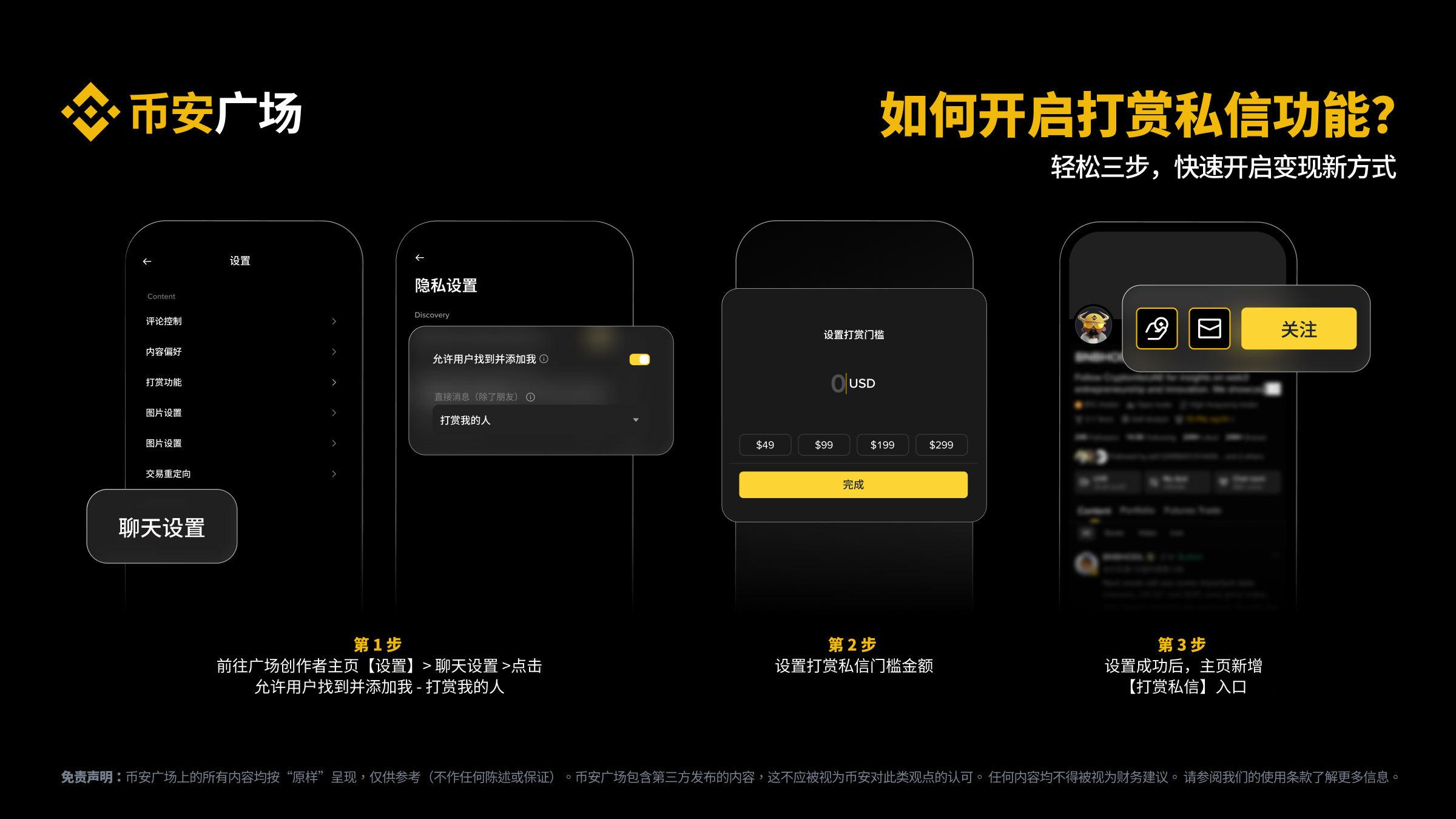
Creator: How to enable tips private messages.
Step 1: Go to the plaza creator's homepage 【Settings】> Chat Settings > Allow users to find and add me - those who tip me.
Step 2: Set the threshold amount for tips private messages, flexibly pricing according to the type of interaction and time cost you provide.
Step 3: After successful setup, 【Tips】 and 【Private Message】 entrances will be added to the homepage.
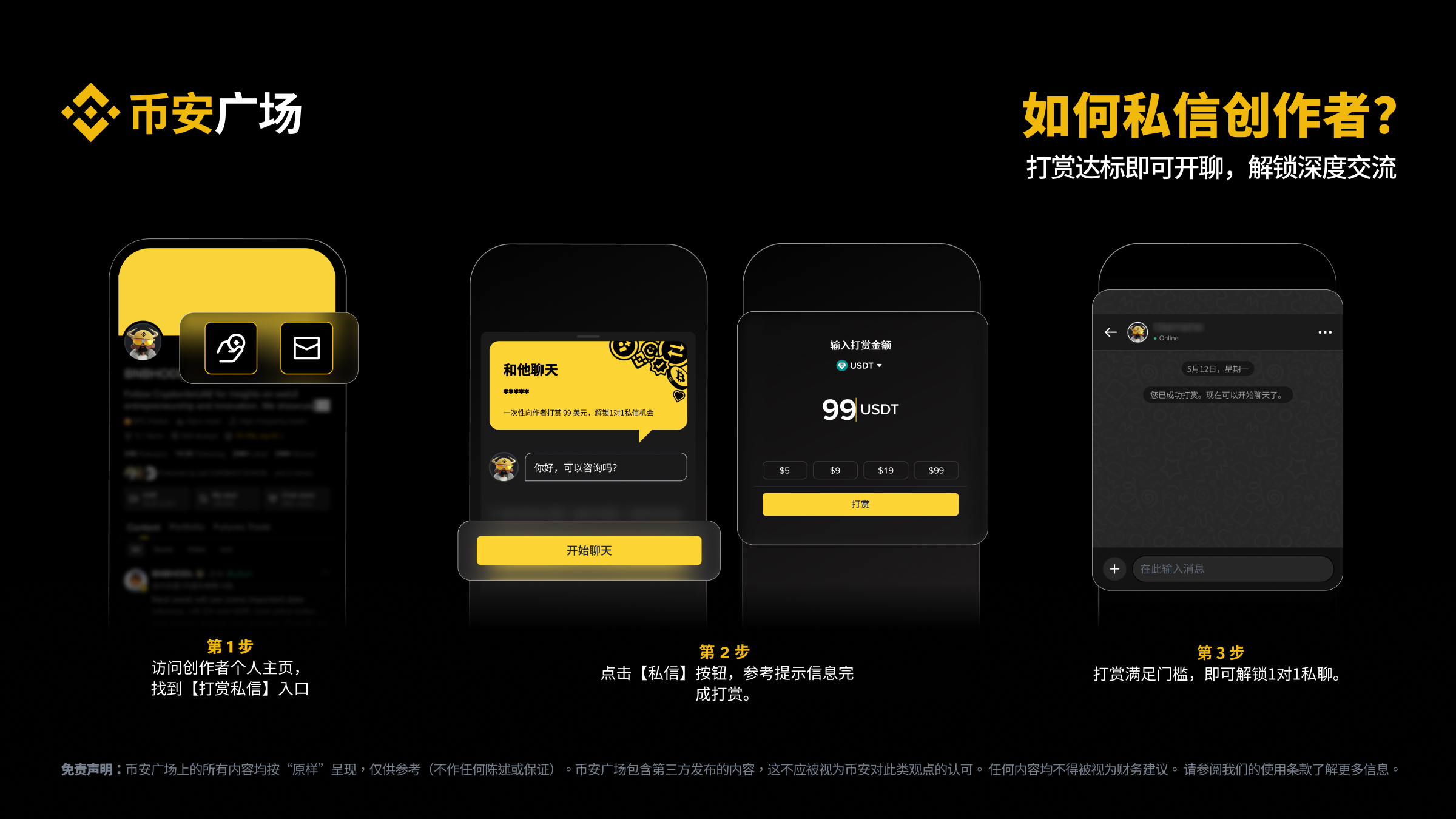
Reader: How to unlock private messages through tipping.
Step 1: Visit the creator's personal homepage and find the 【Tips Private Message】 entrance.
Step 2: Two methods
- Click 【Tips】 to support the creator, and after meeting the threshold amount, click 【Private Message】.
- Click 【Private Message】, and the system will prompt the tipping threshold amount set by the creator; you can tip as prompted.
Step 3: If the tip meets the threshold, you can unlock 1-on-1 private chat.
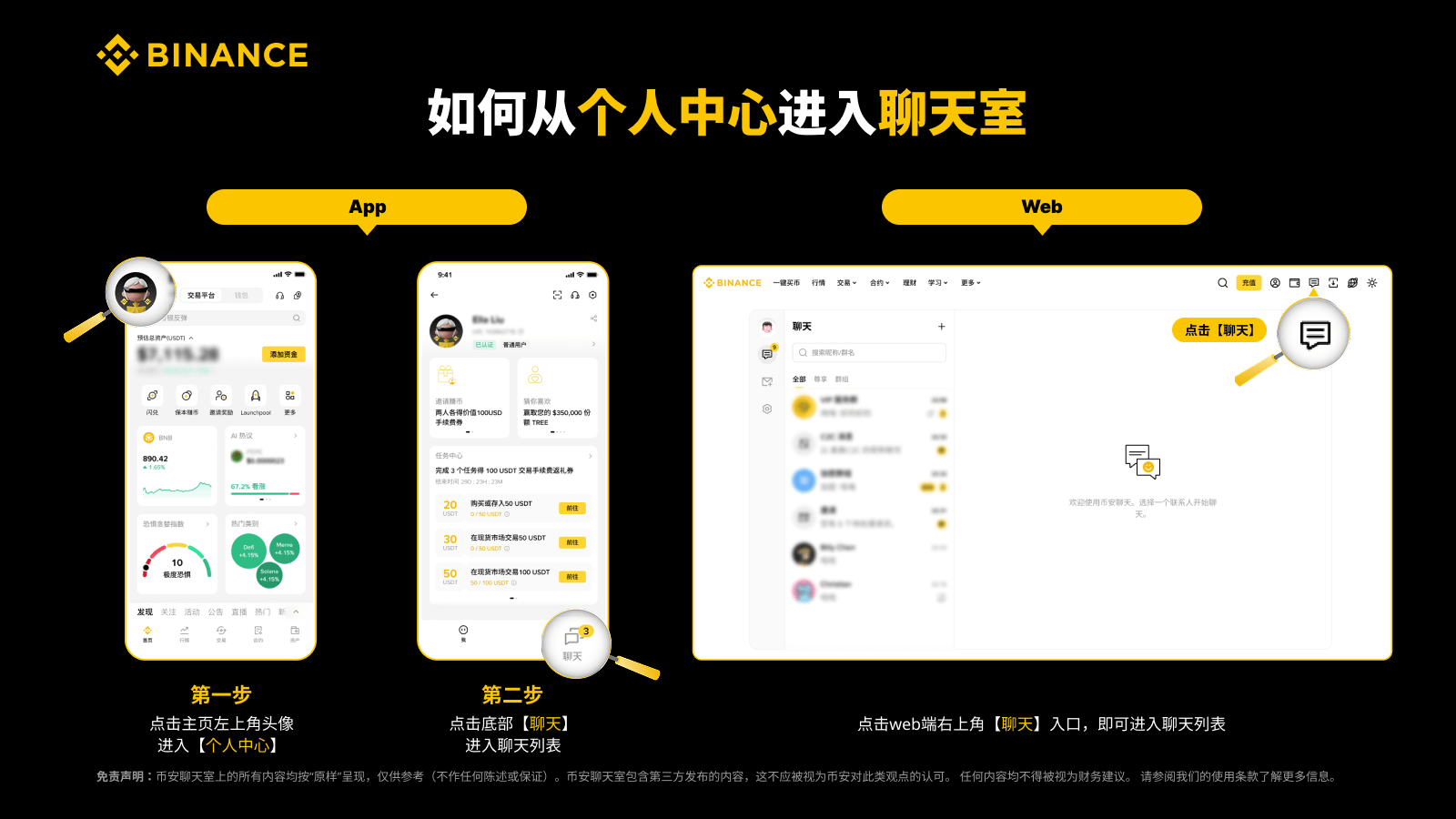
Quick private message entry: one-click direct access to the chat room.
Once the initial contact is established, you can quickly access the chat list through the following methods, making it convenient to check and initiate private messages at any time.
App version
Step 1: Click on the avatar in the upper left corner of the homepage to enter 【Personal Center】.
Step 2: Click on 【Chat】 at the bottom to enter the chat list, where you can view or initiate private messages.
Web version
Click the 【Chat】 entrance in the upper right corner of the web version to enter the chat list, view or initiate private messages.
Frequently Asked Questions (FAQ)
1. Is the tips private message function enabled by default?
No. Creators must actively go to their personal homepage > private chat settings to enable the 【tips private message】 function and set the threshold amount for it to take effect. Unactivated creator homepages will not display tipping and private message entrances.
*This feature may not be applicable in your region.
2. What is the minimum threshold amount that creators can set?
Minimum of 1 USD, priced in USD, creators can flexibly price according to their own situation.
3. Does the threshold amount need to be met in a single instance, or can it be accumulated through multiple instances?
A single tip must meet the threshold amount; multiple small tips do not count towards the threshold determination.
4. Does tipping support refunds?
Tips are considered final transactions and cannot be refunded. Please confirm that you really want to proceed before tipping.
5. What tokens are supported for tipping?
Supports various cryptocurrencies in the fund wallet, spot wallet, and financial wallet. You can manually select the wallet and currency when tipping.
6. After a creator modifies the tipping threshold amount, will the private message permissions of users who have met the criteria be affected?
No. The private message permissions of users who have met the criteria are not affected by subsequent adjustments to the threshold amount by the creator.
7. Will creators definitely reply after receiving tips?
The tips private message function provides users with a channel to send private messages to creators, but whether the creator replies is at their discretion. Creators have the right to block any user.
Please note: When using the tips private message function, please follow the existing chat room management guidelines of the plaza.
8. Will the tips private message function affect my account privacy?
No. The tips private message function follows the existing chat room management guidelines of the plaza, including blocking, reporting, and other mechanisms. Creators and users can manage their private message permissions and privacy settings as needed.
9. Where can I view the tipping records?
Both the payer and the payee can view the complete records through 【Wallet】>【Fund Wallet】>【History】>【Payment】>【Paid/Received】. Creators can also view the total amount of tips, tips for individual content, and detailed tips from individual readers in the tips section of the creator center.
10. What should I do if the tipping payment fails?
When the payment fails, the tokens will be automatically returned to the wallet. You can check the records in the payment history of the fund wallet, or try again later according to the system notification.