How to redeem a Token Coupon
Have you ever entered your Rewards Hub and found a coupon that says "Trade on Spot to get 5 USDT", but you don't know where to start? 😅
Don't worry! Here I explain step by step how to turn that task into real money for your wallet.
💡 1. Understand the concept: What is the "Volume Task"?
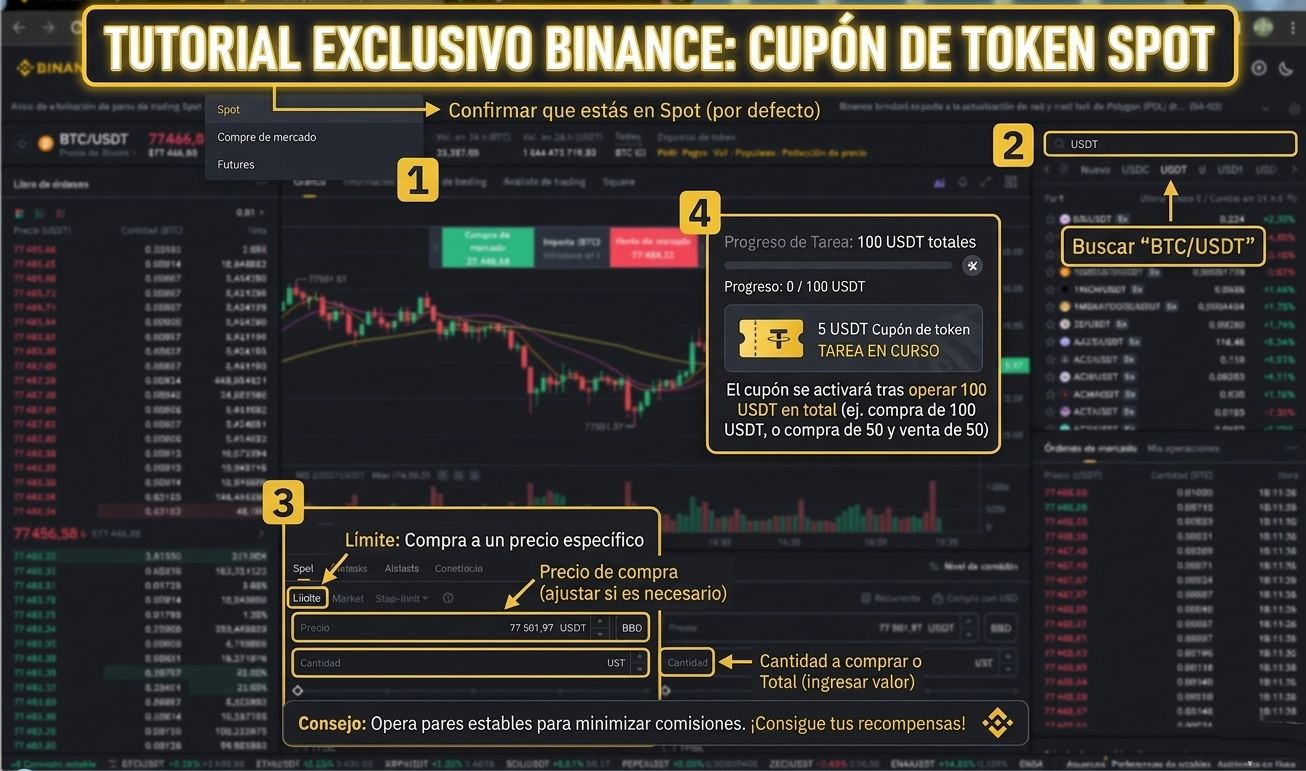
Binance asks you for a "Progress of 0/100 USDT". This does NOT mean that you have to spend 100 USDT. It means that the total of your transactions (purchases + sales) must add up to 100 USDT.
Example: If you buy 50 USDT of Bitcoin and then sell it, you have already met the 100 USDT volume. It's that easy!
🛠️ 2. The Step by Step in the Market (Trading Interface)
When you press the "Trade" button, you will reach the Trading screen. Don't be scared by the red and green numbers, focus on this:
Select the Pair: Search for BTC/USDT (it's the most stable for completing tasks).
Order Type: Choose "Market" if you want it to execute instantly, or "Limit" if you want to set a specific price.
The Amount: Slide the bar to the amount you wish to trade.
Confirm: Click the green "Buy BTC" button.
🎁 3. Claim your Prize!
Once the progress reaches 100%:
Return to the Rewards Hub.
The "Trade" button will change to "Click to receive."
Ready! The 5 USDT will go directly to your Funds or Spot Wallet.
🧐 Is it worth doing it?
Absolutely! The fees for trading 100 USDT on Binance are usually just a few cents (approximately 0.10 USDT). Spending 0.10 to receive 5.00 is a 5000% return. It's smart money. 🧠💰
Did this tutorial help you?
👇 Leave me a Like and Follow me so you don't miss any "Alpha" on how to make the most of Binance tools.
Step 1: Confirm that you are in the Spot market.
Step 2: Search for the BTC/USDT pair for the task.
Step 3: The explanation of how to place a Limit order.
Step 4: The final result: The coupon activated after reaching the volume.
The image contains the step-by-step.
#CryptoTips #TradingParaPrincipiantes #BinanceRewards