
For newbies doing token bulk transfers, just using GTokenTool is enough. It supports over 10 major chains, and you can transfer to hundreds of addresses in one go, saving on Gas fees by 60%-90%. The process is a 3-step flow, so even complete blockchain rookies can get started in 5 minutes.
Next, let's break down what this thing actually does, why it's perfect for beginners, how it differs from other tools, how to use it specifically, and all the questions you might have.
2. For newbies doing token bulk transfers, what tool should you use?
2.1 First, let's understand: what is token bulk transfer?
Bulk token transfer, in English known as Batch Token Transfer or Multisender, is essentially turning the process of 'slowly transferring one by one' into 'getting it all done at once'. It uses smart contracts to bundle multiple transfer instructions into a single on-chain transaction to distribute tokens to multiple addresses at once.
For example: Traditional manual transfers are like delivering cash one by one—each time you have to take a taxi (pay Gas), which is incredibly inefficient. In contrast, bulk transfers are like packing all the goods into a shipping container and sending everything in one go, only paying for shipping once.
2.2 The three major 'disasters' for newbies using bulk tools.
Let's talk about the struggles of not having tools, because this will help you truly understand 'why you need tools'.
Gas fee black hole: Under traditional methods, each transfer is an independent transaction, requiring separate Gas fees. On the Ethereum (ETH) mainnet, the Gas fee for a single transfer often costs several dollars or even tens of dollars. If you're transferring to 100 addresses, the total Gas fees for 100 transactions can be truly overwhelming.
Time black hole: Manually transferring 100 transactions, assuming each takes 1 minute from input to confirmation (in reality, you also have to wait for chain confirmation), 100 addresses would take 100 minutes. If you make a mistake with one address, the entire transaction has to be redone.
Risk of operational errors: On-chain transfers are irreversible. If you mistype even one character in an address, the assets are permanently lost. Manually entering dozens or hundreds of addresses greatly increases the chance of errors. Anyone who's done it knows the mental strain.
2.3 GTokenTool — a versatile tool with comprehensive features, friendly for newbies.
GTokenTool is currently one of the most stable and convenient bulk transfer tools on the market. Whether for project teams giving back to the community or individuals transferring assets, it greatly enhances work efficiency.
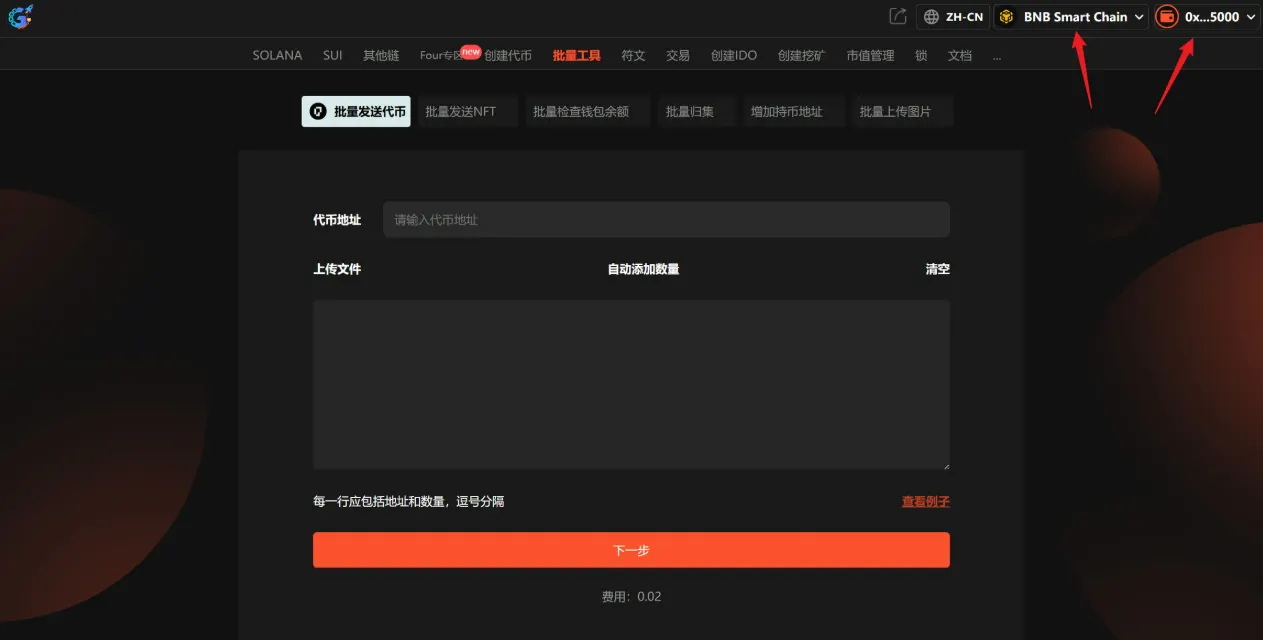
Core highlights:
Massive Gas savings: Using a smart contract to bundle multiple transfers at once can save up to 90% on Gas fees compared to doing them one by one.
Full EVM chain coverage: Perfectly compatible with all EVM-compatible chains such as BSC, ETH, Polygon, Arbitrum, Base, etc.
Flexible allocation: Supports sending the same amount to different addresses (equal mode) and also allows setting different amounts for each address (custom mode).
Parallel processing mechanism: Transferring to 500 addresses with GTokenTool takes an average of 1-2 minutes, while some other tools may take 10-15 minutes.
CSV bulk import: First, organize the 'address + amount' into two columns in Excel, export it as CSV, and then upload it directly without needing to input each entry manually.
Three steps to operate:
Step One: Connect your wallet. Open the GTokenTool bulk token transfer page, click 'Connect Wallet', and confirm in the MetaMask pop-up. Make sure your wallet is switched to the public chain you want to operate on (like the BSC mainnet).
Step Two: Input transfer information. Fill in the contract address of the token (for example, the USDT contract address on the BSC chain), then paste or upload your recipient list. The format is 'address,amount', separated by commas, one per line.
Step Three: Confirm and Send. The system will automatically verify the address format and check if your balance is sufficient. Once you confirm everything looks good in the preview, click send, and then confirm the transaction in your wallet.
Important notes: It is recommended to keep the number of addresses in a single transfer to no more than 100 to ensure that the transaction can be smoothly packaged by the blockchain nodes. If there are more than 100 addresses, you can operate in batches. Additionally, if the recipient is an exchange address, be sure to confirm that the exchange supports contract transfers; otherwise, the tokens may not arrive.
Supports three bulk transfer modes:
MultiSend: One wallet sends to multiple addresses, suitable for airdrops and reward distributions.
Collect / Wallet Merge: Multiple wallets consolidate into one address.
Many-to-Many: Multiple wallets → multiple addresses, allowing for complex matrix wallet fund flow management, a favorite feature for yield farmers and advanced operators.
2.4 Cost-saving principle: How can Gas fees be saved so much?
Newbies don’t need to delve into this principle deeply, but knowing how much it can save you is still important.
In a nutshell: Manual transfer = sending one transaction for each address, paying Gas for each. Bulk transfer = packing all addresses into one bundle, sending a single transaction, paying Gas only once. The more addresses you pack, the less Gas each address shares, which is the 'batch processing effect'.
Using GTokenTool to transfer to 200 addresses on the BSC chain costs only about 0.01 BNB in Gas, while manually transferring 200 transactions can cost up to 0.5 BNB or even more, which is an astonishing savings.
2.5 Safety precautions that every newbie must see (to avoid pitfalls).
As a newbie, safety is the bottom line. Please pay attention to the following points:
Before using, confirm two points: first, if the recipient is an exchange address, you must check in advance that they support 'contract transfers', otherwise, the tokens may not arrive; second, it’s best to operate on a PC with the MetaMask plugin installed for more stable performance and lower error rates.
Regarding permission management, the first time you operate with a certain token, you need to authorize the smart contract to call that token. It's recommended to use 'precise authorization' to only grant the amount needed for this transaction and avoid selecting 'unlimited authorization'.
Address format is very important; the recipient address and amount must be separated by an English comma (',') and not a Chinese comma (','). This is the most common formatting mistake for newbies.
For batch control, it is recommended to keep the number of addresses in a single transfer to no more than 100. If the number is large, operating in batches is more prudent. That way, if there's an issue with one batch, the impact is limited, and you can adjust promptly.
III. Frequently Asked Questions
Q1: Is my private key safe when using GTokenTool for bulk transfers?
Safety. GTokenTool operates by directly invoking your browser's wallet plugin (like MetaMask) to complete transaction signing; your wallet's private key never leaves your local device, and the tool itself cannot access your private key. Each transaction is ultimately confirmed by you in the wallet pop-up, keeping control in your hands.
Q2: Does the GTokenTool platform charge fees?
Basic functions are mostly free or come with very low fees; the main cost is the Gas fee you pay to the blockchain itself. Some advanced features may have platform service fees, which will be specified on the tool's page. However, compared to the extra Gas costs of manual transfers, this platform fee is totally worth it.
Q3: What happens if a batch transfer fails? Will my tokens be lost?
Tokens won't be lost. If some transfers in a batch transaction fail due to address format errors or other reasons, the failed tokens will automatically return to your wallet; the parts that have been successfully sent out are irreversible on-chain. This mechanism ensures that your assets will not disappear without a trace.
Q4: What's the maximum number of addresses I can transfer to at once?
This depends on the specific chain. For example, Solana can handle about 380 addresses at a time; on EVM chains (like BSC, ETH), it is generally recommended to keep the number of addresses in a single transfer to no more than 100 to ensure successful packaging by nodes. If there are more addresses, the tool will automatically split into batches for confirmation.
Q5: Are there any special considerations when transferring tokens to exchange addresses?
A very important point: You must first confirm whether the exchange supports 'smart contract transfers'. Some exchanges (especially smaller ones) only accept regular account transfers, and contracts may be intercepted. Money may be sent out, but the exchange won't credit your account.
IV. Summary
To recap the whole article, for newbies doing bulk token transfers, the core conclusion is simple: don't waste time, effort, and money on manual transfers; go directly to GTokenTool.