
Using GTokenTool for bulk token transfers, you can pack hundreds of addresses in one go. It merges multiple transfers into a single on-chain transaction via smart contracts, saving 60%–90% on Gas fees compared to sending each transfer individually. For example, on the BSC chain, airdropping tokens to 200 addresses traditionally requires 200 separate transactions, but with GTokenTool, you only need one package, costing around 0.005 BNB. Now, let me break down from scratch what this tool is, how to use it, and why it's worth your while.
1. Introduction: Why do Gas fees give headaches when doing Web3 airdrops?
If you're just getting into blockchain, you might be hit repeatedly by one term—Gas fees.
In simple terms, the Gas fee is the transaction fee you need to pay to the network when initiating a transaction on the blockchain. Whether it's transferring, exchanging tokens, or deploying contracts, each step incurs Gas fees. During the Ethereum bull market peak, the Gas fee for a single transfer once reached over $200.
Imagine this scenario: you've issued a community token and plan to airdrop some to the first batch of 500 early members. If you do it manually — open the wallet, paste the address, enter the amount, confirm, wait for on-chain confirmation… on average, it takes 2–3 minutes per operation, which means over a dozen hours of repetitive labor for 500 addresses. The more fatal issue is that each transfer incurs a separate Gas fee. At an average of 5 Gas on Ethereum, that’s 2,500 for 500 transactions, and if you mess up one address, the assets could be permanently lost.
This is why a 'bulk token transfer tool' has become almost a necessity in the Web3 world. Today, we're discussing GTokenTool, one of the most feature-rich and user-friendly bulk transfer platforms currently available.
II. What Exactly is GTokenTool?
2.1 One-Sentence Understanding of 'Bulk Transfer'
Bulk Token Transfer, known in English as Batch Token Transfer or Multisender, simply means turning 'transferring one by one' into 'doing it all at once'.
For example: Traditional manual transfers are like delivering cash individually to each address — you have to take a ride each time (paying Gas each time). Bulk transfers, on the other hand, are like loading all your goods into a single container and sending them all at once, paying for shipping just once.
2.2 Overview of Key Advantages
Super Fast and Efficient: Supports CSV file imports or manual pasting of addresses, completing transfers for hundreds or thousands of addresses with one click.
Massive Savings: By optimizing with smart contracts, merging multiple transfers into a single transaction can save up to 90% in Gas fees compared to processing each one individually.
Multi-Chain Coverage: Perfectly compatible with all EVM chains like ETH, BSC, Base, Arbitrum, Polygon, and Optimism, while also natively supporting non-EVM chains such as Solana, TON, TRON, Sui, and OKB, covering over 10 mainstream chains in total.
Flexible Distribution: Supports sending equal amounts of tokens to different addresses, while also allowing for varied transfer amounts for each address.
Secure Assurance: The core contract templates have passed multiple rounds of security audits by CertiK, Hacken, PeckShield, and the platform operates in a non-custodial model, ensuring no access to user private keys.
2.3 Which Chains and Assets are Supported?
GTokenTool supports a wide range of public chains:
EVM Compatible Chains: ETH (Ethereum), BSC (Binance Smart Chain), Base, Arbitrum, Polygon, Optimism, Avalanche, Fantom, etc.
Non-EVM Chains: Solana (supports SPL tokens and Token2022 protocol), TON, TRON (Tron), Sui, OKB chains, etc.
Asset Types: Fungible Tokens (ERC-20/BEP-20/SPL) + NFTs (ERC-721); also supports the latest Token2022 standard tokens on Solana.
2.4 Complete Bulk Transfer in Three Steps (Step-by-Step Guide)
If you're a newbie in Web3, don't worry! The entire process only takes three steps:
Step 1: Connect Wallet
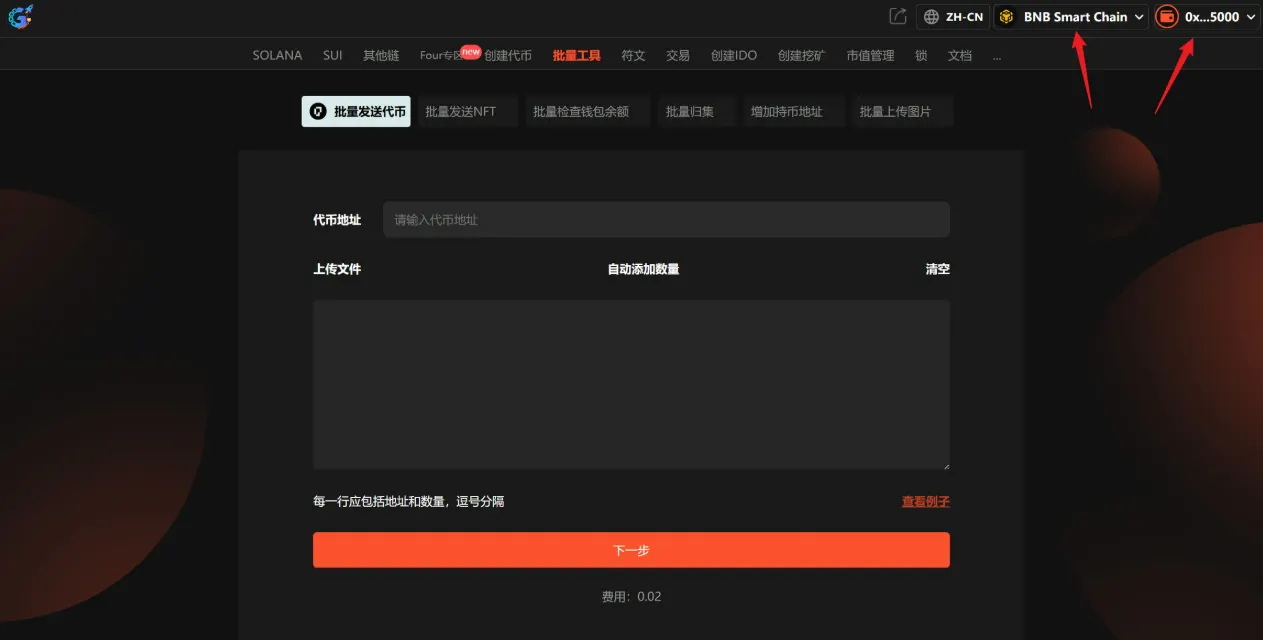
Visit the official GTokenTool website, navigate to the bulk token transfer page, and click on the 'Connect Wallet' button in the upper right corner. It's recommended to use the MetaMask (little fox) extension wallet on a PC for more stable operations. Once connected, ensure your wallet is switched to the public chain network you're operating on (for example, if you're transferring tokens on the BSC chain, switch MetaMask to the BSC mainnet), and the page will automatically recognize and display the current chain name and wallet address.
Step 2: Enter Transfer Information
This is the most critical step. You need to fill in the following details:
If there are many addresses, it's recommended to first organize the 'Address + Amount' columns in Excel, export it as a CSV, and then upload or paste directly; the system will automatically deduplicate and verify the address format.
Token Address: If transferring native coins (like BNB), simply select BNB or the corresponding option; if transferring a specific token, enter the smart contract address of that token.
Receiving Address and Amount: Format as 'address, amount', separated by a comma, one pair per line. For example:
text
0x13FC...2cD2,0.01
0x697F...B0B1,0.02
0xAb8d...1AA8,0.03
Step 3: Confirm and Send
Click 'Next', and the system will verify the address format and whether your wallet balance is sufficient. After confirming the preview list is correct, click 'Send', confirm the Gas fee payment in the pop-up wallet, and wait for on-chain confirmation. Once the transaction is complete, you can check the status on the page.
Important Notes: To ensure a smooth transfer, it is recommended not to exceed 100 addresses in a single transfer; additionally, if the receiving address is an exchange address, please confirm that the exchange supports contract transfers, or the funds may not arrive.
Step 3: Data Comparison: Traditional Individual Transfers vs GTokenTool Bulk Transfers
The following table visually showcases the huge gap between using GTokenTool and traditional manual transfers:
Comparison Dimensions Traditional Manual Transfers GTokenTool Bulk Transfers Operation Method Inputs address, amount, signature confirmation in sequence Bundles everything, imports via CSV file, one signature for multiple addresses Time Taken Approximately 100–300 minutes (2–5 hours) for 100 addresses About 1–2 minutes per transfer Gas Cost (using BSC as an example) Approximately 0.01–0.05 × 100 transactions One bundled transaction costs about 0.005 BNB ≈ 3–5 Gas Savings No savings; each transaction incurs independent fees Up to 60%–90% savings Risk of Address Input Errors Very high (manual entry of hundreds of addresses is prone to mistakes) Very low (CSV import + system auto-verification and deduplication) Security Relies on personal operation Non-custodial; does not touch private keys; contract audited by CertiK/Hacken/PeckShield Supported Chains Single wallet's chain 10+ public chains (EVM + Solana + TON, etc.) Maximum Address Limit per Transaction 1 Solana chain Up to 380 addresses with a single signature; only 3 signatures needed for 1000 addresses.
IV. Conclusion
The bulk transfer feature of GTokenTool addresses three key pain points: time cost (handle hundreds of addresses in minutes), Gas cost (save up to 90% in one bundled transaction), and security risk (non-custodial model + multiple audits + automatic verification and deduplication). Whether you're a project looking to airdrop to the community or an individual managing multiple wallets, this tool is definitely one to bookmark.
