
Introduction
In the crypto world, many newbies notice a strange phenomenon: some newly launched tokens suddenly experience a trading volume explosion, with prices skyrocketing as if they’ve become 'star tokens' overnight. Behind this often lies a key tool—the market cap management bot.
1. What exactly is a market cap management bot?
Core Definition
A market cap management bot is an automated program that uses algorithms to facilitate automated buying and selling, liquidity injection, and price stabilization, helping users optimize token liquidity and market performance. You can think of it as an 'automated trading steward'—in the past, to manipulate token prices, you had to manually monitor candlestick charts and switch between wallets repeatedly, which was inefficient and prone to error. The market cap bot can import dozens or even hundreds of wallets at once, executing trades automatically according to your preset strategies, all without human intervention.
The difference between it and manual trading.
Manual trading requires someone to constantly watch the screen, making manual orders only when they see price changes, which is not only inefficient and slow to react but also easily affected by emotions. The market cap management robot can achieve:
24/7 uninterrupted operation: The bot doesn’t need to sleep and can execute trading strategies at any time.
Millisecond response: Connect to the exchange via API or operate directly on-chain, responding almost instantly to price changes.
Multi-wallet bulk operations: Control dozens or even hundreds of wallet addresses at once, simulating the buying and selling behavior of real retail investors, avoiding a single address being recognized as 'whale activity' by the market.
Strictly execute preset strategies: Not influenced by fear and greed, completely executing according to the parameters you set.
Target Audience
The main users of the market cap management robot include:
Project Team: Needs to manage the market cap, liquidity, and trading depth of their own token.
Market Makers: Need to efficiently provide market-making services for multiple tokens.
Traders: Want to replace manual operations with automated tools to enhance trading efficiency.
Two, the working principle of the market cap management robot.
Taking GTokenTool as an example, the core workflow of the bot is:
Connect Wallet → Users connect to the platform via wallets like MetaMask or Phantom.
Select Token and Pool → Enter the token contract address to query the trading pool information for that token on the DEX.
Import Operation Wallet → Import or generate multiple wallet addresses in bulk; these wallets will work together to execute trades.
Choose mode and set parameters → Select one from the four modes: Pump, Dump, Volume Boost, High Sell Low Buy, and set buying amounts, time intervals, target prices, etc.
Start the bot → The bot automatically executes trades according to the parameters and displays logs in real-time.
Three, a detailed explanation of the four core modes of the GTokenTool market cap robot.
The GTokenTool market cap robot offers four automated trading modes, each corresponding to different market objectives:
Mode One: Pump Mode — Rapidly drive up the price.
Continuously buying tokens to drive up market prices, aiming to make the coin price rise rapidly in a short time to attract market attention and speculative funds. Users set a target price (must be above the current market price), choose the buying amount or quantity, and the trading time interval (default 8-15 seconds), and the bot will automatically buy tokens in batches through multiple wallets, continuously pushing up the price. It will stop automatically once the target price is reached.
Mode Two: Dump Mode — Quickly sell to depress the price.
By diversifying sell orders to depress prices, suitable for unloading or washing for accumulation. The smart algorithm will scatter sell orders, disguising them as natural fluctuations to avoid being identified as manipulation.
Mode Three: Volume Boost Mode — Creating active phenomena.
Quickly simulate buying and selling cycles without focusing on price changes; the goal is to increase trading volume. All trades are real on-chain operations, and data is 100% verifiable. This mode is especially important for newly launched tokens, as rankings and exposure on DEX are often directly tied to trading volume.
Mode Four: Grid Trading Mode — Stable arbitrage within a range.
Repeatedly buying low and selling high within a set price range to stabilize arbitrage, suitable for market making. Once the grid parameters are set, the bot can operate 24/7, capturing volatility for profit.
Four, GTokenTool market cap robot configuration tutorial.
Here is the complete configuration process, taking the BSC chain as an example.
Step One: Enter the platform and connect your wallet.
Open your browser (recommended Chrome + MetaMask extension), visit the GTokenTool market cap robot page. Click 'Connect Wallet' in the upper right corner and select MetaMask (the little fox wallet) to connect. After a successful connection, the page will prompt a one-time 'Unlock Fee' deduction.
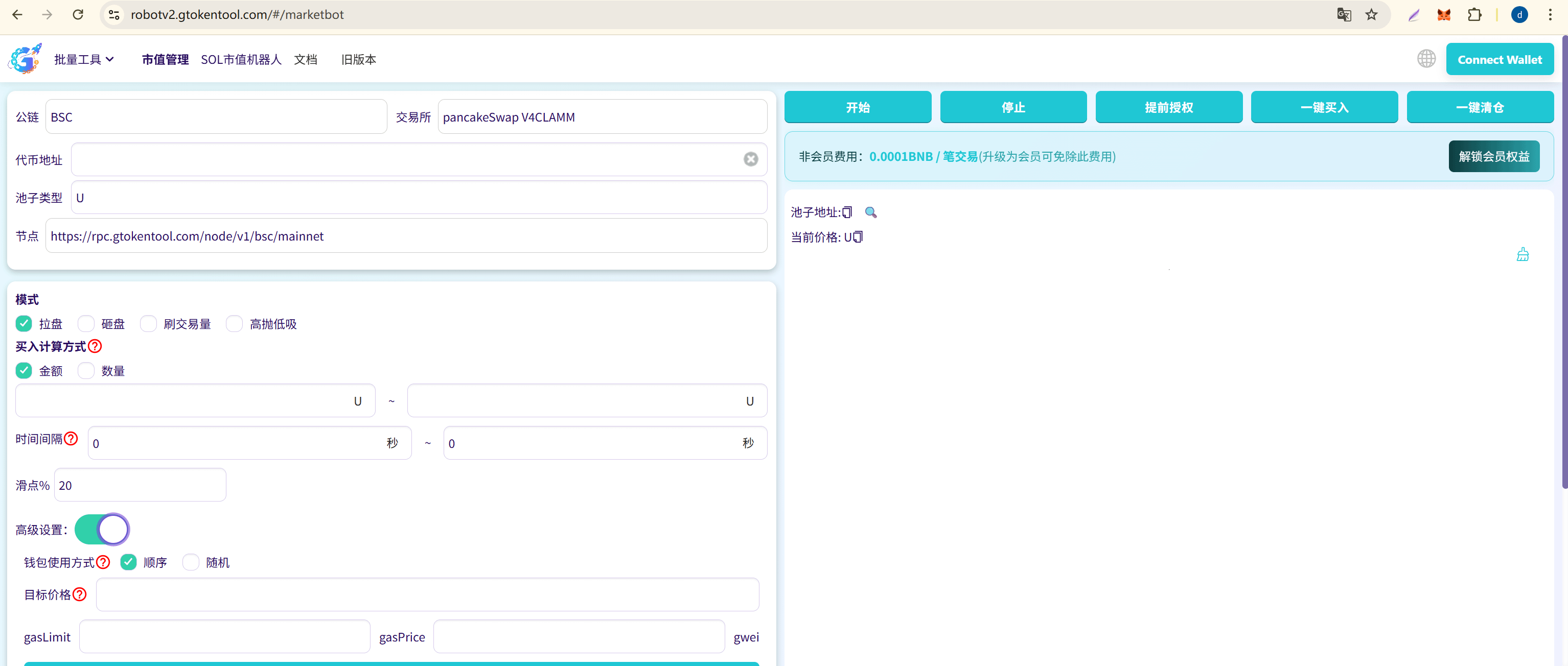
Step Two: Query and confirm the trading pool.
In the middle of the page, select an exchange (like PancakeSwap V3), input the contract address of the token you want to operate on. If it’s a V3 pool, you need to additionally select the Fee level (0.01%, 0.05%, 0.25%, 1%, etc.). Click the 'Check Pool' button, and the system will automatically read the pool information, including current price, liquidity, token symbol, etc. If it shows 'Pool information correct', you can continue.
Step Three: Import trading wallets (core for bulk operations).
The power of GTokenTool lies in its ability to import dozens or even hundreds of wallets at once. Click the 'Import Wallet' button at the bottom of the page and paste the wallet private keys line by line (one private key per line). It’s recommended not to exceed 100 at a time to avoid browser lag. After a successful import, the table will display the balance of each wallet.
If you don’t have that many wallets, you can click the 'Generate Wallet' feature to generate them in bulk for free. Note: After generation, be sure to click 'Export Private Key' immediately to download and save it; if lost, it cannot be recovered.
Step Four: Choose trading mode and set parameters (the most critical part).
This is the most critical step in the entire configuration process. Taking Pump Mode as an example:
Parameter description suggests setting modes. Choose one of the four modes and select 'Pump' for buying. Calculation method: Amount or Quantity, choose 'Amount' for buying amount, range for each purchase such as 0.01~0.05 BNB. Time interval: Seconds between each purchase, 8~15 seconds. Slippage: Acceptable maximum price deviation, 10%~99%. Target price: Automatically stop after reaching (optional), higher than the current price. Wallet usage: Sequential or random, random for a more natural effect.
Once set up, if you enable 'Wallet Trading Simultaneously', click 'Approve' first, then click 'One-Click Buy'.
Step Five: Monitor Operating Status
Once the bot is started, the page will display real-time trading logs, including the status of each trade, transaction price, Gas consumption, etc. You can pause, adjust parameters, or stop the bot at any time.
The entire process from connecting the wallet to starting the bot usually takes 5-10 minutes. No coding is required; it's completely 'dummy-proof' operation.
Five, Preparation Checklist for New Users
Before you start using it, make sure you have prepared the following:
✅ A browser with the MetaMask or Phantom wallet extension installed.
✅ The wallet has enough native tokens (like BNB, ETH, SOL) to pay for Gas fees.
✅ Confirm that the wallet network has switched to the target public chain.
✅ Prepare the contract address of the token to be operated on.
✅ It’s recommended to test with a small amount of funds first, and increase investment after familiarizing yourself with the operation.
✅ Before importing operation wallets, back up your wallet private keys in advance.
Frequently Asked Questions (FAQ)
Q1: I’m a complete newbie and have never done on-chain trading before. Can I use GTokenTool?
A: Yes. The biggest feature of GTokenTool is its zero-code operation and intuitive interface. All you need to do is: install the wallet extension → top up Gas fees → connect to the platform → input parameters → start. The entire process from connecting the wallet to starting the bot usually takes 5-10 minutes. However, it’s recommended for newbies to test with a very small amount (like 0.01 BNB) first to familiarize themselves with the entire process before using it normally.
Q2: What should I do if I don’t have that many wallet addresses?
A: GTokenTool has a built-in 'Generate Wallet' feature that allows you to generate new wallet addresses in bulk for free with one click. You can also manually create multiple MetaMask wallets and export their private keys for import. After generating, be sure to download and save the private key files immediately; the platform will not store them for you. For newbies, it’s recommended to start with 5-10 wallets for testing, and then expand once you're familiar.
Summary
The market cap management robot is a powerful automated trading tool that replaces manual labor with algorithms, achieving 24/7 uninterrupted quantitative trading. GTokenTool, as a representative platform, significantly lowers the barrier for cryptocurrency market cap management with advantages like zero-code operation, multi-chain support, and coverage of four core modes.
