
Introduction
If you're running a Web3 project and plan to distribute airdrop rewards to community users, you’ll likely face a nightmare scenario: opening your wallet, pasting hundreds or even thousands of recipient addresses one by one, repeatedly confirming the amounts, endlessly clicking 'send', and paying Gas fees for each transaction... The whole process can take hours, and if you make a single typo in an address, your assets could be permanently lost and unrecoverable.
This is why the 'token batch transfer tool' has become a standard in the Web3 world. And GTokenTool is currently the most beginner-friendly and easiest platform for batch transfers on the market — just connect your wallet, paste the address list, and click send. In three steps, you can complete an airdrop distribution to thousands of users, saving 60%–90% on Gas fees compared to individual transactions.
I. What exactly can GTokenTool do?
GTokenTool is a 'foolproof' multi-chain token bulk transfer tool, supporting over 10 mainstream blockchains like ETH, BSC, Base, Arbitrum, Solana, TON, and TRON. With one operation, you can package hundreds of addresses, merging multiple transfers into a single on-chain transaction via smart contracts, saving 60%–90% on Gas fees compared to per transfer.
It requires no programming knowledge, no scripts, and no complex development environment setup. As long as you can copy and paste and connect your MetaMask wallet, you can complete a token airdrop to hundreds of users in under 5 minutes.
II. What is Bulk Token Transfer?
2.1 The principle is actually quite simple
Bulk Token Transfer, also known as Batch Transfer or MultiSend, allows users to send the same token to multiple recipient addresses in a single transaction. Its core principle is to package multiple 'minting' instructions together and submit a single transaction request to the blockchain, with smart contracts executing all transfers uniformly.
This analogy makes it easy to understand:
Traditional manual transfers: It's like delivering cash, going to each place one by one—each time you leave, you need to take a ride (paying Gas each time), which is very inefficient.
Bulk transfers: It's like putting all goods into a single container and delivering them all at once, only paying for shipping once.
2.2 What transfer modes are supported?
In practice, GTokenTool supports three modes of bulk transfers:
MultiSend: Send to multiple addresses from one wallet, perfect for airdrops and reward distributions; this is the most commonly used method.
Collect / Wallet Merge: Consolidate multiple wallets into one address, suitable for asset aggregation.
Many-to-Many: Multiple wallets sending to multiple addresses, suitable for complex matrix wallet fund flow management.
III. Step-by-step tutorial: Complete an airdrop to tens of thousands of users in three steps
Taking the most commonly used BSC chain as an example, I'll guide you step-by-step to complete a token bulk transfer. No coding required.
Preparation Steps
Before you start, please ensure the following points:
Install a wallet: It's recommended to use the PC version of the MetaMask (Fox) plugin wallet for more stable operations.
Prepare Gas fees: Ensure your wallet has enough native tokens (like BNB/ETH/SOL) to cover Gas fees and transfer amounts.
Prepare an address list: Organize 'Recipient Addresses' and 'Transfer Amounts' in two columns in Excel, and save as CSV format.
Exchange Reminder: If the recipient is an exchange address, be sure to confirm that the exchange supports contract transfers in advance, or the tokens may not arrive.
Step One: Connect Wallet and Network
Visit the GTokenTool bulk transfer page.
Click the 'Connect Wallet' button in the top right corner, and confirm in the MetaMask popup.
Switch your wallet to the target blockchain for the transfer (like the BSC mainnet). The page will automatically detect and display the current 'Chain Name' and 'Wallet Address.'
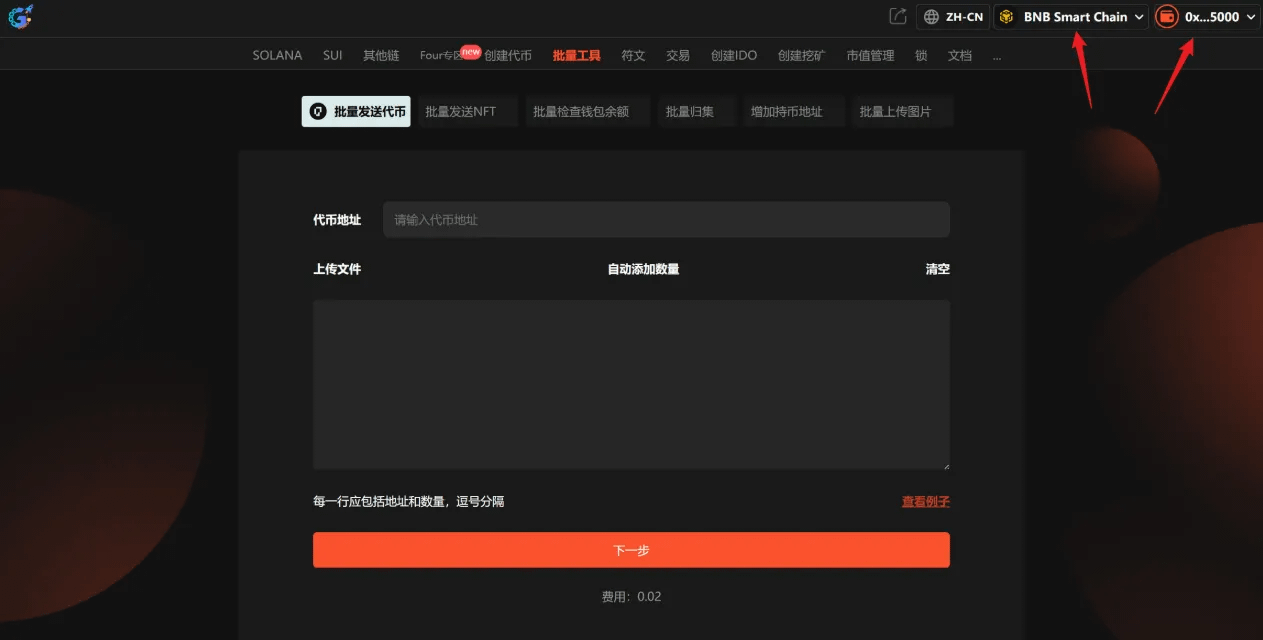
Step Two: Input transfer information
This is the most crucial step, and you need to fill in the following information:
Choose token:
If you want to transfer native coins (like BNB), just select BNB.
If you want to transfer a specific token, input that token's smart contract address, and the system will automatically recognize it.
Fill in the recipient list:
Format requirements: Recipient address, transfer amount (make sure to separate with English commas).
Example:
text
0x13FC…2cD2,0.01
0x697F…B0B1,0.02
0xAb8d…1AA8,0.03Pro Tip: If you have a lot of addresses (more than a few dozen), it's highly recommended to organize them in Excel with two columns (Column A for addresses, Column B for amounts), export it as a CSV file, and upload directly—no need to input each one manually.
Important Notes:
It's recommended to limit the number of addresses per transfer to no more than 100 to ensure the transaction is smoothly packed by blockchain nodes.
Recipient addresses and amounts must be separated by commas, with each group on a new line.
Step Three: Confirm and send
Click 'Next,' and the system will automatically verify the address format and balance sufficiency.
Check the total number of recipient addresses and the total amount of tokens to be sent in the preview screen, and confirm everything is correct.
Click 'Send,' and confirm the Gas fee payment in the MetaMask popup.
Wait for on-chain confirmation (usually completed within a few seconds to tens of seconds), and you can check the transfer status after the transaction is done.
At this point, a token airdrop aimed at hundreds of users is complete. If the number of addresses to send exceeds 100 (like 10,000 users), just split it into batches—10,000 addresses, 100 per batch, will take about 100 batches, with each batch taking around 1–2 minutes, totaling 2–3 hours, which saves you dozens of times the time compared to manual operations.
IV. Why is GTokenTool suitable for beginners? Three core advantages broken down.
Advantage 1: Extremely low Gas fees
GTokenTool packages multiple transfers into a single on-chain transaction using smart contracts, avoiding the waste of paying Gas fees for each transaction. For Ethereum, a single ERC-20 transfer typically requires 45,000–65,000 Gas, and during network congestion, fees can be as high as several dollars or even tens of dollars. If transferring to 100 addresses, Gas fees could reach hundreds of dollars. However, GTokenTool combines 100 transactions into 1, saving 60%–90% on Gas costs, reducing what would be hundreds of dollars to just a few dozen.
Advantage 2: Full multi-chain coverage
GTokenTool supports all mainstream EVM-compatible chains like ETH, BSC, Base, Arbitrum, Polygon, Optimism, and it natively supports non-EVM blockchains like Solana (including Token2022 protocol), TON, TRON, Sui, covering over 10 mainstream blockchains. No matter on which chain your project issues tokens, GTokenTool can almost always support it.
Advantage 3: Guaranteed security
For beginners, the biggest concern is usually about the security of funds. GTokenTool's security is guaranteed on two levels:
Non-custodial mode: GTokenTool works by directly calling your browser wallet plugin (like MetaMask) to complete transaction signing; your wallet's private key never leaves your local device, and the tool cannot access your private key. Each transaction is confirmed by you in the wallet popup.
Contract audit: The core contract template of GTokenTool has undergone multiple audits by internationally renowned security companies like CertiK, Hacken, and PeckShield, with security standards ranking among the best in the industry.
V. Summary
GTokenTool's bulk token transfer tool is currently the most user-friendly and lowest barrier airdrop distribution solution on the market. It simplifies what used to take hours and hundreds of manual operations, costing tens or even hundreds of dollars in Gas fees, into three simple steps: Connect Wallet → Paste Addresses → Confirm Send, saving 60%–90% on Gas fees.