
The GTokenTool Market Cap Bot was designed with the core idea of "no-code, one-click operation" in mind. You don’t need any programming background or complex script setups. Everything is done through a user-friendly browser interface: connect your wallet, choose your token, set your parameters, and click start—just four steps to get your bot trading automatically. Even if you don’t fully grasp what "blockchain" is, just follow the platform's operational guide step by step, and you can set up and run your first quantitative trading bot in under 15 minutes.
2. Introduction
Many newbies in crypto often wonder: why do some tokens see a surge in trading volume and price right after launch? Why do other projects seem to 'go viral overnight' while the coins I launch go unnoticed? Behind this, there often lies a key tool—a market cap management bot.
But when they hear the term 'bot', many complete beginners start to worry: Do I need to know how to code? Is the setup complicated? What if I mess something up and lose all the coins in my wallet?
Don't rush, this article is specifically written for you, who has zero coding background and zero tool experience. We'll take the GTokenTool market cap bot as an example, breaking down each step from connecting a wallet to starting it up, making everything crystal clear. By the end, you'll realize that the so-called 'market cap bot' is just a visual, one-click automation tool, as easy to operate as online shopping.
3. Main Text
3.1 What exactly is the GTokenTool market cap bot?
GTokenTool is an automated trading tool platform based on blockchain technology, specifically designed for automated quantitative trading of tokens on decentralized exchanges (DEX). Its core positioning can be summarized in one sentence: enabling ordinary people without programming skills to manage token market cap like professional market makers.
The platform supports multiple mainstream public chains including Solana, Ethereum, BSC (Binance Smart Chain), Arbitrum, Base, Polygon, and covers major DEXs like Uniswap, PancakeSwap, Raydium, etc. No matter which chain you launched your token on, you'll likely find corresponding support.
The bot offers four core trading modes:
Pump mode: Continuously buy to push up the price, used to create hype and attract attention.
Dump mode: Sell off to push down the price, used for offloading or shakeout to accumulate.
Volume sweep mode: Rapidly buy and sell to boost trading volume data.
Arbitrage mode: Repeatedly buy low and sell high within a set price range for stable profits.
These four modes each correspond to different market objectives, and beginners can flexibly combine them based on actual needs.
3.2 Zero Coding Requirement: The entire operation is fully visualized.
No coding required. The entire operational process is completed through a graphical interface on the web, with all parameters set via input boxes, dropdown menus, and buttons. You don’t need to understand smart contract logic, install any development environment, or even know what an API is.
A typical operational flow on the platform goes like this:
Open your browser and visit the GTokenTool market cap bot page.
Click 'Connect Wallet' in the upper right corner and choose MetaMask or Phantom wallet.
Input the token contract address, and the system will automatically query the trading pool information.
Select a trading mode (pump/dump/volume sweep/arbitrage), and fill in parameters like buy amount, time interval, target price, etc.
Click 'One-Click Start', and the bot will automatically execute trades.
The whole process from connecting your wallet to starting the bot usually takes about 5 to 10 minutes. For users with some blockchain knowledge, it's almost 'foolproof'; even complete beginners can follow the platform's guidance step by step without any pressure.
3.3 How easy is the configuration? A step-by-step guide in one article.
To give you a clearer sense of the operational difficulty, let’s break down the complete process in the simplest terms:
Step one: Preparation
You need to prepare a few things:
A browser (Chrome recommended) + MetaMask or Phantom wallet extension
Make sure you have enough Gas fees in your wallet (for on-chain transaction fees).
And the tokens you want to trade along with a small amount of base tokens (like BNB, ETH, SOL, etc.).
Step two: Connect wallet and query pool.
Open the GTokenTool market cap bot page and click 'Connect Wallet'. Make sure the network switch is correct (for example, if you're trading a token on the BSC chain, ensure your wallet is switched to the BSC mainnet).
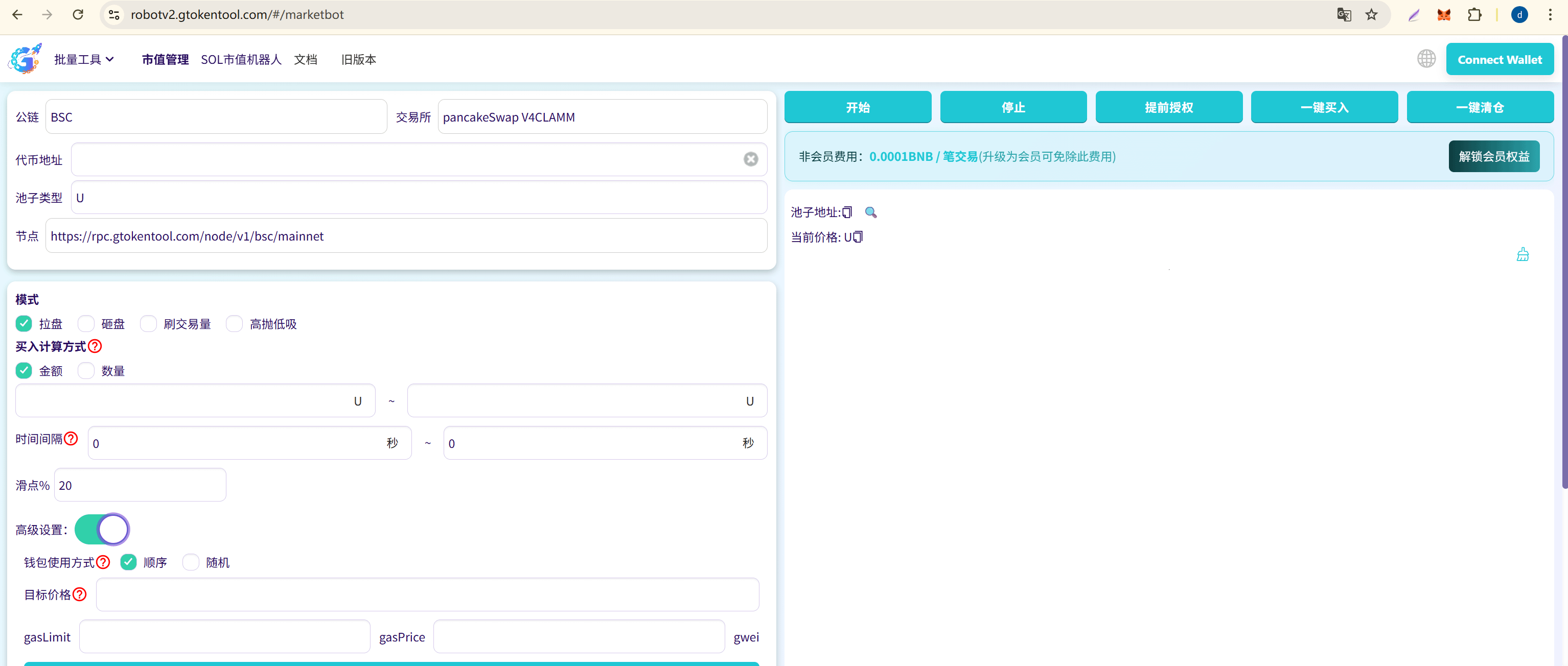
Then input the token contract address on the page, choose an exchange (like PancakeSwap V3), and click 'Check Pool'. The system will automatically read the pool information, including current price, liquidity, and token symbol. If it displays 'Pool information is correct', you can proceed; if there's an error, it's usually due to an incorrect address or the token not having a liquidity pool created yet.
Step three: Import trading wallet.
This is the core of bulk operations. Click 'Import Wallet' on the page and paste your wallet's private key line by line. You can also use the platform's built-in 'Generate Wallet' feature for free bulk generation, but remember to export and securely save your private key immediately.
Step four: Choose a mode and set parameters.
Choose one of the four modes. Taking the most commonly used pump mode as an example, you'll need to set:
Buy amount: How much to spend on each buy (can be set to a fixed value or random range, e.g., 0.01–0.05 BNB).
Time interval: Seconds between each buy, defaulting to 8–15 seconds.
Slippage: Recommended at 10%–99%, depending on liquidity conditions.
Target price: The price at which the bot automatically stops (optional).
If you don't want to dive into the specifics of these parameters, you can directly use the default settings to get started. Start with a smaller amount for testing, and then gradually adjust as you get comfortable.
Step five: Start and monitor.
Click the 'One-Click Buy' or 'Start' button, and the bot will start running automatically. The trading log at the bottom of the page shows real-time updates on each trade, including status, amount, and time, ensuring high transparency. If something goes wrong, you can pause or adjust parameters anytime.
3.4 One-Click Order Function: Market Cap Monitoring Done in 30 Seconds
To further lower the operational threshold, GTokenTool has also introduced the 'One-Click Configuration Order Bot' feature. Users just need to find 'Advanced Settings' on the market cap bot page, click the 'One-Click Configuration Order Bot' button, choose the token/address to monitor, save the configuration, and you will receive precise buy push notifications in real-time.
This feature also includes intelligent filtering: the system will automatically identify and block reports from your own market-making addresses, only pushing notifications for buy trades from real users, helping you extract genuinely valuable information from the 'information overload'. The entire process requires no programming background and is completed in one click.
4. Conclusion
The core competitiveness of the GTokenTool market cap bot lies in its graphical interface that simplifies complex on-chain quantitative trading into a straightforward 'select mode, fill parameters, click start' process. No coding, no deployment, no server needed, and even terms like 'slippage' and 'Gas Limit' can use default values while you learn on the go.