
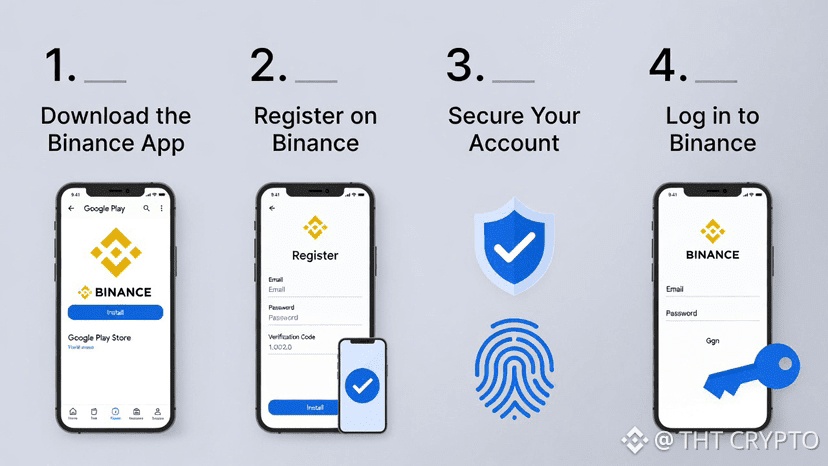
The Binance mobile app is one of the most powerful tools for buying, selling, and managing cryptocurrencies — all from your phone! Whether you’re new to crypto or just switching to mobile trading, this guide will walk you through everything you need to get started safely and easily.
Why Use the Binance App?
• Trade anytime, anywhere (spot, futures, earn rewards, and more)
• Super secure with built-in protections
• Beginner-friendly “Lite” mode + advanced “Pro” mode
• Supports hundreds of cryptocurrencies and many local payment methods
Step 1: Download the Official Binance App
1. Open your phone’s app store:
• iPhone → App Store
• Android → Google Play Store
2. Search for “Binance: Buy Bitcoin & Crypto” (developed by Binance — make sure it’s the official one with millions of downloads).
3. Tap Install / Get and wait for it to download.
→ Avoid third-party APK sites to stay safe!
Step 2: Register a New Account
Once installed, open the app. You’ll see a clean welcome screen.
1. Tap Register (usually at the bottom or center).
2. Choose your sign-up method:
• Email address (recommended for most people)
• Phone number
• Or quick login with Apple/Google (if available in your region)
3. Enter your email/phone and create a strong password (mix letters, numbers, and symbols — at least 8 characters).
4. Agree to the terms and tap Create Account.
5. Check your email/SMS for a verification code → enter it to confirm.
Congratulations — you now have a Binance account!
Step 3: Complete Basic Security Setup (Very Important!)
Right after registration, the app will guide you to secure your account. Don’t skip this!
1. Enable 2-Factor Authentication (2FA) — the #1 way to protect your funds:
• Go to Profile (bottom right) → Security
• Tap Google Authenticator (recommended) or SMS
• Download Google Authenticator app if you don’t have it
• Scan the QR code shown → enter the 6-digit code that appears
• Save your backup key in a safe place (write it down offline!)
2. Turn on Biometric Login (Face ID or Fingerprint):
• In Security settings → enable Biometric authentication
• Now you can log in super fast without typing your password every time!
Step 4: Quick First Login & App Tour
• Close and reopen the app
• Log in using your email/phone + password (or biometrics)
• You’ll land on the homepage with market prices, quick actions, and menu at the bottom:
• Markets → see prices
• Trades → buy/sell
• Earn → staking & rewards
• Wallet → your balances
• Profile → settings & security
💡Pro tip: If it feels overwhelming, look for the Lite mode toggle (usually in settings or profile). It simplifies everything for beginners!
Ready to start your crypto journey? Download the app safely today and follow these steps. Questions? Drop them in the comments — happy trading!
