

Let’s get straight to the point
This week, oh-my-coder completed its most intense iteration ever, transitioning from a command line tool to a desktop app, evolving from a single function to a full-fledged Agent collaboration system. We basically polished the entire project.
If you checked out this project last week, coming back this week will show you it’s a whole new game.
What went down this week
🖥️ The desktop version is officially live
This is the biggest update of the week.
oh-my-coder now has a legit desktop app; you no longer need to stare at that black command line window, but can execute all your trades on a clean interface:
Left sidebar: historical sessions are clear at a glance, switch anytime.
Right settings panel: each model has a separate API Key configuration, no more confusion.
Cmd+K for quick invocation: call up the command panel anytime without interrupting your workflow.
Markdown real-time rendering: AI responses are displayed as formatted text, no longer a bunch of symbols.
Diff view: clear comparison of code changes before and after, you can see at a glance what has changed.
The design philosophy of the desktop version is: terminal efficiency, desktop experience; we don’t want to create a bloated IDE, but a lightweight shell that allows command line users to enjoy the convenience of a graphical interface.
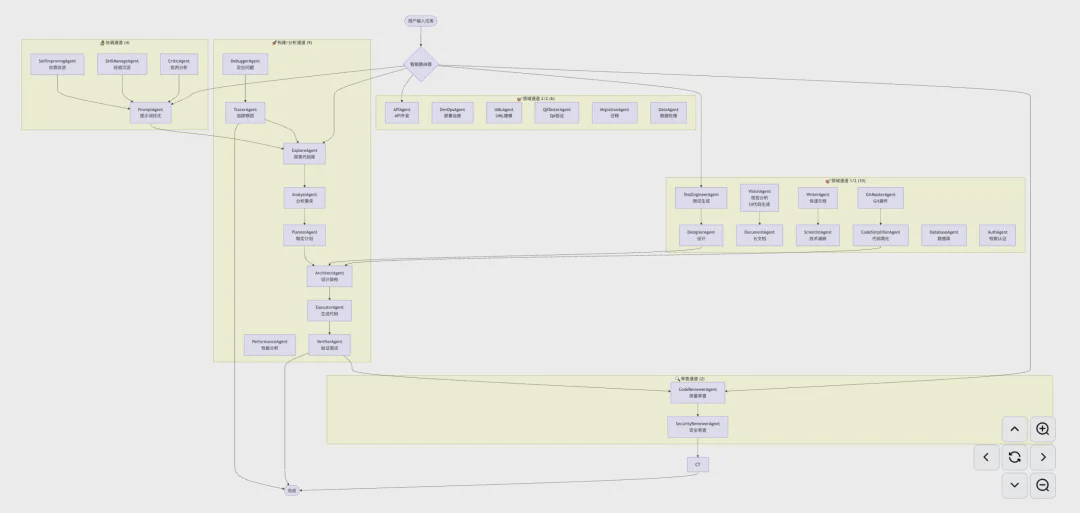
🤖 How do 31 Agents coordinate their work?
This is the question users ask the most, and today we’ll answer it seriously.
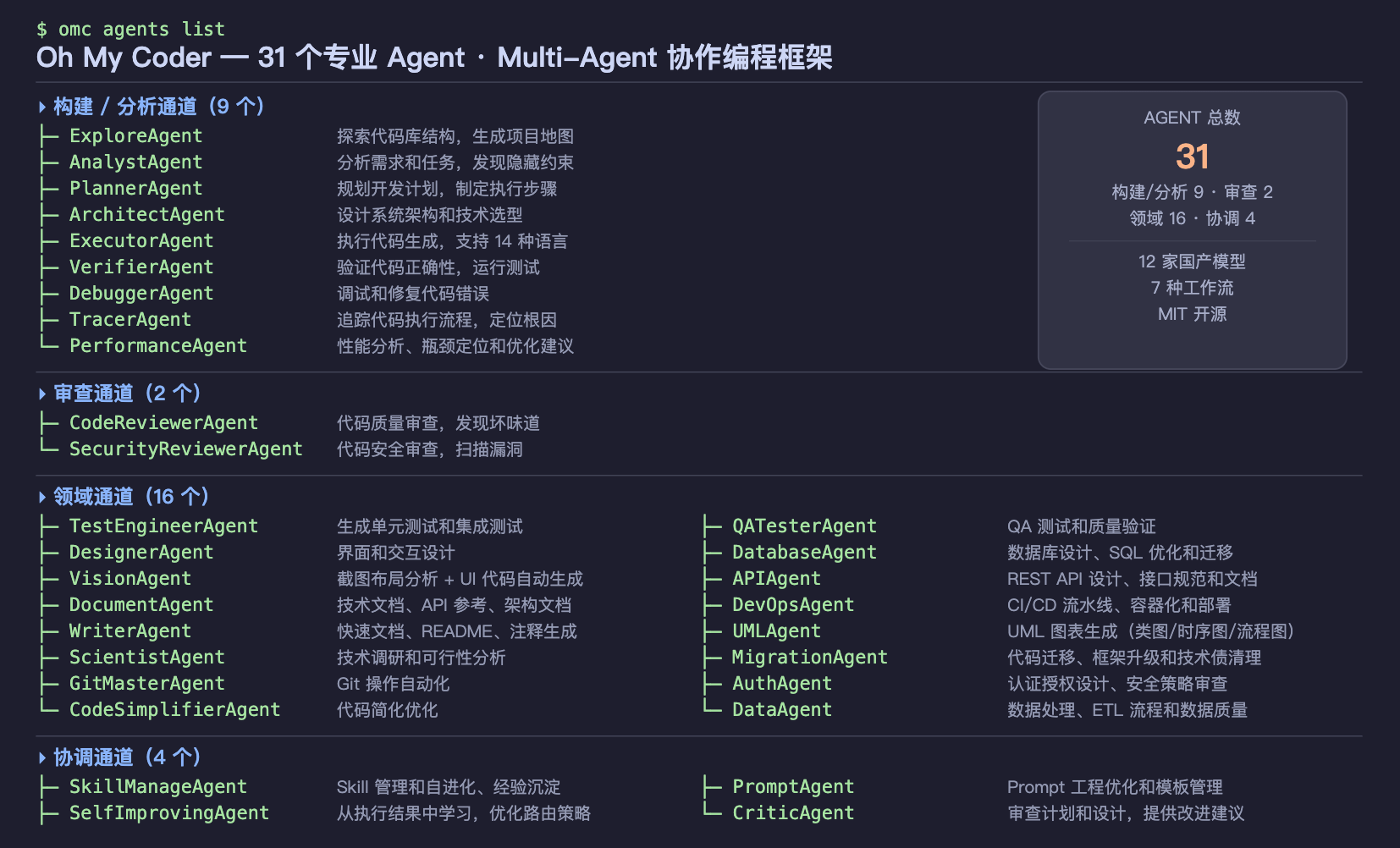
Many people may wonder about the '31 Agents': with so many Agents, how do they divide the work? Will they fight with each other? Will they run amok?
Simply put: they are a specialized team, not a bunch of scattered soldiers.
Every time you issue a task, oh-my-coder won't deploy all 31 Agents; it automatically selects the most suitable Agent combination based on the task type, for example:
Write code → Invoke code generation Agent + code review Agent
Fix bugs → Invoke debugging Agent + testing Agent
Write documentation → Invoke documentation Agent + format checking Agent
These Agents work in parallel and then cross-validate results; if two Agents reach inconsistent conclusions, the system will automatically flag it for you to decide which one to follow.
Why cross-validation?
Because a single AI can make mistakes, can 'hallucinate,' and confidently provide wrong answers, but the probability of two independent Agents making the same mistake simultaneously is far less than that of one; this is a conclusion we’ve drawn from engineering practice, not a gimmick.
In addition, each Agent has a health check mechanism; if an Agent does not respond within 60 seconds, the system will automatically reassign its task to other Agents, so the entire process won’t freeze.
💰 How we view Token consumption issues.
This is also the most common concern among users: does multi-Agent collaboration consume too many Tokens?
To be honest: yes, more than a single Agent.
But we've done a few things to control this issue:
First, to let you see where your money is spent.
After each task completion, oh-my-coder generates an execution tracking report, showing you how many Tokens each Agent used, which step was the most expensive, so you won't feel like 'I don’t know where my money went.'
Second, only production-level models are enabled by default.
This week we added a model filtering feature; by default, oh-my-coder only displays and uses verified production-level models, hiding those experimental models still in testing, thus avoiding using expensive models for simple tasks and preventing unstable models from ruining important work.
Third, GLM-4.7-Flash is completely free.
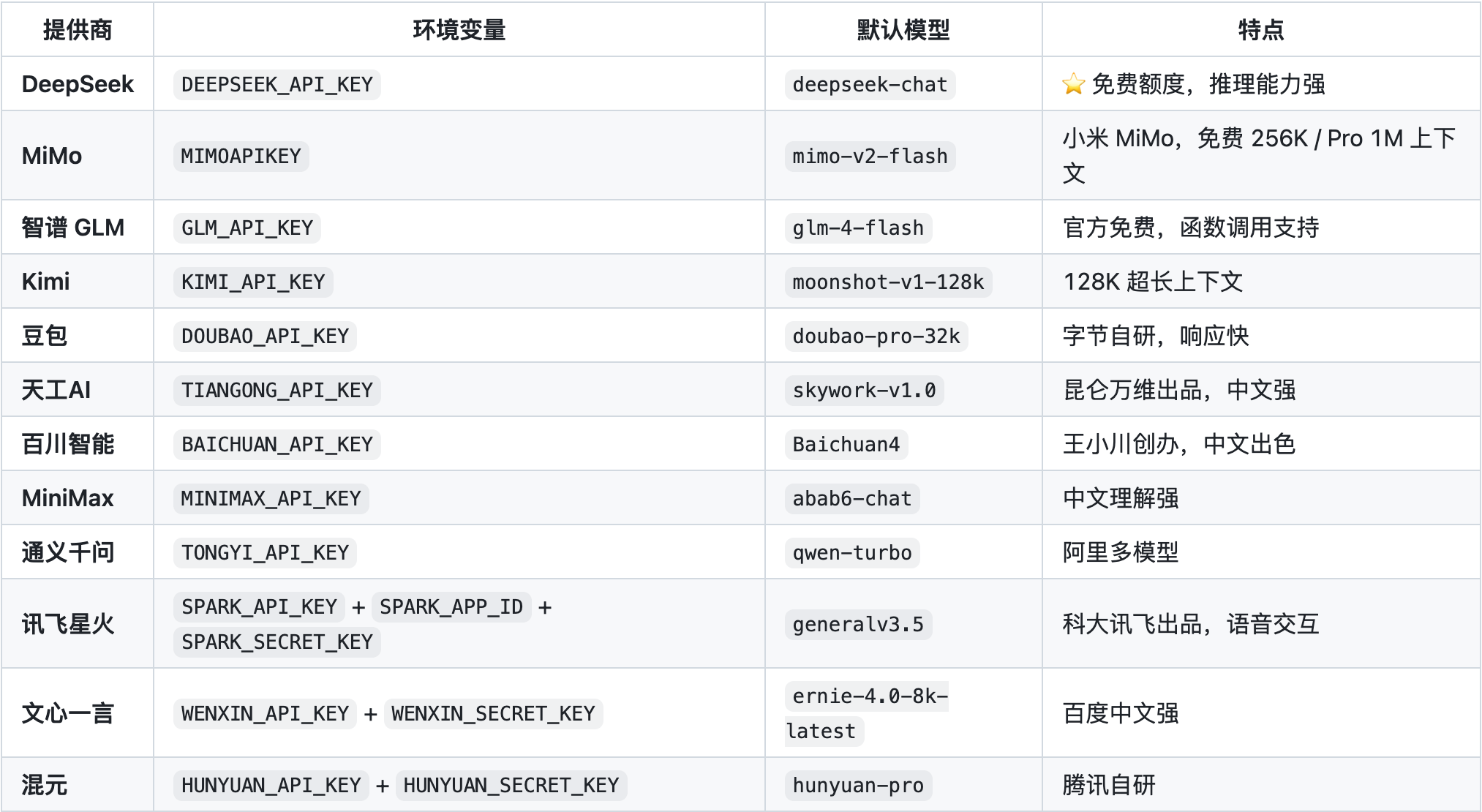
If you just want to test the waters without spending a dime, go straight to GLM-4.7-Flash; it's a free model from Zhiyu AI, capable enough to handle most daily programming tasks, and we've set it as the default recommendation - three steps to configure, zero cost to start.
🚀 Beginner's guide: three steps to get started.
This week we've added an interactive quick start guide.
Previously, new users had to read the documentation, find configurations, and guess commands when using oh-my-coder for the first time; now it's different:
Run omc quickstart
The system guides you to choose a model (with recommendations, no need to research yourself)
Paste the API Key, and you're done.
The entire process takes no more than 3 minutes and doesn't require reading any documentation.
🔒 Security hardening
This week, we also did something less noticeable but very important: security hardening.
Fixed a logical flaw in API Key configuration (Issue #7, thanks to user shiflymoon for the feedback).
Added protection rules to the main branch of GitHub to prevent accidental code overwrites.
All error messages no longer expose sensitive system details.
What makes us different from competitors?
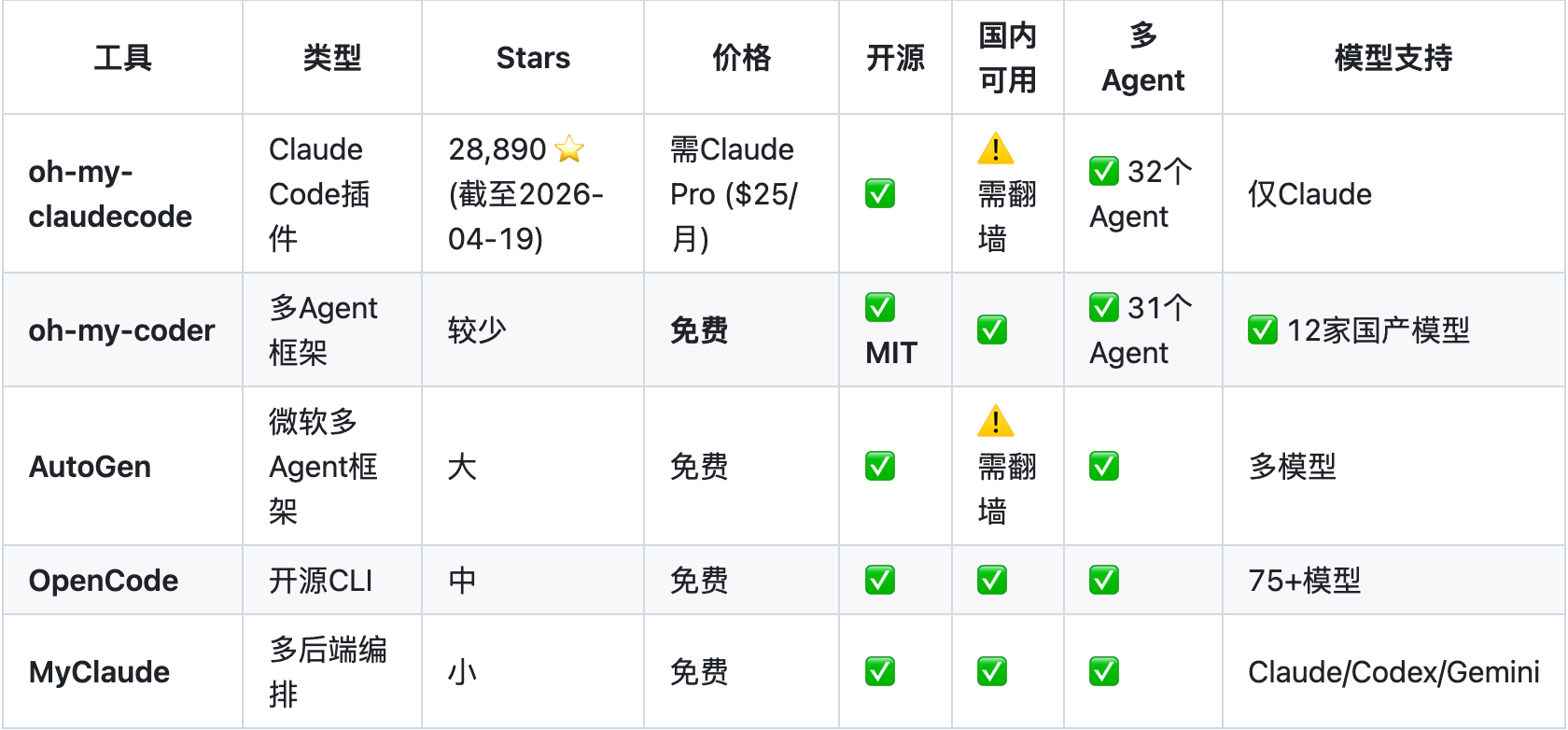
There are quite a few similar tools on the market, the most famous being OpenCode (146K stars) and Claude Code.
OpenCode supports over 75 models and has an advanced architecture, but it's designed for global users and is not user-friendly for domestic users - many models require a VPN, it's complex to configure, and there's no optimization for domestic models.
Claude Code is officially produced by Anthropic, providing a great experience, but it only supports Claude series models, and recently, Anthropic's account suspension issues for Chinese users have led many to seek alternatives.
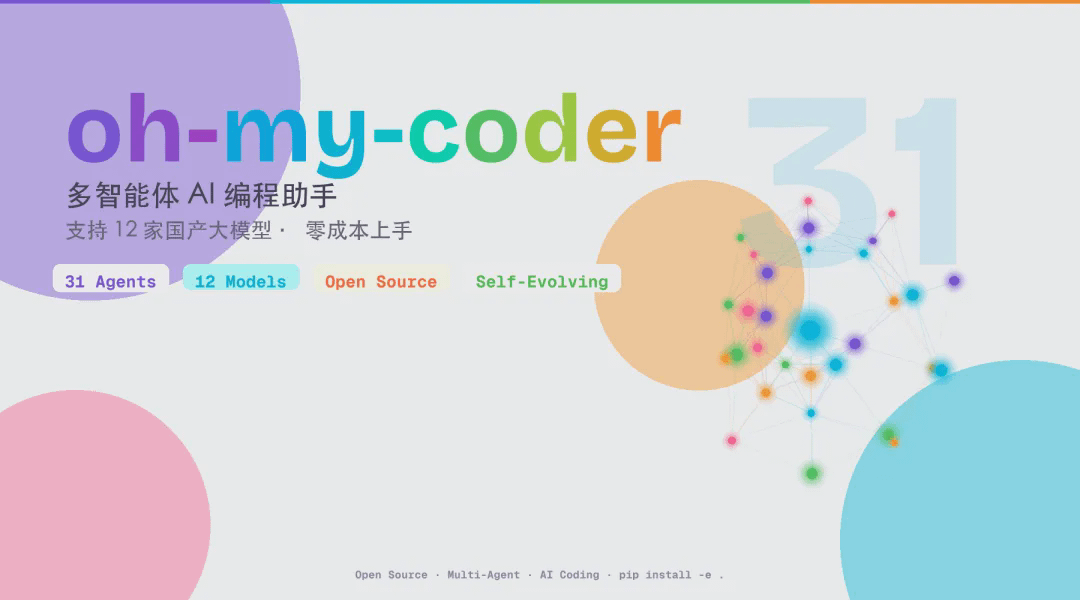
oh-my-coder's positioning: a multi-Agent programming assistant built specifically for domestic developers.
12 domestic large models, all directly connected, no proxies needed.
31 professional Agents cover the complete development process from requirement analysis to code review.
Completely open source, MIT license, the code is in your hands, not relying on any cloud services.
Self-evolution system: after each task, the system writes experience into memory, making future similar tasks more accurate.
Self-evolution: this feature deserves a separate mention.
oh-my-coder has a feature that many people overlook: it learns.
After each task completion, the system automatically summarizes the task experience - what methods were used, what pitfalls were encountered, which Agent performed best - then writes it into a layered memory system.
Next time you encounter a similar task, it will check this memory first instead of starting from scratch.
This means: the longer you use it, the more it understands your project and your habits.
This isn't marketing jargon; it's a design philosophy we learned from Claude Code's architecture, then implemented in oh-my-coder.
What's next?
VS Code plugin: lets you directly invoke oh-my-coder in the editor without switching windows.
Token auto-compression: long conversations automatically compress context, reducing unnecessary consumption.
Web interface: provides a more user-friendly entry for those not accustomed to the command line.
Finally
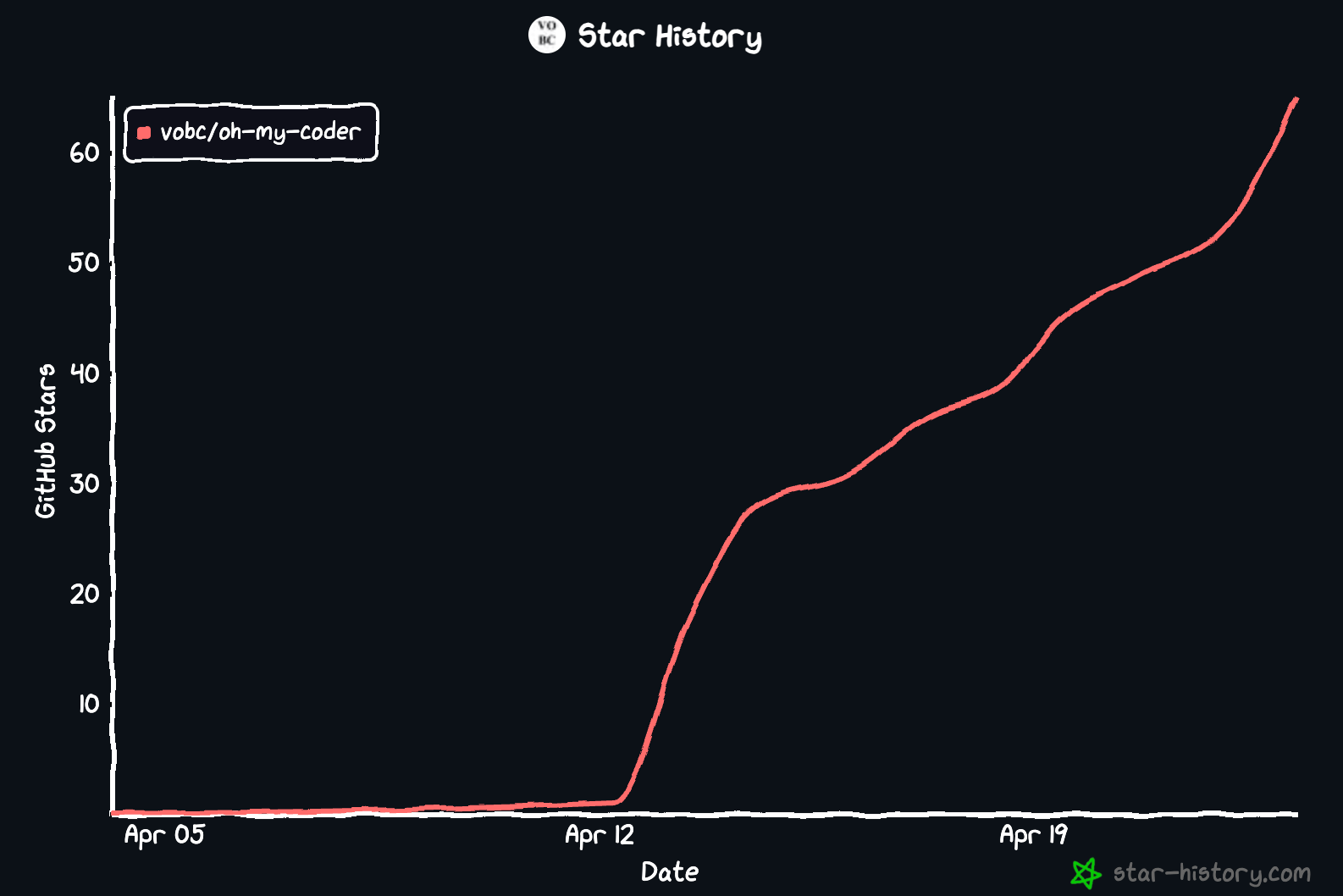
oh-my-coder is a rapidly growing project; we update every day and have new features every week.
If you encounter any issues, feel free to submit an Issue on GitHub; if you find it useful, a Star is the biggest encouragement to us.
GitHub:
https://github.com/VOBC/oh-my-coder
#OhMyCoder #claude_code #AIAgent #vibecoding
The IC content you care about
Technical progress | Project info | Global activities

Follow the IC Binance channel
Stay updated with the latest news