

How to use your Futures Coupon on Binance without dying in the attempt (Ultimate Guide)
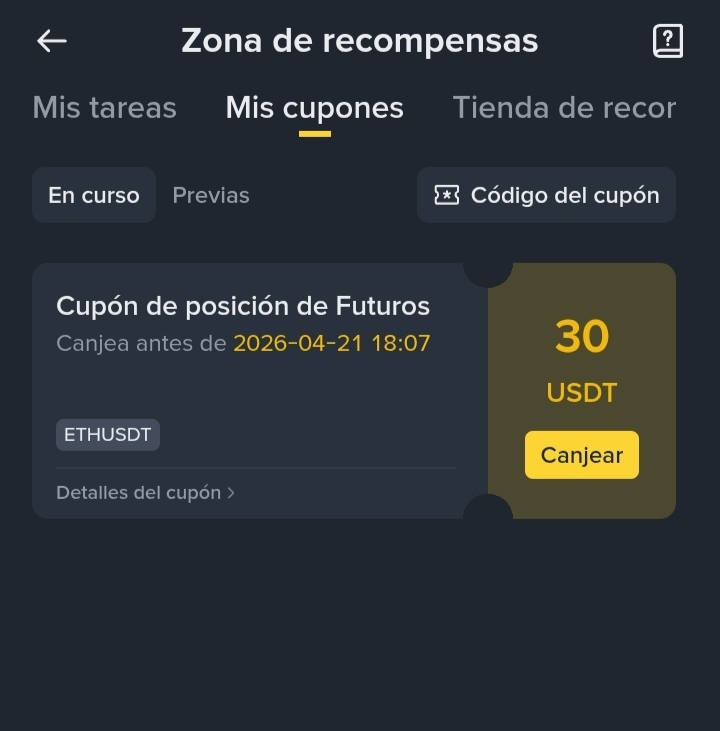
If you opened your Rewards Zone in Binance and found a juicy Futures coupon (for example, of 30 USDT), you probably asked yourself the big question: "How do I withdraw to have that money in my account?"
The reality is that you cannot withdraw the coupon directly. Binance lends you that money as capital so you can make a trade in the Futures market. The good news is that all the profits you generate with that borrowed money are 100% yours and you can withdraw or exchange them for your local currency through P2P.
Here we explain step by step how to trade, protect yourself, and come out winning.
1. The rules of the game: What does 20x mean?
Most of these coupons come with a leverage of 20x. This is like putting a racing engine on your money. If the price of the cryptocurrency (like Ethereum or Bitcoin) moves 1% in your favor, you gain 20%.
The good news: With small market movements, you can generate real profits quickly.
The risk: If the price moves 5% against you, your position is liquidated. That is, you lose the coupon (but beware, you never lose your personal money, because the coupon uses Isolated Margin).
2. Buy (Long) or Sell (Short)?
Once you hit "Redeem" on the coupon, you will find yourself in front of the chart. You have two options to make money:
Go Long (Buy): Select this if your analysis tells you that the price will rise. You make money while the price climbs.
Go Short (Sell): Select this if you think the price will fall. Yes, in Futures you can make money when the market drops.
Entry tip: If you don’t want to complicate yourself guessing the exact price to enter, select the Market order. This will open your trade instantly at the current price.
3. The Autopilot: Setting up the Take Profit
You don’t have to be glued to the screen sweating every time the candle goes up or down. That’s what Take Profit (TP) or Profit Taking is for.
When opening your trade, or in the lower tab of "Positions" once opened, look for the TP/SL (Take Profit / Stop Loss) button.
In the Take Profit box, write the price at which you would like to exit with profits.
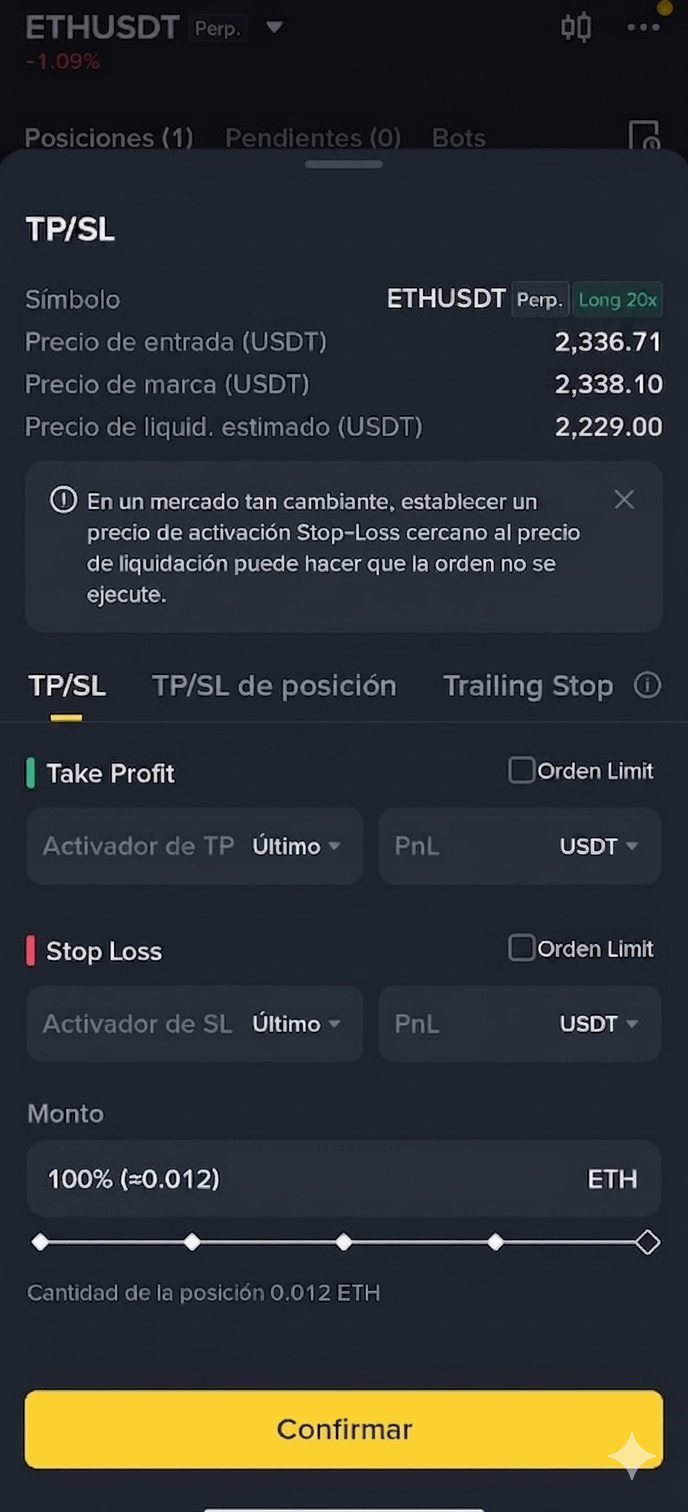
The app will show you an estimate of how many real USDT you will earn if the price reaches there.
Stop Loss (SL) is the automatic order that tells Binance: "If the price falls to here, take me out of the trade immediately." It’s not about accepting defeat, but about managing risk so that a bad market move doesn’t wipe out your wallet. In trading, it’s a thousand times better to walk away with a small scratch today than to be out of the game tomorrow for not having set a limit in time. Set it above the liquidation price but not too close. (Example: if liquidation is at 2229, it can be set in a range from 2980 to 3000 to secure profits)
Confirm and you’re done. You can go play or just sleep; if the price hits that number, Binance closes the trade automatically and deposits the profit for you.
4. Deciphering the numbers: Mark Price vs. Liquidation
When you have your position open, you will see several numbers that may confuse you:
Mark Price: It’s the "official" price that Binance uses to calculate your profits and losses. It’s an average of several global markets to avoid rapid manipulations affecting you. Your profits (PnL) are based on this number.
Liquidation Price: This is the number you need to watch. If the Mark Price hits your Liquidation Price, the system takes away the coupon. The further the current price is from this number, the safer you are.
5. What if I want to close now or earn more?
The market is dynamic and your strategy can be too:
Manual close: If you see that your profit (PnL) is in green (+5 USDT, +10 USDT) and you don’t want to wait for it to reach Take Profit for fear that the market might turn back, just press the Close Position button at 100%. That profit will go to your wallet immediately.
Extend the profit: If you set a Take Profit but see that the coin is rising very strongly, you can edit it. Tap the pencil icon next to your current TP and set a higher price.
The pro trick: If you decide to extend your target to earn more, set a Stop Loss on profits. For example, if you entered at $2,300 and the price is already at $2,350, set your Stop Loss at $2,330. That way, if the market unexpectedly crashes, you walk away with guaranteed profits.
Trading with coupons is the best school! You don’t risk your own money, you learn to use the platform, and if you play your cards right, you end up with real dollars ready to use.
Now it’s your turn! 🚀
Binance coupons are the perfect tool to test strategies without risking your pocket, but as you saw, the key is not to let greed take over.
Tell me in the comments:
Have you received your 30 USDT coupon or are you waiting for yours?
What has been your biggest profit using a gift voucher?
If you have any questions about the Mark Price or how to set your Take Profit, leave it below and I’ll help you solve it!
See you in the next trade! 📈
#futuros #GanarDineroConBinance #Ethereum #TradingParaPrincipiantes #BinanceSquare