
Many people around me want to play with cryptocurrency, but the first question is always: 'How do I transfer money into Binance?'
In fact, there are multiple methods, and they vary significantly!
I have organized the three suitable deposit methods currently offered by Binance, plus a withdrawal tutorial.
After reading this, you'll know which one is best for you 🙌
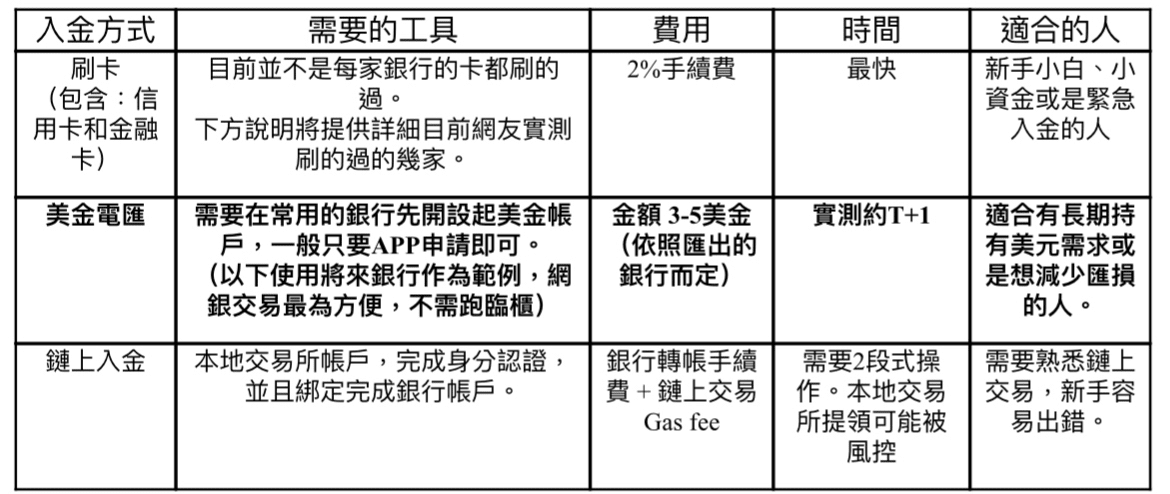
💳 Card Deposit: Credit Card (beginner-friendly but high fees)
APP entry: On the homepage, select Add Funds ➝ Buy cryptocurrency with TWD ➝ Choose payment method: bind credit card or Apple/Google Pay ➝ Enter the amount and cryptocurrency you want to buy.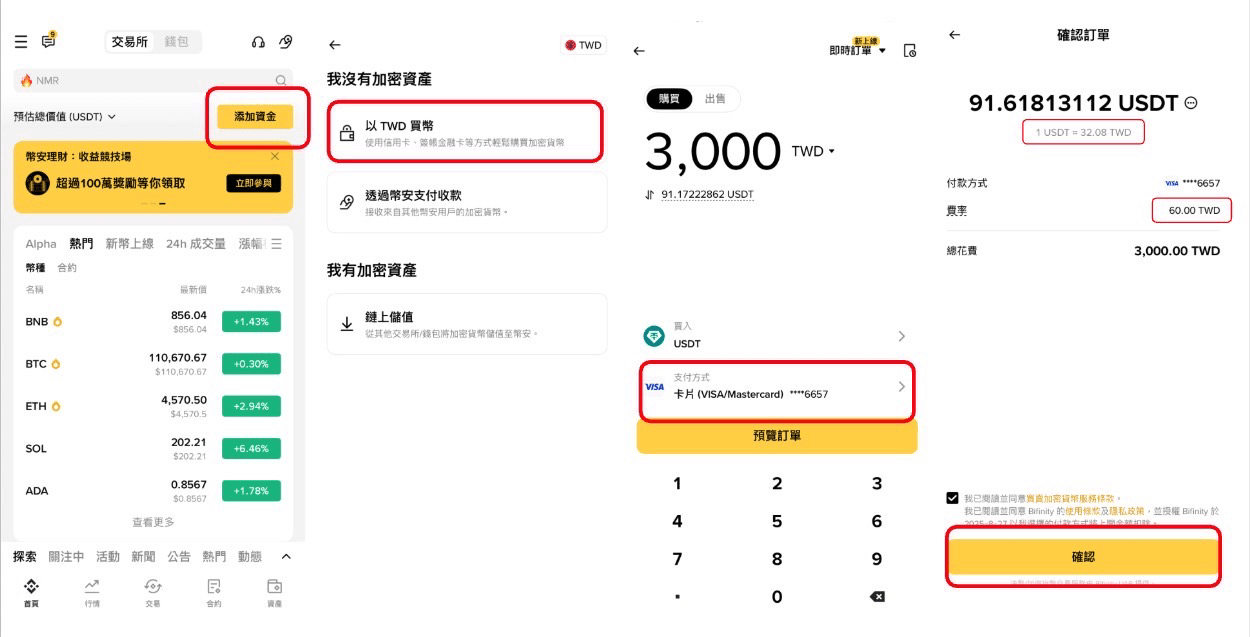
The simplest and fastest. You can buy cryptocurrency directly by binding your credit card / debit card.
✅ Advantages: Instant deposit, most convenient operation
⚠️ Disadvantage: Transaction fee is about 2%, exchange rate is relatively high
📍 Tested successfully with: Taishin, Line Bank, Yongfeng, DBS, Shin Kong, Far Eastern, First, Changhua
(Cathay's card acceptance rate is relatively low⚠️)
💡 Reminder:
Binance occasionally offers credit card transaction fee waivers, but most are limited to 'first-time credit card cryptocurrency buyers'.
Using a credit card is fast, but the exchange rate is relatively unfavorable. Small amounts are okay, but large amounts are not recommended. As shown in the image, 3000 TWD ultimately bought 91.6 USDT, while at that time, 3000 TWD could be exchanged for 97.9 USD.
🏦 USD wire transfer:
The most stable and economical!
First, you need to obtain your exclusive transfer information from the Binance APP, and then go to your usual bank to apply for foreign exchange.
Step 1: Obtain Binance's USD transfer account information
Binance APP entrance: On the homepage, select 'Add Funds' ➝ Switch to USD in the top right corner ➝ Deposit USD ➝ Bank transfer ➝ Get your exclusive bank transfer information
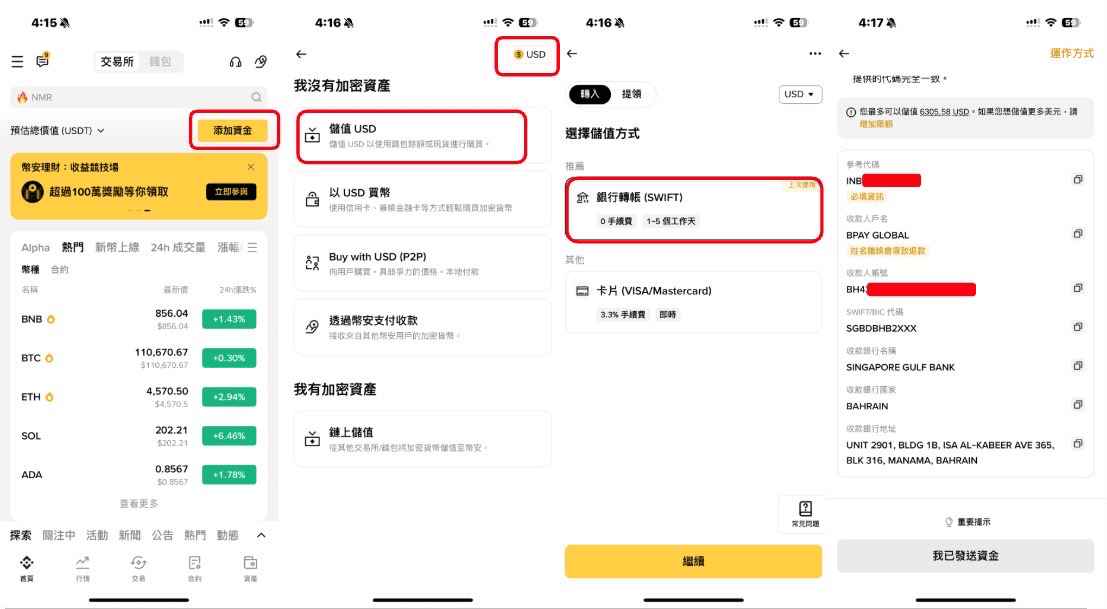
Step 2: Local bank foreign exchange
It is recommended that everyone use Future Bank, as you can complete account opening and USD foreign exchange online directly. It is currently the most convenient and cheapest method based on actual tests. Future Bank is one of the three purely online banks authorized to operate in Taiwan, along with Line Bank (but currently only open for remittances to US accounts, while Binance's account is in Bahrain) and Rakuten International Commercial Bank.
Of course, if it is a traditional bank, you can do that too, but traditional banks generally require you to go to the counter to open a USD account and bind a foreign exchange designated account, which is relatively troublesome. Moreover, investing in cryptocurrencies can easily attract special attention from bank staff.
💡 Preparation: Download Future Bank APP to complete account opening and open a USD account.
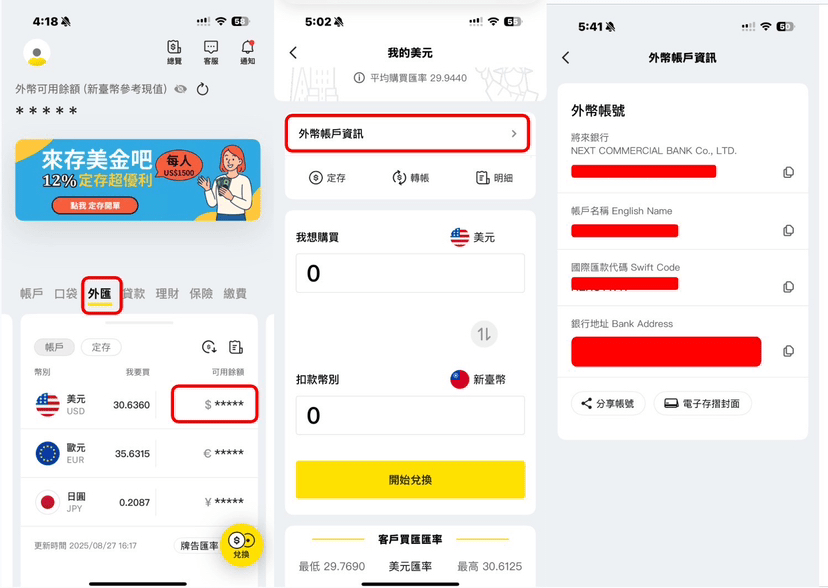
Future Bank APP operation demonstration: On the homepage, select foreign exchange ➝ Click on USD (if you don't have USD yet, you can buy it directly at this step) ➝ Transfer ➝ Fill in the corresponding account information provided by Binance one by one.
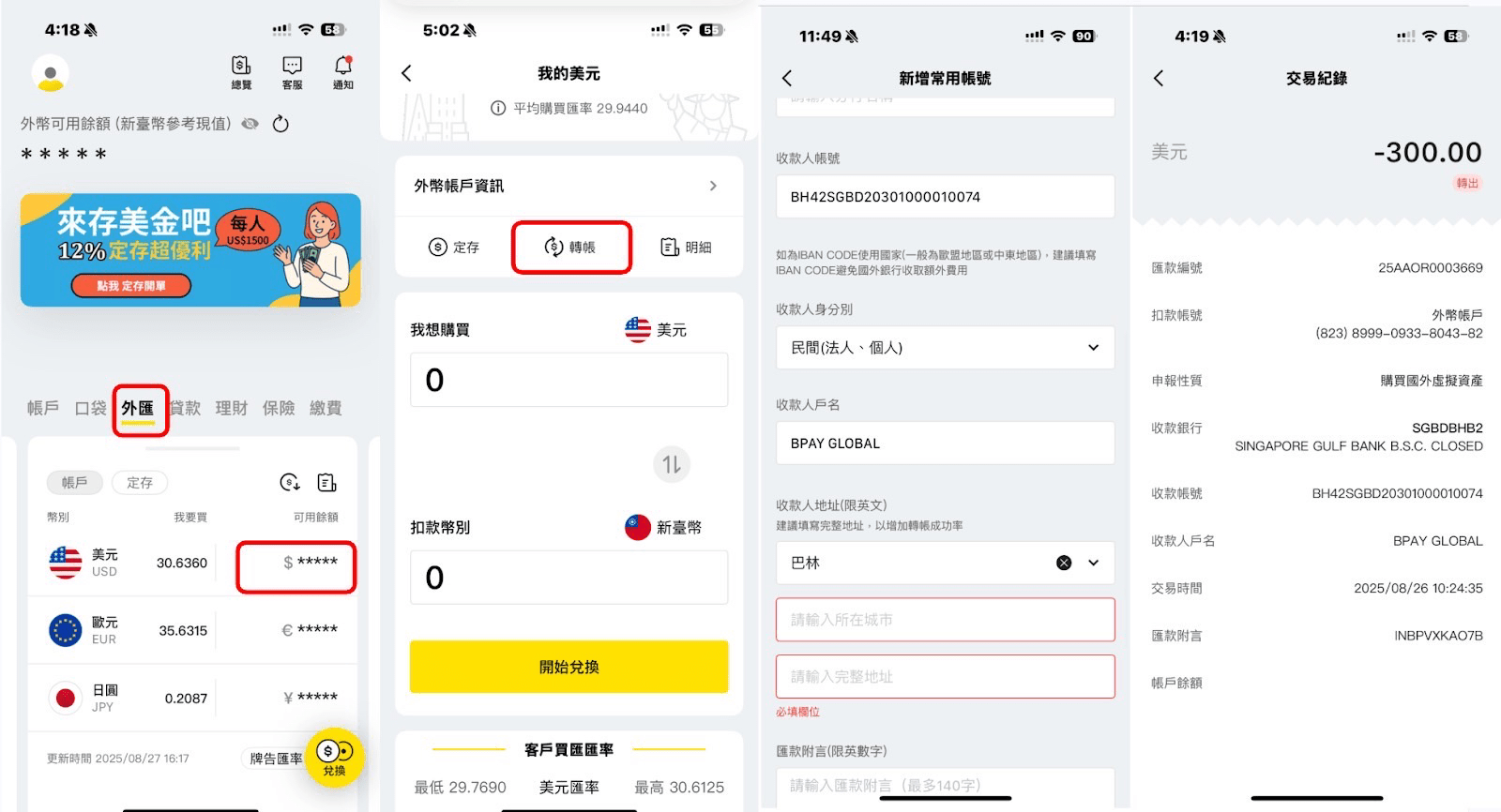
⚠️ Notes: The reference code is used by Binance to identify your account, so be sure to copy and paste the reference code provided by Binance into your notes for each transaction. Also, when filling in the reason for the bank remittance, it is recommended to fill in according to the actual situation: domestic capital outflow - investment in cryptocurrency, to avoid issues with the transfer.
Step 3: Confirm the deposit was successful
When Binance receives the funds, it will send an email and APP push notification to inform you. Actual testing shows that it can be received very quickly, typically within T+1 working days.
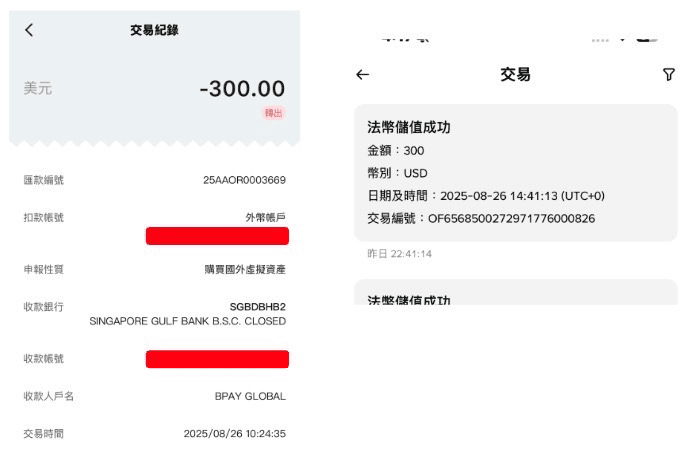
💡 Reminder: Currently, the Binance USD wallet has a limit of 6600 USD. If you need a higher limit, you need to submit additional address verification. Alternatively, you can first convert USD to cryptocurrency within Binance and then continue to deposit.
Step 4: Use fiat currency to purchase cryptocurrency
After receiving the funds, just go back to the homepage 'Add Funds', click the arrow below to open the full menu, select 'Buy cryptocurrency with USD', and you can choose to pay with the balance in your USD fiat wallet. It is recommended to directly exchange USD for USDT, as Binance currently offers a 1:1 exchange rate to ensure zero friction throughout the trading process, making it more convenient for subsequent transactions on the Binance exchange.
🔗 On-chain transfer
After binding the bank account from the local exchange, transfer USDT to the Binance address (choosing the right chain is very important⚠️)
✅ Advantages: Flexible, low cost
⚠️ Disadvantage: New users are prone to transferring to the wrong chain
🔁 Withdrawing is also very simple
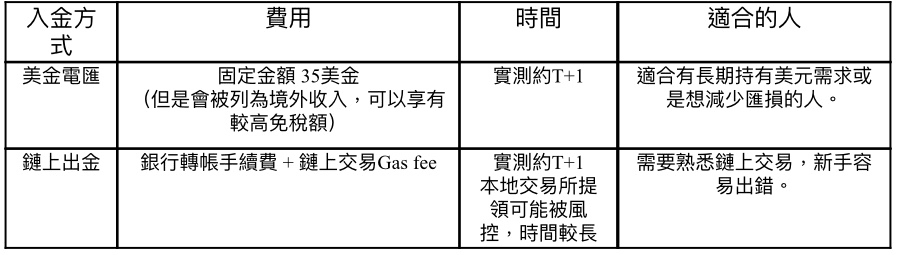
🏦 USD wire transfer → Back to bank account
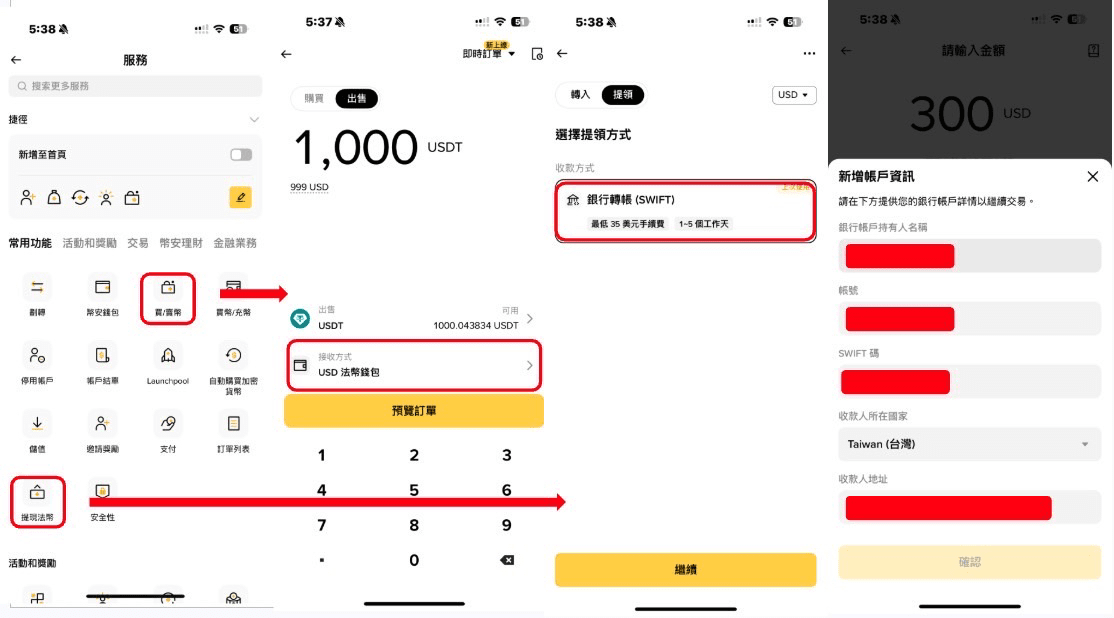
Step 1: Convert cryptocurrency to USD
In the APP, select 'Buy/Sell Cryptocurrency', choose the 'Sell' tab at the top, select 'USD fiat wallet' as the receiving method, enter the amount and confirm.
Step 2: Withdraw USD
In the APP, select 'Withdraw Fiat', choose 'Bank Transfer', then enter your bank account information and confirm to send.
Check your foreign currency account information at Future Bank:
Step 3: Wait for the bank notification
Taking Future Bank as an example, the bank will send APP push notifications and SMS notifications. After receiving the notification, enter the APP, click to confirm, while traditional banks may use phone calls for confirmation. Actual testing shows that it can take about 1 working day to reach the account.
🔗 On-chain transfer out → Back to the local exchange to withdraw TWD
Step 1: Obtain the receiving address from the local exchange
In the asset management page, click 'Add Value', select the cryptocurrency and network, and you can copy the address.
Step 2: Enter the local exchange address in Binance
In the APP, click the asset icon in the lower right corner, select 'Send', then choose 'On-chain withdrawal', paste the address you just copied, and select the corresponding blockchain mainnet. After entering the amount, you can confirm the withdrawal.
Step 3: Confirm withdrawal status
After submitting the withdrawal request, the funds will typically be transferred to your account within 5 to 10 minutes. You can also track the historical withdrawal records on Binance.
Step 4: Withdraw to the bound bank account
In the asset management page, click 'Withdraw', enter the amount you wish to withdraw, and confirm the withdrawal. Before withdrawing to the bank, be sure to exchange cryptocurrency for TWD at the local exchange first.
🎯 Summary in one sentence:
Credit card is the fastest, wire transfer is the most economical, and on-chain is the freest.
Choose the method that suits you best, and you can freely enter and exit Binance 🚀