Lesson: Trailing Stop (Trailing Stop Order)
The Trailing Stop order is one of the smartest orders
Because it allows you to protect your profits automatically without having to constantly watch the screen.
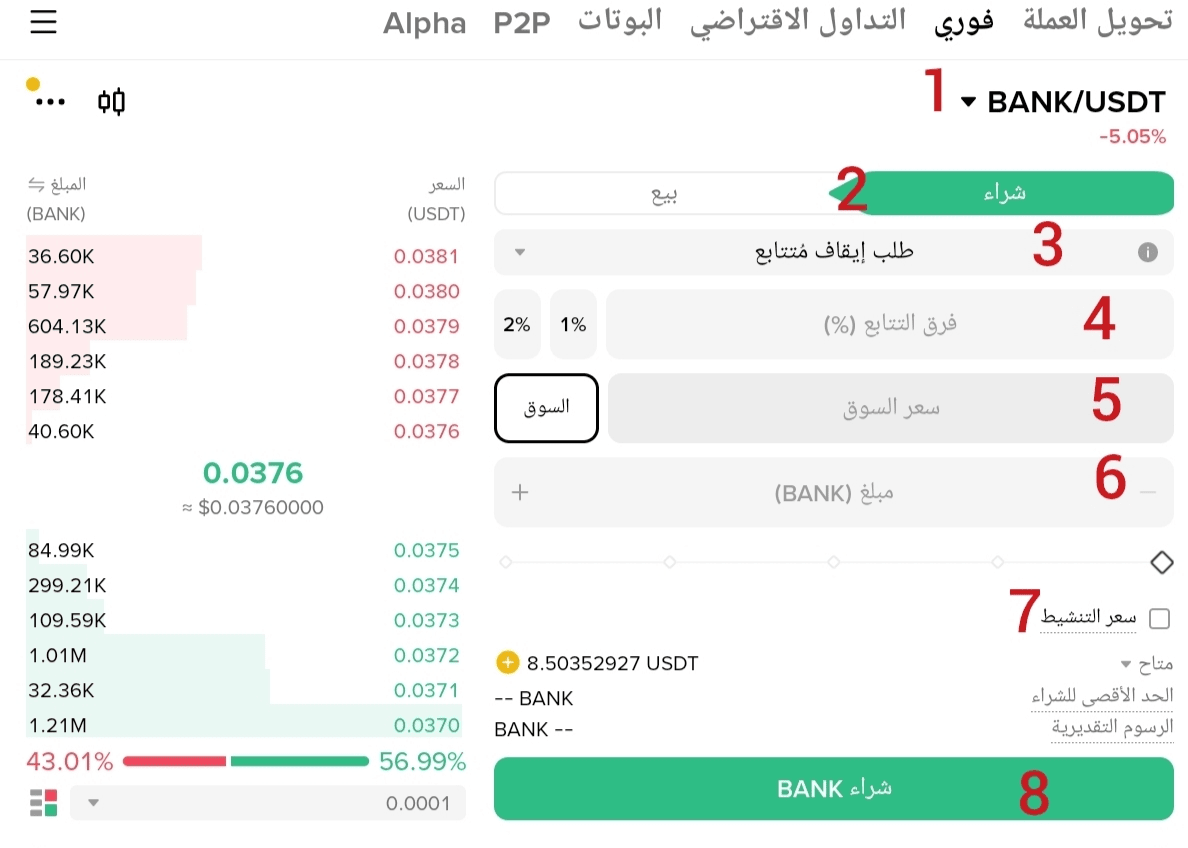
Let's explain it step by step according to the numbers in the image 👇
① Trading Pair
Select the currency you will be working with (here BANK/USDT).
② Buy
Make sure we are in buy mode.
③ Order Type: Trailing Stop
We choose 'Trailing Stop Order'.
④ Trailing Difference (%)
This is the most important point 👈
The percentage at which the order is executed if the price reverses.
Example:
If you set 2%
→ Does the price go up? The order moves with it
→ The price drops 2% from the highest point? It will be executed automatically.
⑤ Market Price (Optional)
Here you have two options:
Either you enter a manual amount
Either press the (market) button
In this case, the market price at the activation time will be adopted.
⑥ Currency Amount
Specify the amount you want to buy.
⑦ Activation price (Optional)
Possible:
Activate the option and set a specific price for tracking to start
Or leave it empty
And then the tracking starts automatically once the trailing percentage (number 4) is achieved.
⑧ Execute the order
By pressing the buy button, Trailing Stop is activated.
---
🎯 When do we use Trailing Stop?
When you anticipate a strong movement
When you want to protect profits without manual intervention
When you can't continuously monitor the market
⚠️ Important Note
Trailing Stop protects profits
But the percentage choice must be logical
So that the natural volatility doesn't trigger the order too early.
---
📌 Next lesson:
A practical explanation of using Trailing Stop Sell to protect profits after the rise.
If you want to follow the series → Follow
And if you find it useful → Interact
The series continues daily 🕘