
Many friends who are new to cryptocurrency often get stuck at the first step of 'how to deposit'—with funds in hand, how can they exchange it for the most widely circulated stablecoin USDT (Tether)?
In fact, the operation is not complicated, but during the trading process, **'safety'** is always the top priority. Today, I will teach you step by step how to quickly and safely buy USDT on the world's largest exchange—Binance.
Must-read for beginners: Before starting the operation, it is recommended to prepare your account in advance.
Binance exclusive referral link: https://www.binance.com/zh-CN/join?ref=CS7MMKKE
Invitation code: CS7MMKKE (using this code for registration can enjoy the highest transaction fee rebate)
Step one: Enter the C2C trading area.
Open the Binance App homepage, click **【Add Funds】, then select 【C2C Trading】**.
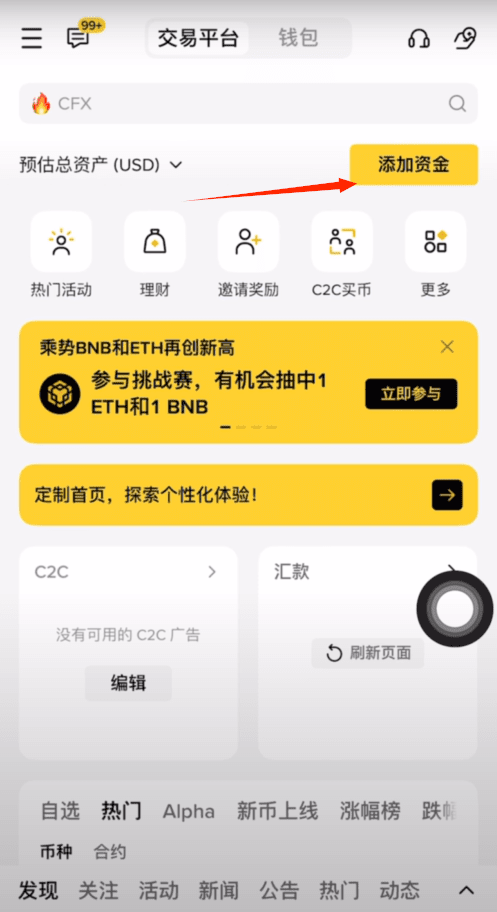
At the top of the trading interface, you will see four core areas:
Quick area: The system automatically matches merchants, suitable for beginners, pursuing efficiency.
Self-select area: Prices and conditions are transparent, allowing you to choose merchants on your own.
Carefully selected area (highly recommended): A high-protection area newly launched by Binance. If there are abnormalities in the account during the transaction, the platform provides 100% compensation guarantee, making deposits feel the safest.
Bulk area: Specifically for large fund transactions.
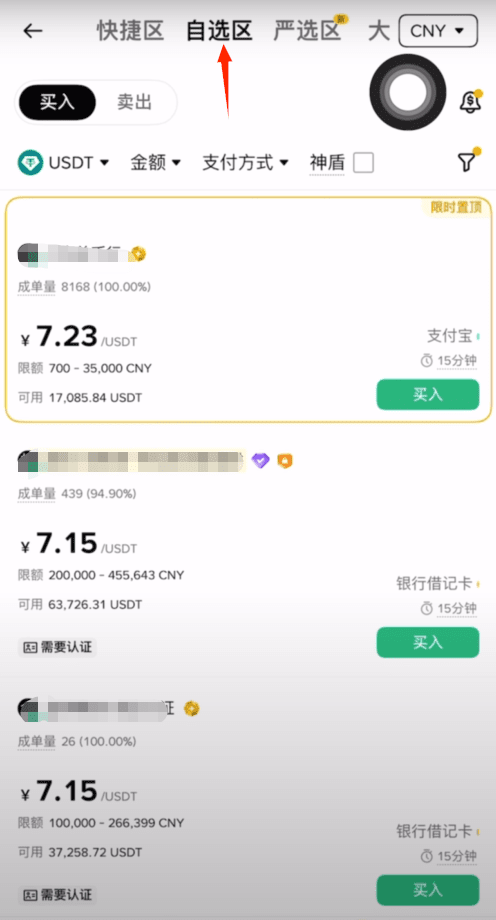
Step two: Operation demonstration (using the quick area as an example)
Choose currency: Select USDT and enter the amount you plan to purchase.
Choose payment method: Supports WeChat, Alipay, bank cards, and QQ Wallet.
Preview order: Click to display the optimal exchange rate. You have 30 seconds to check the merchant's transaction volume, completion rate, and trading requirements.
Order confirmation: Click to place the order once confirmed.
Step three: Communicate with the merchant and make the payment.
View chat window: After placing the order, click the **【Chat】** button in the upper right corner immediately.
Strictly follow the requirements: Merchants usually require **“real-name payment is mandatory”**, meaning the payment account must be yours.
Transfer operation: Leave the Binance App and transfer according to the QR code or account provided by the merchant.
Save the proof: After the payment is successful, be sure to take a screenshot to save the payment proof.
Step four: Upload proof and receive coins.
Return to the Binance page, click **【Upload Payment Proof】 and submit the screenshot, then click 【I have paid】**. The seller will release the coins immediately after verifying the payment, and the USDT will reach your fund account within minutes.
Pitfall guide: Don't miss the fee benefits.
In cryptocurrency trading, transaction fees are a long-term expense. To help everyone save costs, it is recommended to register through the link below to lock in permanent discounts:
Binance registration: Click here to register
Invitation code: CS7MMKKE
Exclusive benefits: By registering with this invitation code, you can receive a 20% transaction fee rebate. This rebate will be automatically updated to your account daily, accumulating to a substantial wealth over time.


