

Overview
The Crypto Trade Analyzer is a tool that helps traders see the real cost of trading cryptocurrencies across different exchanges. Instead of only showing the displayed price, it considers order book depth, fees, discounts, and slippage to show what a trade would actually cost in real life.
Prices on exchanges often look similar, but the final amount you pay or receive can be very different. This tool removes that confusion by simulating real trade execution in real time.
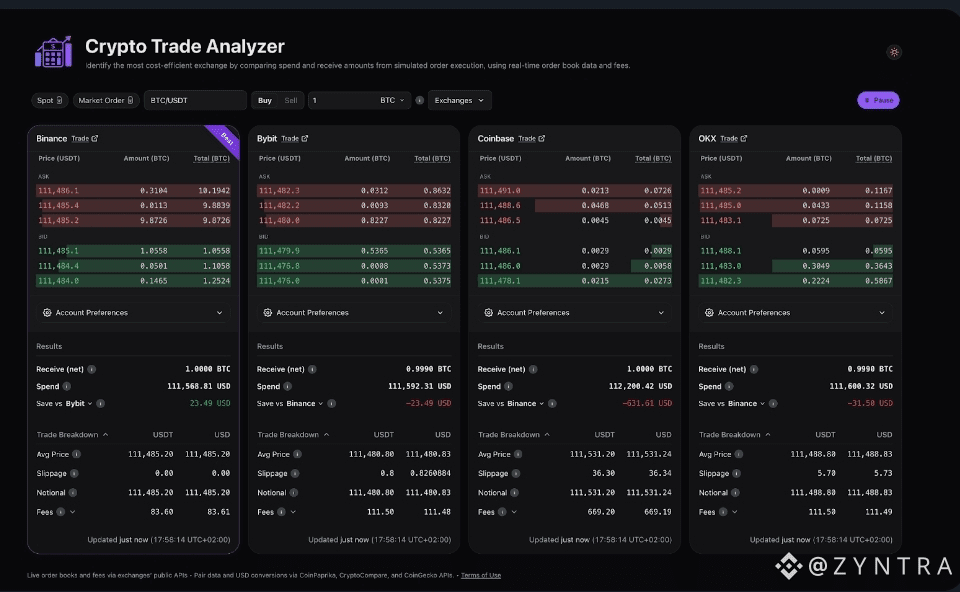
The analyzer supports major exchanges like Binance, Bybit, Coinbase, and OKX, and more exchanges are added regularly.
You can access it here:
binance.github.io/crypto-trade-analyze.
Key Takeaways
The analyzer shows true trading costs, not just headline prices.
It considers liquidity, slippage, fees, and token discounts.
It compares multiple exchanges side by side in a fair and standardized way.
Data updates live, reflecting real market conditions.
It is easy for beginners but detailed enough for professional traders.
Why Trading Costs Are Hard to Compare
At first glance, choosing the cheapest exchange seems easy. But the listed price is only part of the story. Other factors can change the final result:
Low liquidity can push prices higher or lower.
Trading fees vary between exchanges and account tiers.
Slippage happens when large orders move the price.
Because of this, two exchanges with the same displayed price can produce very different results.
The Crypto Trade Analyzer solves this by simulating a real trade exactly as it would happen right now.
Who Should Use the Crypto Trade Analyzer?
This tool is useful for many types of traders:
Beginners learning how trading costs really work
Frequent traders who want to reduce costs over time
Arbitrage traders comparing price differences and liquidity
High-volume traders seeking the best execution prices
Anyone comparing exchanges before trading or moving funds
How the Crypto Trade Analyzer Works
The analyzer combines live market data with exchange rules to calculate the effective price of a trade. This is the price you actually pay or receive after everything is included.
1. Collecting Live Market Data
The tool connects to each exchange’s live order book for the selected trading pair. This ensures calculations are based on current market conditions.
2. Simulating Trade Execution
Instead of using only the best bid or ask price, the analyzer looks level by level through the order book.
It calculates a volume-weighted average price (VWAP), showing how much the trade would really cost for the chosen size.
3. Applying Fees and Discounts
Each exchange has different rules:
Maker and taker fees
Fee tiers based on trading volume
Token discounts (like using BNB to pay fees on Binance)
The analyzer applies these automatically so results reflect real user conditions.
4. Standardizing and Comparing Results
All results are converted into a clear format that shows:
Average execution price
Slippage
Fees (in native currency and USD)
Final effective price after fees
Exchanges are ranked from most cost-efficient to least, and results update in real time.
Understanding Price, Fees, and Slippage
Market Price and Liquidity
The displayed price is only valid if enough liquidity exists at that level.
Large trades often consume multiple price levels, increasing costs.
The analyzer checks the entire order book, not just the top price.
Trading Fees
Most trades pay fees:
Maker fees for adding liquidity
Taker fees for removing liquidity
Since the analyzer simulates instant execution, it assumes taker fees by default.
It also accounts for user-specific discounts and fee tiers.
Slippage
Slippage happens when the execution price is different from the initial quoted price.
Example:
Buying 1 BTC at a displayed price of $110,000 might actually fill at an average price of $110,050 due to limited liquidity.
The analyzer clearly shows how much this slippage costs.
Effective Price
The effective price includes:
Market price
Slippage
Fees
This is the most important number because it shows what the trade truly costs or returns.
How to Use the Crypto Trade Analyzer
Step 1: Choose Trading Pair and Order Type
Select the trading pair (e.g., BTC/USDT) and choose Buy or Sell.
The analyzer immediately starts tracking live data.
Step 2: Enter Trade Size
Enter the amount you want to trade.
You can specify it in:
Base asset (e.g., BTC)
Quote asset (e.g., USDT)
Step 3: Select Exchanges
Choose which exchanges you want to compare.
The analyzer will calculate results for only those selected.
Step 4: Set Account Preferences
Adjust settings such as:
Fee tier
Token discounts
Custom fees
This makes the results more accurate for your real trading account.
Step 5: Review Results
Each exchange is shown as a card with:
Average execution price
Slippage
Trade value
Fees (native and USD)
Net amount received or spent
Effective taker fee
The best option is highlighted with a “BEST” badge.
Step 6: Understand the “Save vs” Metric
This shows how much money you save or lose by choosing one exchange over another for the same trade.
Tips for Best Results
Use realistic trade sizes for accurate comparisons
Keep fee tiers and discounts updated
Be careful during high market volatility
Compare multiple trading pairs, not just one
Pay attention to small savings—they add up over time
Limitations of the Tool
Simulated, not executed: Results are estimates, not guarantees
Taker-focused: Maker rebates and advanced strategies are not included
Order books change quickly: Liquidity may disappear
Exchange rules differ: Minimum trade sizes and price steps vary
USD values rely on third-party pricing, which may briefly differ
Final Thoughts
The Crypto Trade Analyzer makes trading costs transparent and easy to understand.
Instead of guessing or using spreadsheets, traders can see real execution costs live across exchanges.
It shifts the focus from displayed prices to actual outcomes, helping traders make smarter decisions.
Whether you are just starting out or trading professionally, this tool provides a clear, honest view of how trades really perform in today’s fast-moving crypto markets.

