
With the development of blockchain technology, traditional financial assets are merging with the crypto world. You can now not only trade cryptocurrencies on Binance but also directly purchase US stock tokens through the Binance Wallet (Binance Web3 Wallet), such as AAPL (Apple), TSLA (Tesla), AMZN (Amazon), etc.
If you want to buy US stock tokens more deeply, enter the invitation code: BNB33 when registering or binding to enjoy a fee reduction!
The following will take you from zero to a complete demonstration of how to purchase US stock tokens in your wallet, allowing you to easily invest in global assets on your phone.
One, what are US stock tokens? Why can they be bought with Binance?
Stock Tokens are assets issued on the blockchain that represent the price performance of real-world stocks.
It has the following advantages:
Fragmented purchases: No need for whole shares, you can get Apple or Tesla tokens for a few dollars
24-hour trading limit: No restrictions on US stock market opening hours
The tedious and cumbersome process of opening US stock accounts
On-chain transparency, decentralized
For users who want to invest in US stocks but do not want to open a US stock securities account, it is a very convenient choice.
Two, Preparation in advance: Activate Binance wallet (very critical)
US stock tokens belong to Web3 assets and must be purchased using 'Binance Web3 Wallet'.
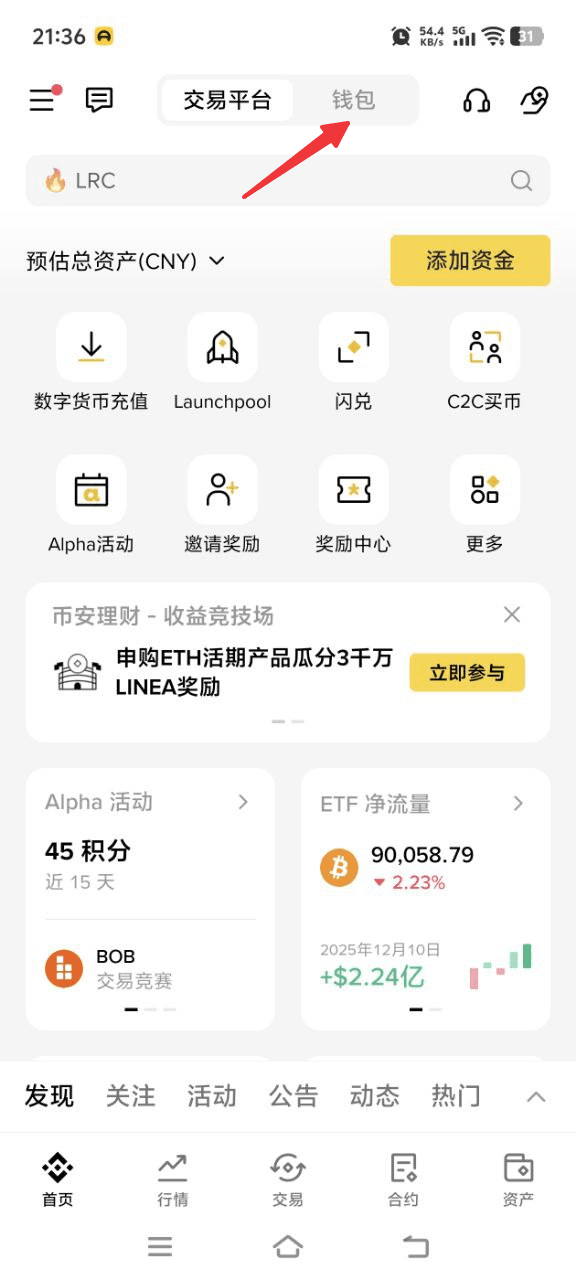
✔ Step 1: Open Binance App
Homepage 'Wallet' → Find 'Web3 Wallet'
✔ Step 2: Create or import wallet
Create a new wallet as prompted, set a security password and backup mnemonic phrase.
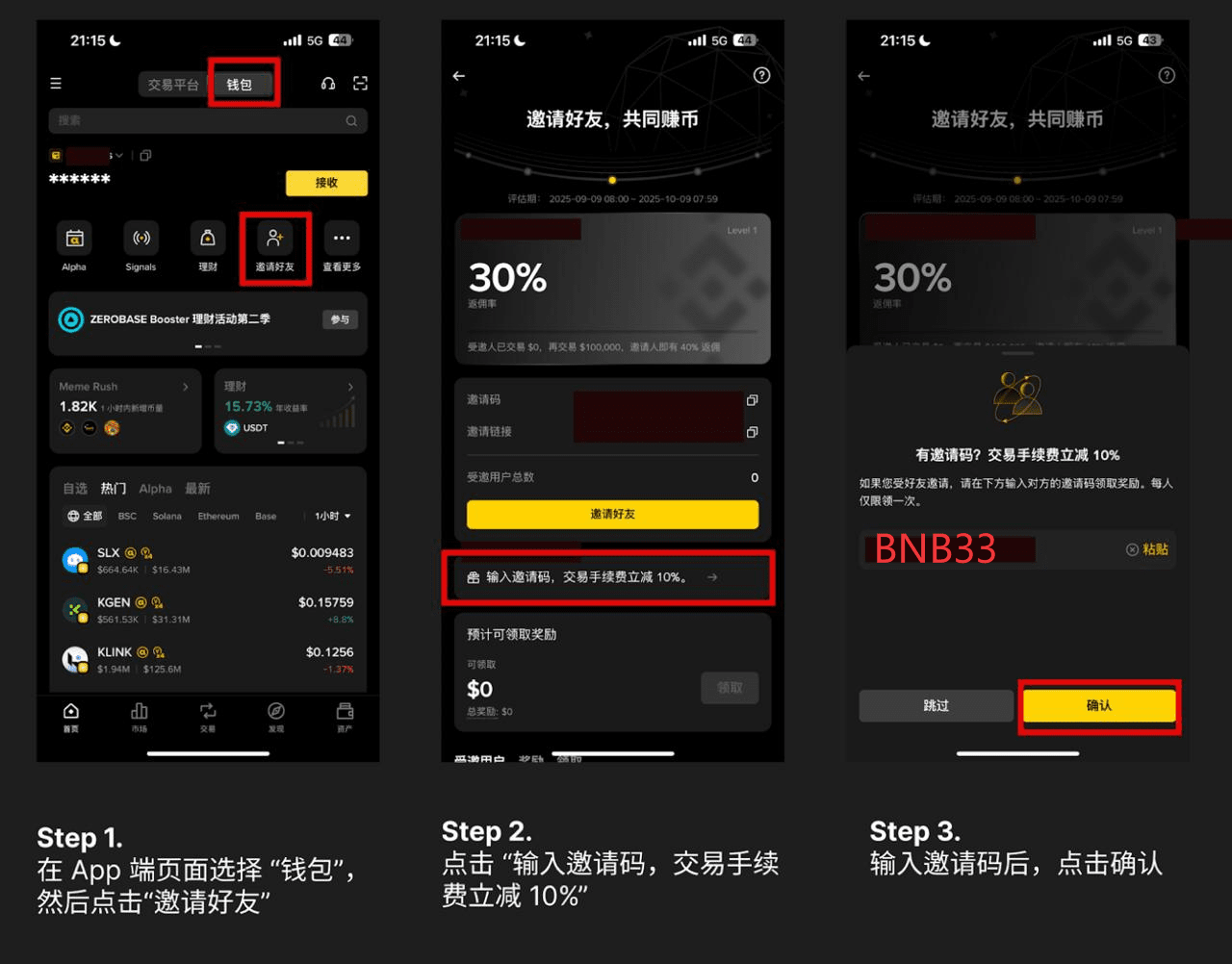
✔ Step 3 (Important): Fill in the invitation code
Enter the following in the settings → referral code after the creation is complete:
Invitation code: BNB33
You can enjoy fee discounts, saving more costs in subsequent transactions.
Three, how to purchase US stock tokens with the security wallet (step-by-step guide)
US stock tokens belong to on-chain assets, and you need to purchase them through the Web3 wallet. The process is very simple:
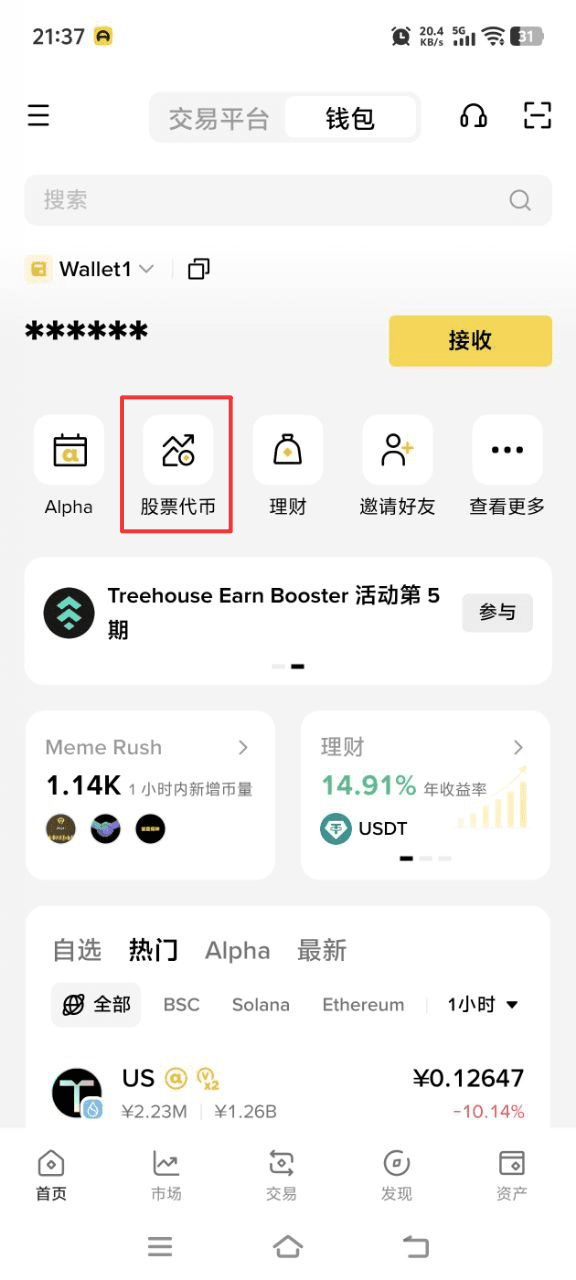
Step 1: Open Binance Web3 Wallet
Binance App → 'Wallet' → Open and enter Web3 Wallet
Confirm that the wallet has been created and logged in successfully.
Step 2: Switch to a network that supports US stock tokens
US stock tokens are usually issued on the following chains:
BNB Chain
OpBNB
Other EVM-compatible chains
The Web3 wallet will automatically recognize it, making manual addition easier.
Step 3: Prepare the required assets for purchase (USDT/BNB)
You can do it through:
Binance internal transfer (0 fee)
Buy USDT in spot and transfer to Web3 Wallet
Transfer USDT to the Web3 wallet.
Step 4: Enter the decentralized trading area (DApp)
Click on the Web3 wallet homepage:
DApp browser → Search 'Stock Token' or supported DEX
Common supported platforms will automatically display trading pairs for US stock tokens, such as:
Apple Inc.
Tesla
Yuan
Amazon
NVIDIA
Step 5: Search for the US stock tokens you want to buy
For example:
You want to buy Apple (AAPL) tokens
Search input bar: AAPL
The system will show the relevant token prices, candlestick charts, and liquidity pool data.
Step 6: Submit the transaction and confirm
Enter the amount you want to purchase (e.g., 100 USDT)
Click exchange/purchase
Confirm the transaction in the Web3 wallet
Once the on-chain process is complete, your tokens will be automatically deposited into the wallet
Four, how to check your US stock tokens after purchase?
Return to the Web3 wallet homepage → Click 'Assets' → You will see:
Apple Inc.
Tesla
Amazon
The details of the US stock tokens you just purchased.
If it does not show, you can click 'Add Token' to search and add manually.
Five, how to save on fees? Be sure to fill in the invitation code: BNB33
Using the Web3 wallet will incur Gas fees for on-chain transactions.
Fill in the invitation code: BNB33 has an answer:
✔ Cheaper trading
Fees are automatically reduced, helping you save money on buying US stock tokens in the long run.
✔ Officially valid for a long time
The invitation code is a referral system officially provided by Binance Web3, and filling it in gives you lifelong rights.
Users who did not fill in the invitation code can supplement:
Open Web3 Wallet → Settings → Referrer → Enter:
BNB33
Six, Frequently Asked Questions (FAQ)
1. Are US stock tokens real stocks?
It reflects the real stock price, but in the form of on-chain assets, not real stocks held by brokers.
2. Is KYC required?
App trading functions complete identity verification. Web3
Wallet does not require mandatory on-chain transactions, but it is recommended to complete Binance basic verification.
3. Can US stock tokens be traded 24 hours?
Yes, it can be traded anytime, just like cryptocurrency assets.
4. Can it be sold?
Can be sold anytime, either for USDT or BNB.
Seven, Summary: Investing in US stocks with Binance Wallet has never been easier
Through Binance Web3 Wallet, you can:
No US stock account needed
No trading time restrictions
Easily purchase tokens like Apple, Tesla, Amazon, etc.
Full control over on-chain assets
Use the invitation code BNB33 to save on fees
This is one of the most convenient ways to connect traditional finance with the crypto world.


