Some friends may wonder whether it is illegal to trade Bitcoin in China. The conclusion is that you are free to buy and sell Bitcoin as a follower. But it is not protected by China’s existing legal framework. Based on the above knowledge, if you still want to try to enter the currency circle and have fun, the first step is to spend a little money to buy some cryptocurrency to feel the process.
This article is intended for novices in the currency circle who have never bought coins. Let me share with you how to buy cryptocurrency for the first time. First, let’s briefly discuss a few questions. These three questions were my first questions when I didn’t understand anything.
1. Where are the coins I bought placed?
When everyone hears about cryptocurrency, they often hear the word blockchain decentralization. What is decentralization? For example, if we use the analogy of money in a bank, our own money is stored in the bank. Only we and the banking industry know how much money we have in our bank accounts. In this process, the bank is a center, and all our money transactions must go through the bank. Such a closed link, and cryptocurrency does not have a bank link. The coins we bought are placed directly in an address. This address is just a string of characters with no actual meaning. Everyone knows how much cryptocurrency is on this address. Rather than having a specialized agency for closed management like a bank. If you want to use the cryptocurrency on this address, you need to use the private key corresponding to this address. This private key is the most important thing. You can understand that if the address is a wallet, the private key is the key to the wallet.
2. Where can I buy coins?
Cryptocurrency is supported by some countries around the world and not by others. China does not support it. Therefore, it is basically a platform without cryptocurrency and directly supports Chinese users to purchase through legal currency. At present, the most mainstream transaction method is C2C. That is to say person to person. The exchanges we often hear about, such as Binance and Eureka, only serve as a guarantee platform in the middle. You can think of it as Alipay. You transfer your fiat currency to the other party, and the other party sends its cryptocurrency to your address. The exchange acts as a guarantee in the middle. The Binance we are talking about today is also such a platform. In fact, a platform of this nature goes against the concept of blockchain decentralization. Because the platform assigns you the address, he will not actually give you the private key. What you are given is the platform's own account system. After you log in, you can see the related things of this address and use it. There are other decentralized exchanges, but centralized exchanges like this are indeed the most convenient way to trade cryptocurrencies with fiat currencies.
3. What is a stablecoin?
As we all know, the price of cryptocurrencies like Bitcoin fluctuates greatly. Globally, the convenience of directly trading cryptocurrencies with fiat currency is not very user-friendly. Therefore, we need to use a relatively stable benchmark in the cryptocurrency dimension to withdraw the prices of other cryptocurrencies. Because the U.S. dollar is the big brother among legal currencies. So basically stablecoins are pegged to the U.S. dollar, so there are many stablecoins on the market that claim to maintain a 1:1 relationship with the U.S. dollar. Among them, the issuer of USDT claims that for every USDT issued, it will complete the transaction of one U.S. dollar. U.S. dollar reserves to achieve the effect that 1 USDT is equal to one U.S. dollar. Although in fact many people have also discovered that the issuer of USDT actually only reserves more than 70% of US dollar reserves. It's not exactly 1:1. But by far, it is also the stablecoin that has always had the largest impact and largest share. Therefore, most cryptocurrency transactions are still based on USDT. If we want to use fiat currency to buy cryptocurrency. The correct way is to go to the exchange first, use fiat currency to buy USDT, and then use USDT to buy other types of cryptocurrencies you want to invest in.
It would be boring to talk too much about theory, so let’s go straight to the actual practice. Let me take you through the process of purchasing cryptocurrency on the Binance exchange.
1. Account registration
For those who have not yet registered for Binance Exchange, you can click on the Binance registration link below and use your mobile phone number or email address to register a Binance account.
https://www.binance.com/zh-CN/join?ref=114789569
2. Download Binance APP
1. Users of Android phones can directly download the Binance APP. If your phone's built-in browser blocks you, use Firefox instead.
2. Users of Apple mobile phones can watch the video below to register an overseas Apple ID.
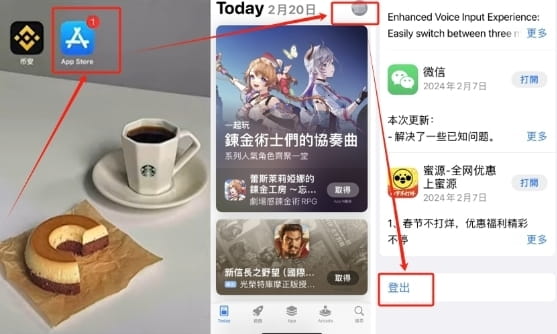
Then open the app store, click on the little man's avatar in the upper right corner, scroll down, and find the [Logout] button. Just change the login ID above.
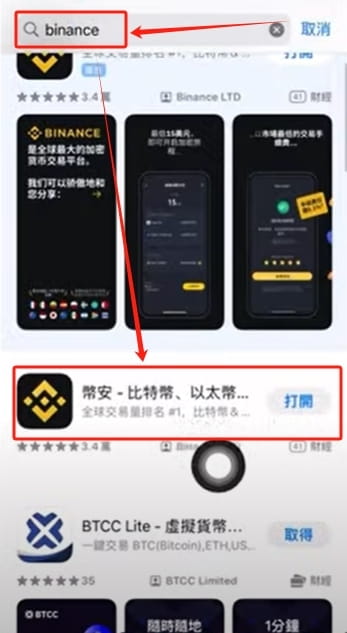
Search for "binance" in the search area to find the second Binance to download.
3. Identity authentication
After registering on Binance, the first thing you need to do is to authenticate your identity.
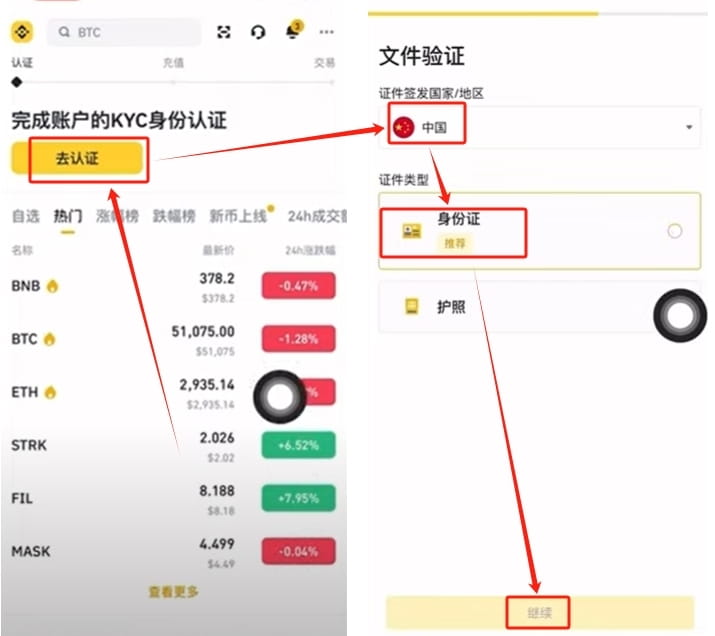
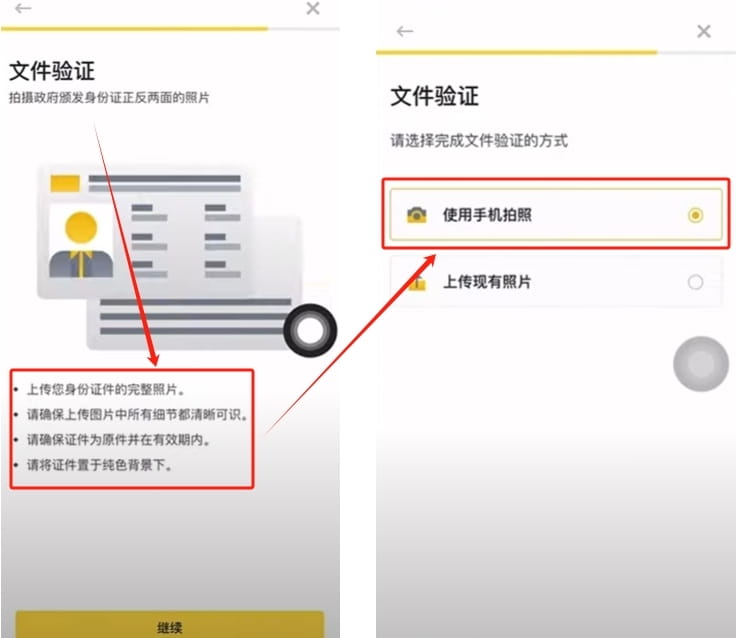
1. Click [Go to Verification] on the Binance homepage, select your country or region, and choose your ID card or passport as your identity document. It is recommended that everyone use ID cards. Select [ID card] and click [Continue]
2. Upload your identity document according to its process. After uploading the completed document, a facial recognition scan is required. The subsequent face scanning includes nodding, shaking the head, blinking, etc. Note that you must use real identity information for authentication. The entire certification process takes about three to five minutes. After the upload is completed, everyone can buy coins on Binance after the certification is passed.
4. Purchase USDT
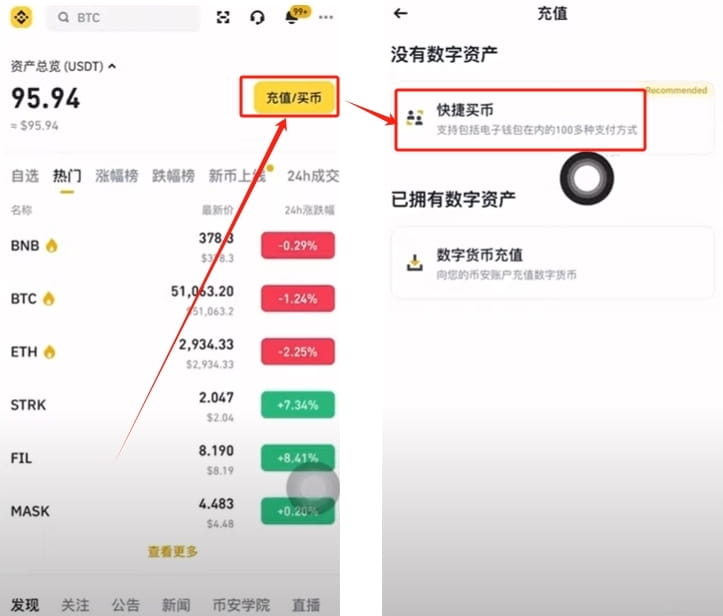
1. Click [Deposit/Buy Coins] at the top of the Binance homepage and select [Quick Buy Coins]
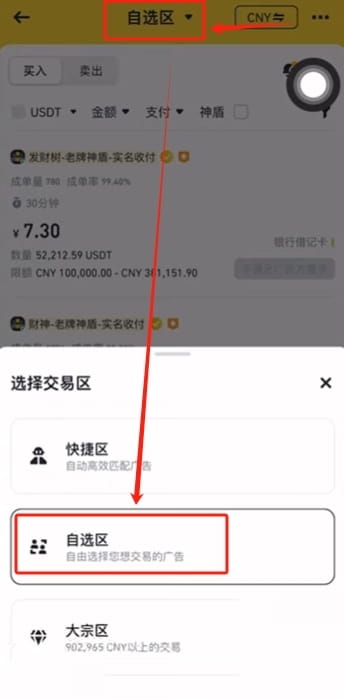
2. There are three options above, quick zone, custom zone and bulk zone. Here we choose [Self-Contact], which is C2C person-to-person transactions.
3. The CNY in the upper right corner means RMB, which is the legal currency we want to use. You can switch the legal currency you want to use, so we can just choose CNY.
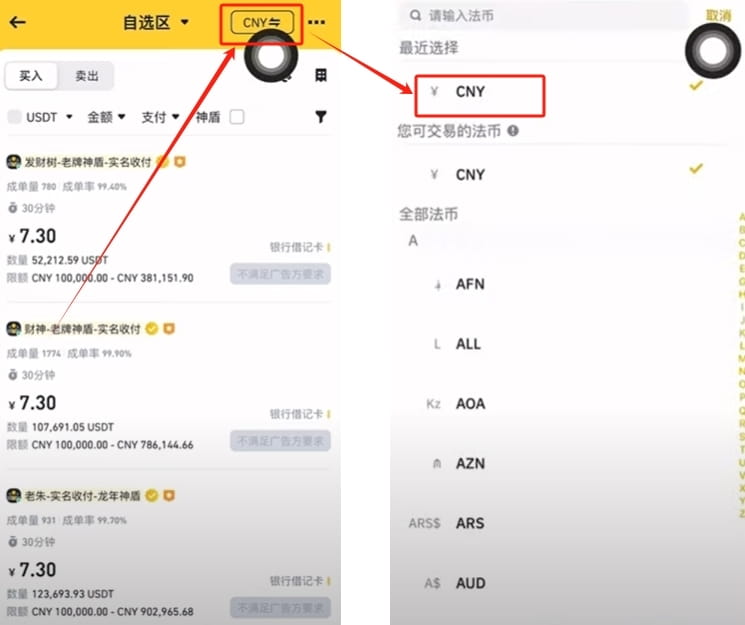
4. After we select the legal currency, we can purchase it here. What we want to buy is USDT, which is Tether. Currently, USDT is the most widely used currency in the currency circle. After purchasing USDT with legal currency, use USDT to exchange for any other digital currency.
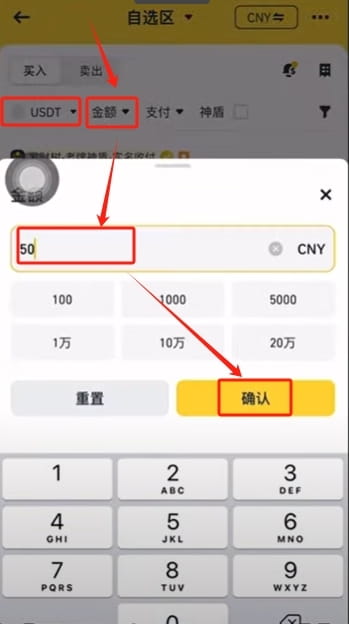
Enter the amount you want to buy, for example, I want to buy 500 USDT. Enter 500 and click [Confirm]
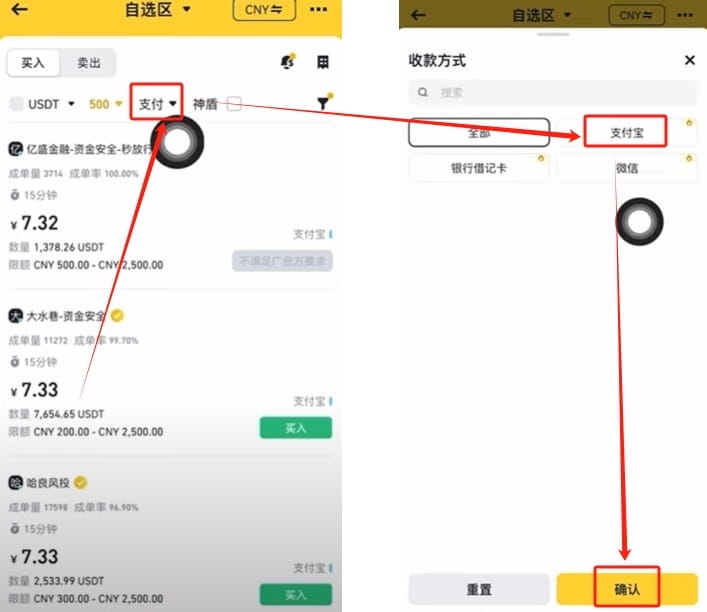
5. Binance will screen the merchants for us, and then we will choose some payment methods. Click [Pay], it has three payment methods, Alipay, bank card and WeChat payment. Use whichever payment method you are accustomed to using. For example, you are used to using Alipay. Just select [Alipay] and click [Confirm]
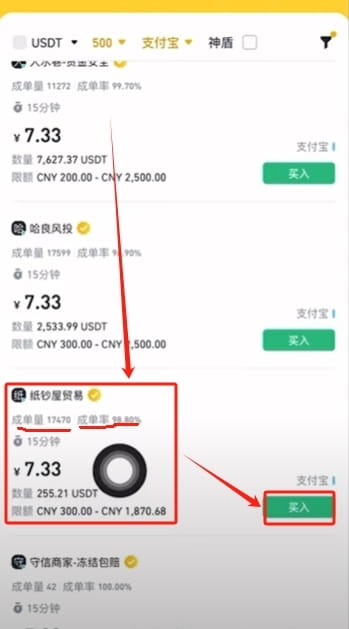
6. At this time, Binance will match us with merchants based on our amount and payment method. We need to find merchants with high order volume and order rate to make purchases. Because those with high order volume and order rate are the best. It's equivalent to them being relatively powerful merchants. At least select merchants with a transaction volume greater than 3,000 and an order completion rate greater than 98%. His entire price ranking is from low to high. Because we want to buy, of course we want to buy cheap.
For example, the fourth company, "Banknote House Trading", has a trading volume of 17,470. At the same time, its favorable rating is 98.8%, which is quite high. We can come and purchase from this company. Click [Buy]
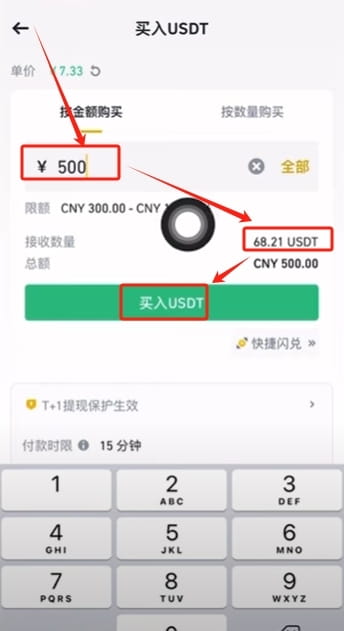
7. Enter the amount we want to purchase again. After entering it, the following will automatically calculate it for us. After paying 500 RMB, we will receive 68.21 USDT. Click【Buy USDT】
8. Click on the small chat window. Check the merchant’s payment instructions and click [Go to Payment]
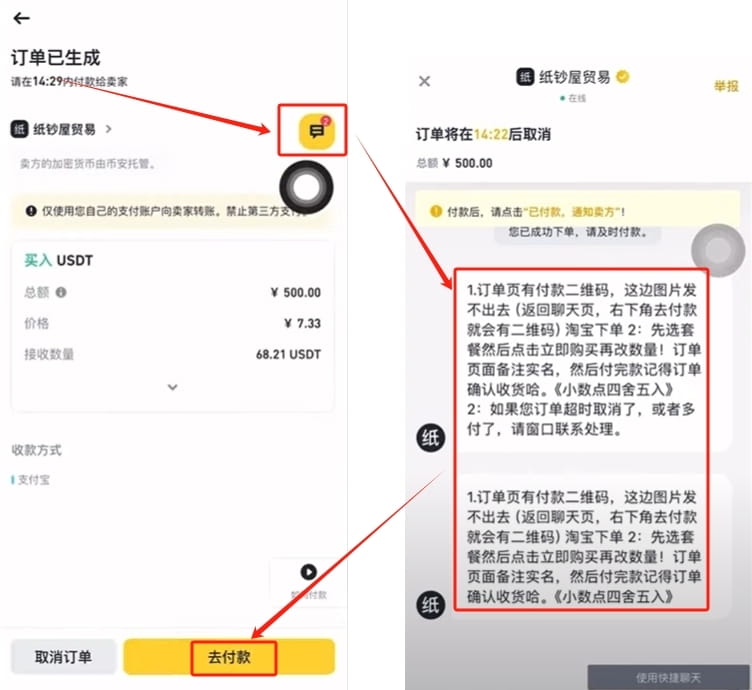
9. Transfer money to the merchant according to the payment method provided by the merchant. After transferring the money, click [I have paid, notify the seller] and ask him to give us the digital currency.
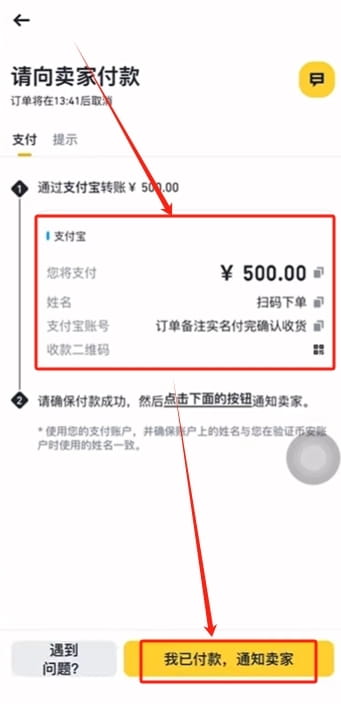
At this time, you may have some questions, that is, what if this person receives my money but does not give me coins. First of all, when the order is generated, his coins are hosted on Binance. If he doesn't give you coins, he can't take them away himself. The second point is because he specializes in business. He deposited a lot of money in Binance. At this time, you take the payment record to Binance’s customer service and say that you want to appeal the transaction. Binance’s customer service will also adhere to the fact-based principle to make a judgment on this transaction. Then the corresponding USDT you should get will be returned to you. So this problem is actually a solvable problem. And after such a long time, Binance will not say which merchants are stupid enough to gain such a small profit and lose their merchant status. This business identity is actually very valuable. Now it does not mean that anyone who wants to be a merchant can become a merchant.
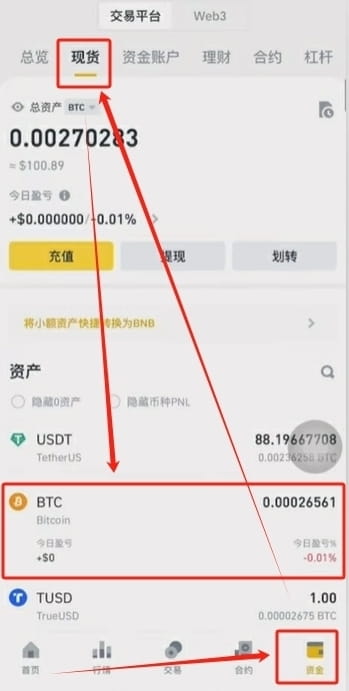
10. The USDT we purchased will be in the capital account. Click [Funds] in the lower right corner, select [Fund Account] at the top, and here you can see the USDT we purchased.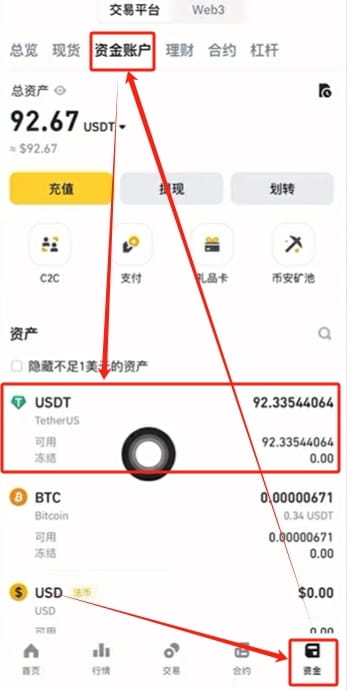
5. Buy Bitcoin
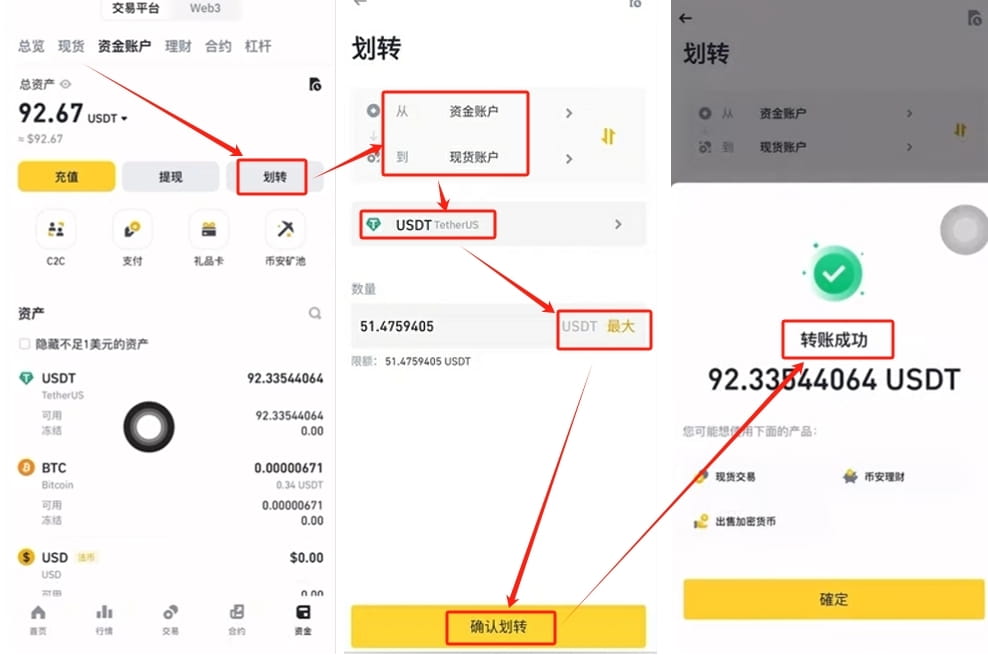
USDT cannot be traded in the capital account. We need to transfer USDT to the spot account before we can trade.
1. Click [Transfer], from the capital account to the spot account, select USDT as the currency, transfer all, click [Confirm Transfer], the transfer is successful.
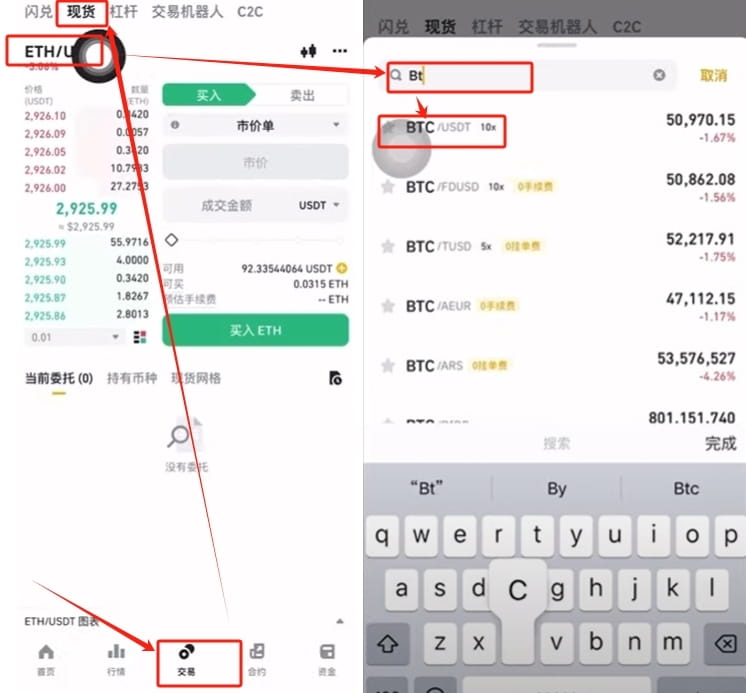
2. After we transfer the money to the spot account, we can start trading. Click the [Trade] button in the middle below, select [Spot] at the top, and select the currency you want to buy. For example, if you are optimistic about Bitcoin, you can search for BTC. BTC is the code for Bitcoin. Select the first BTC/USDT. That is, we use USDT to exchange for Bitcoin. Similarly, if you want to exchange for other coins, you can search here. Then use USDT to exchange.
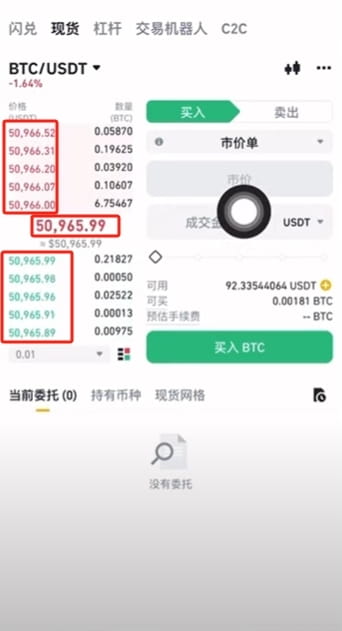
3. Following the corresponding quotes on the left, the red ones on top are the selling prices, and the green ones on the bottom are the buying prices. The number in the middle is the real-time transaction price, which is the quote of Bitcoin.
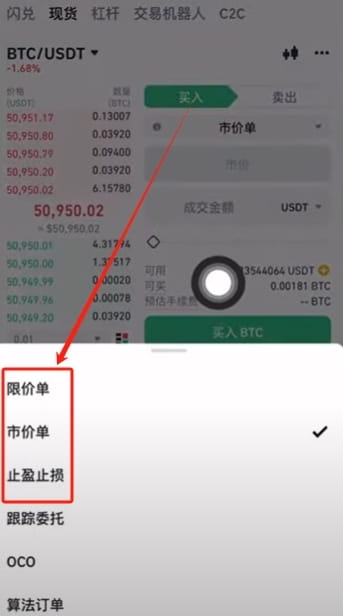
4. The ways to place orders include limit orders, market orders, and stop-profit and stop-loss orders. The most commonly used ones we use are limit price and market price.
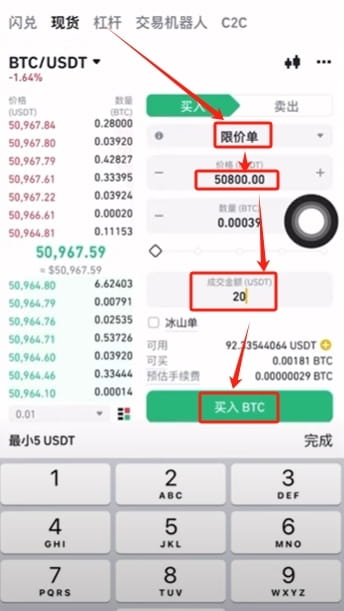
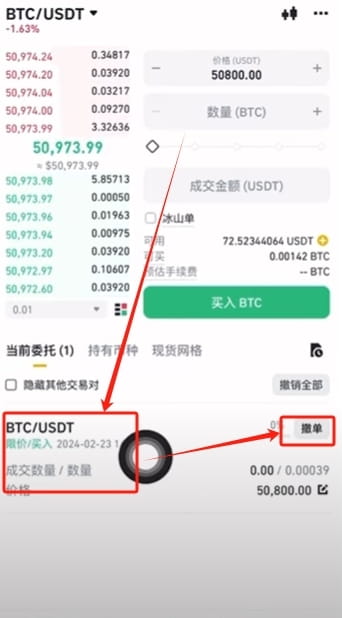
5. The meaning of a limit order is that we quote a price, and the transaction can only be completed when it is similar to this price. For example, the current price is 50964 and we want to buy it at the price of 50800. You can set the price you want to buy here. Enter 50800, then enter the quantity or amount you want to purchase. Click [Buy BTC]. successfully ordered.
6. This so-called successful order does not mean the transaction is completed. It's just that our transaction request was successful. It needs to fall to our desired target price before it can be traded. If you are not equal, click [Cancel Order] at the back to cancel the purchase request for him. Please note that no handling fee will be charged for placing orders and canceling orders if the transaction is not completed.
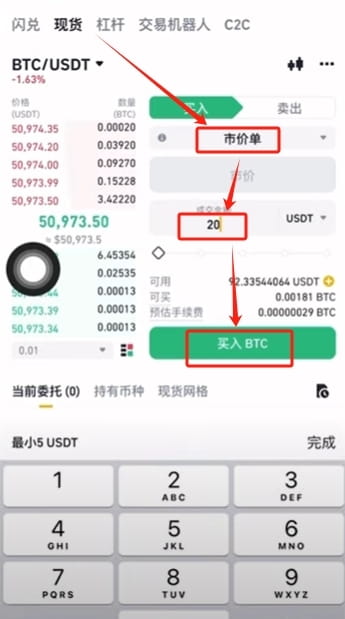
7. If you want to buy now, we can choose market order. A market order means that he will give us the most appropriate price in the current market. Simply enter the amount you want to purchase and your purchase will be successful. Enter 20, click [Buy BTC], and the order is placed successfully.
8. Click [Funds] in the lower right corner and select the [Spot] account at the top. Here you can see the Bitcoins we purchased.